

10 weeks. That’s how long it took Apple to announce, in mid-June 2026, a domain change for Hide My Email, then reverse it on August 24, 2026, after pushback from its developer community. In practice, iCloud+ Hide My Email aliases stay hosted on icloud.com, exactly like standard iCloud addresses; only Sign in with Apple is actually changing domains, later in 2026, moving to private.icloud.com, while keeping privaterelay.appleid.com active for addresses already created. For anyone validating email lists or configuring a Sign in with Apple allowlist, this distinction has a direct impact on how bounces are read and on filtering logic.
What Apple announced on August 24, 2026
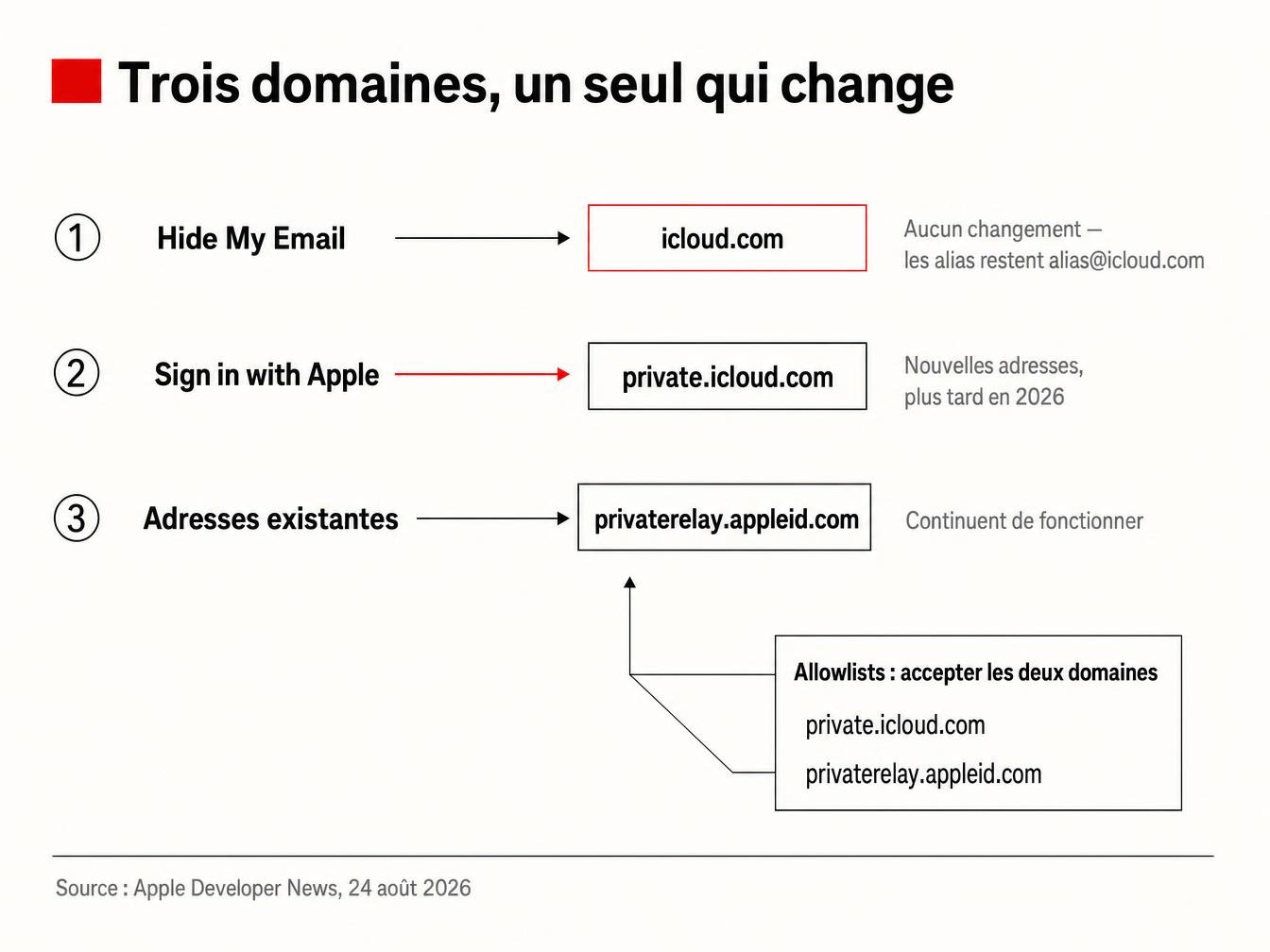
Apple’s developer page, updated that day, has a plain, almost understated title: “Update: New domain for Sign in with Apple.” Hide My Email is gone from the title and gets settled in a single sentence in the body: after reviewing community feedback, addresses stay on icloud.com. That’s how Apple confirms the reversal: no separate press release, no fanfare (Apple Developer News, August 24, 2026). The text specifies that future Sign in with Apple addresses, previously issued on privaterelay.appleid.com, will now be generated on private.icloud.com; existing addresses keep working and relaying messages without interruption. Nothing changes for Hide My Email, though: aliases stay in the alias@icloud.com format, identical to what’s existed since the feature launched.
The original June 2026 plan: why it collapsed in 10 weeks
On June 15, 2026, Apple announced the opposite: Sign in with Apple and Hide My Email would merge under a shared domain, private.icloud.com. The idea looked sound on paper: unify Apple’s private messaging infrastructure under one technical banner. The pushback didn’t take long. Users and developers flagged a concrete problem in the following weeks, and Apple reversed course entirely 10 weeks later.
Why a dedicated domain would have made blocking aliases easier
The reasoning boils down to one technical sentence. A separate domain, reserved solely for disposable aliases, becomes a trivial target for any blocking rule: just add private.icloud.com to a domain blocklist, and every Hide My Email alias disappears from the signup form, without touching real iCloud inboxes. That’s exactly what defenders of the feature feared. 9to5Mac documents this reversal in its August 24, 2026 report. By staying on icloud.com, every alias blends into the same domain as hundreds of millions of real iCloud addresses. Blocking that domain would mean blocking a significant share of iPhone users, something no commercial service can afford.
Apple now recommends that developers using Sign in with Apple make sure their account systems, email validation logic, and allowlists accept private.icloud.com in addition to the existing privaterelay.appleid.com domain, 9to5Mac notes, citing Apple’s August 24, 2026 technical note.
The shift doesn’t affect every integration the same way, though. Apps that hardcode the old domain into their Sign in with Apple validation rules will still need to update their configuration before year’s end, since the new domain is being added alongside the old one rather than replacing it immediately.
What’s actually changing from now on
Three distinct facts, often conflated in early reactions. Hide My Email stays on icloud.com: nothing changes for users or for the services that receive these addresses. Sign in with Apple, meanwhile, is genuinely moving to private.icloud.com, on a timeline set as “later in 2026” with no specific date given at this stage. Existing privaterelay.appleid.com addresses keep working indefinitely, and Apple hasn’t announced any service interruption. This blog’s article published in July presented the migration as settled for both domains; the situation has since changed: only the Sign in with Apple portion of our previous article on the migration to private.icloud.com still holds true today.
What this changes for your lists and email validation
“My campaigns keep landing in spam and I have no idea why, my email tool says everything’s fine.” That’s the kind of feedback that often circulates among growth teams when an icloud.com address behaves differently from one campaign to the next. The reason comes down to one line: a Hide My Email alias and a personal iCloud inbox share the exact same domain, the same MX infrastructure, and often the same MAIL FROM behavior. So the domain tells you nothing. The only clue lies in the username: generated aliases follow a recognizable format, two random words followed by a digit, like sunny.breeze_49@icloud.com. This pattern catches most aliases but never all of them. Along the way, it also snags real addresses built as firstname.lastname_84, a format many users choose for their personal inbox. icloud.com’s sender reputation, shared between aliases and real inboxes, ends up behaving like one giant catchall at the scale of an entire provider.
Filtering out icloud.com addresses after sending won’t curb disposable aliases: doing so also blocks a massive share of real users. The only approach that works: verify each address before sending, using engagement and deliverability signals instead of the domain name, which this reversal just made useless as a marker. On the Sign in with Apple side, the fix is more mechanical: any validation logic or allowlist now needs to accept both private.icloud.com and privaterelay.appleid.com, or risk rejecting legitimate accounts created after the switch. A simple test: run a sample of your list against both domains before your next campaign and watch your hard bounce rate.
FAQ
Should you block icloud.com addresses to limit signups through Hide My Email? No. Blocking by domain hits aliases and real iCloud inboxes indiscriminately, a problem Apple effectively neutralized by keeping Hide My Email on icloud.com instead of a separate domain.
How can you tell a Hide My Email alias from a real iCloud address? The domain alone tells you nothing. The username gives a signal: generated aliases combine two random words and a digit. This pattern stays probabilistic, a real address like firstname.lastname_year matches it just as well. The safest approach is cross-checking it against the address’s behavioral signals (engagement, bounce history, NDRs) rather than blocking on that criterion alone.
Will old privaterelay.appleid.com addresses stop working? No. Apple hasn’t set any sunset date and specifies that these addresses keep relaying mail without interruption, alongside new addresses created on private.icloud.com.
When will the Sign in with Apple switch to private.icloud.com be complete? Apple hasn’t announced any completion date, nor any future sunset of the privaterelay.appleid.com domain. The official timeline stops at “later in 2026.”