

You send a login code by SMS and the customer never receives it: the session expires and the cart stays empty. A transactional SMS is a short message triggered by a user action (an order, a login, a booking) and needed for the service they asked for. It has no commercial aim. Transactional email does the same job on another channel, and SMS steps in when the email does not arrive.
What is a transactional SMS and how does it differ from a promotional one?
A transactional SMS answers a specific event: order confirmation, one-time passcode (OTP), package tracking, appointment reminder, security alert. The recipient expects it because they just did something. “Your order has shipped” is the textbook case, while “Last day to enjoy our sale” is promotional. A promotional SMS pushes an offer at a time the company chooses.
The line is drawn by the purpose of the message. As soon as a promo code or a link to an offer is added to a delivery confirmation, the message turns into marketing. It then changes legal regime and sending channel. Email works the same way: a receipt carrying three banners is no longer a receipt.
The legal basis that allows transactional messages without consent
The legal basis is performance of a contract, set out in Article 6(1)(b) of Regulation (EU) 2016/679 (the GDPR, applicable since May 25, 2018): processing is lawful when it is necessary for a contract to which the person is a party. In France, the data protection authority, the CNIL, files under this heading the communications “necessary for the management or performance of a contract or of a service requested by the person” (our translation from the French guidance), with order confirmations and password resets as examples. These messages therefore generally do not rest on prior consent. They only cover people who placed an order or asked for the service: writing to a prospect does not qualify.
According to the CNIL, a message with a commercial part can be reclassified as prospecting. Take “Your package arrives tomorrow. Enjoy 20% off your next order.”: the first sentence is transactional, the second no longer is. For the marketing part, SMS opt-in message examples and consent rules show how to word the consent request. In France, SMS prospecting of individuals falls under Article L. 34-5 of the Postal and Electronic Communications Code (CPCE), which stems from the law for confidence in the digital economy of June 21, 2004. It requires prior consent. Each message must also name the advertiser and give a simple way to refuse further messages, and a hybrid SMS must offer that option too.
Email, SMS or both: which channel for which message
The choice depends on urgency, content length and the need to keep a record. SMS wins when the person must act on the spot. Email wins as soon as detail or a document is involved, such as an invoice in PDF format. The article on transactional email lists the messages to hand to that channel. An SMS saying “Your December 12 invoice is available” with a file link does not replace the email that contains it.
| Use case | Recommended channel | Reason |
|---|---|---|
| OTP, two-factor authentication | SMS, email fallback | Read at once on the phone. Email takes over if the SMS does not arrive. |
| Order confirmation and invoice | Detailed summary, attachment, archivable record. A short SMS can double up as the acknowledgment. | |
| Delivery tracking | Both | SMS for the time slot of the day. Email for the package details. |
| Appointment reminder | Both | Email confirms the booking. SMS reminds the customer on the day and shows on the lock screen. |
| Security alert (password changed, new device) | Both | The customer must see the alert even if one of the channels is compromised. |
| Password reset | One-time link, too long for an SMS. |
The technical limits of an SMS
A standard SMS fits in 140 bytes, which is 160 7-bit characters with the standard GSM alphabet (3GPP TS 23.038). A single character outside that set, such as a rare accent or an emoji, switches the encoding to Unicode. The limit then falls to 70 16-bit characters. Beyond that, the message is split into concatenated segments of 153 characters in GSM or 67 in Unicode, because 6 bytes of each segment carry the concatenation header. Each segment is billed as one SMS. When you write to French-speaking customers, use only the accents of the GSM set (é, è, à, ù, ç) and avoid “â”, “ô” and the typographic apostrophe that many text editors insert on their own: one such character is enough to trigger the switch.
An OTP fits well within the limit: “Lune Shop: your login code is 482913, valid for 10 minutes.” An order confirmation with an address and a tracking link soon goes over it, whereas “Order 7421 shipped, delivery tomorrow before 6 pm” stays short.
For an appointment reminder, “Reminder: appointment tomorrow at 2:30 pm. Reply YES to confirm.” needs a number that receives replies. The sender ID, the name displayed as the sender, can be a number or an alphanumeric name limited to 11 characters. A name like “LuneShop” reassures the recipient. It does not allow replies, which makes no difference for an OTP but gets in the way for an appointment reminder, where the customer would want to confirm.
Late or missing SMS: where the message gets stuck
An SMS goes through an aggregator and then through the recipient’s carrier, and that is where blocking happens: filtering, a number out of service, a phone switched off. Delays come more often from the queue at the aggregator or from a phone out of coverage. An OTP delivered after it expires is useless. The guide on what carriers filter in your SMS details the reasons for blocking and the messages most at risk.
Setting up an email-to-SMS fallback in six steps
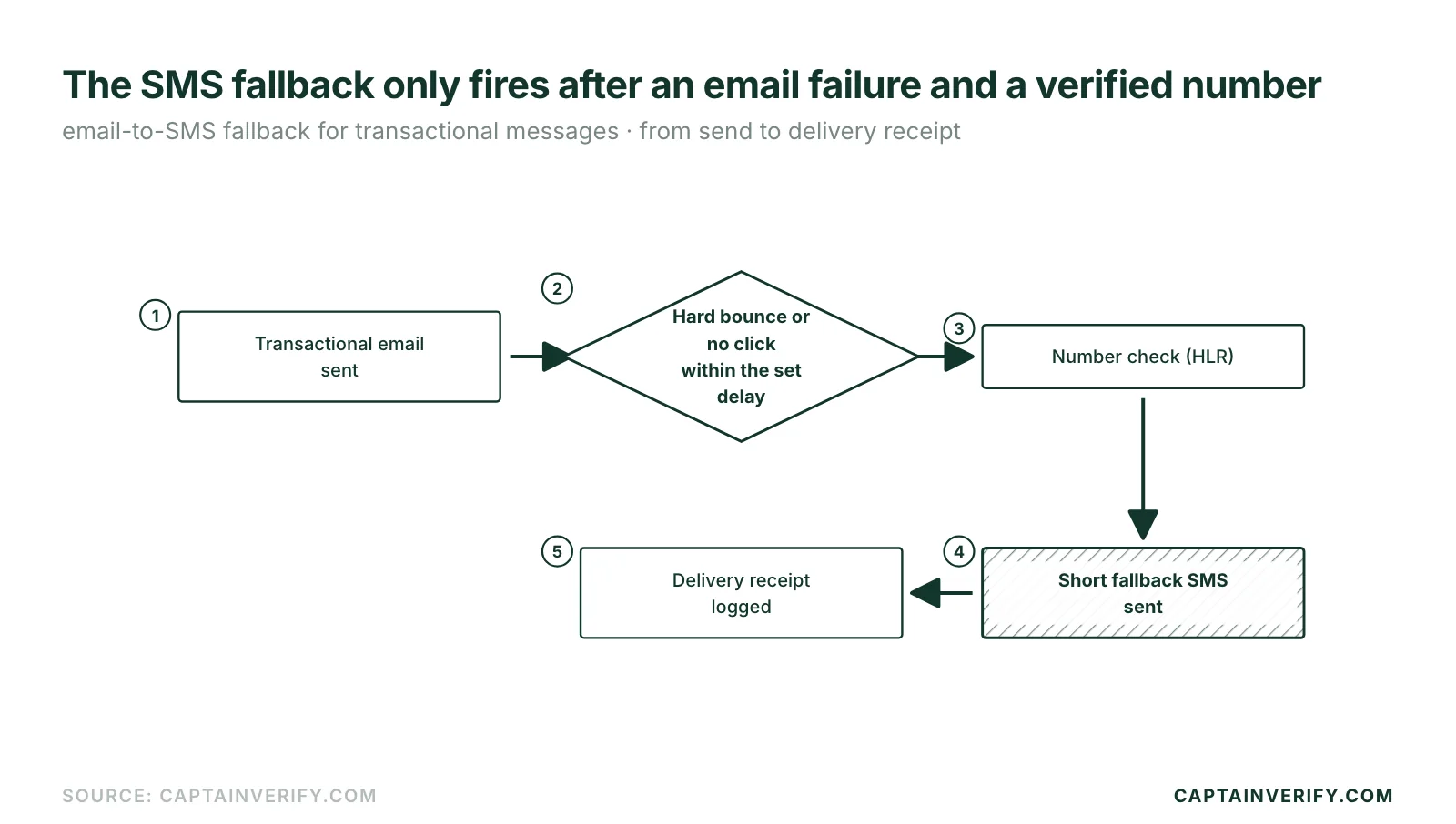
The fallback sends the message through a second channel when the first one fails or gets no reaction.
- List the critical messages: OTPs and security alerts first, then appointment reminders. The others do not need a fallback.
- Collect the mobile number in international format (for example +33 for France) with the purpose stated in the form.
- Check the database before any send: syntax, whether the address exists, whether the number is reachable. An HLR (Home Location Register) check queries the network to find out whether a number is active.
- Define the trigger event: a hard bounce received, no click on the link after a set delay (“10 minutes” to start with) or an explicit request from the customer. Choose it before development, because it sets the logic of the whole queue.
- Write an SMS that fits in a single segment, with no rare accent or emoji, and the company name in plain text. Example: “Lune Shop: the confirmation email did not arrive, here is your code 482913.”
- Log every send with its delivery status and alert the team when the failure rate goes past the threshold you set, for example 5%.
Test the full flow with one number from each carrier before going live.
Criteria for choosing a transactional SMS API
An SMS API must first return a delivery receipt for each message, with a clear status (“delivered”, “failed”, “expired”): without it, there is no way to know whether the fallback went through. Also ask for the delivery rate per carrier (no rate is universal, it is read in the contract), how the alphanumeric sender ID is handled, and whether messages can reach a number ported to another carrier. Since mobile number portability opened in France on June 30, 2003 (decision of the ARCEP, then called ART, of July 11, 2002), the prefix no longer tells which network serves a number: an HLR check reveals it at send time.
The mistakes that come up most often
The first mistake is slipping a promotion into a transactional message. An alert such as “New login detected on an unknown device. Was this not you?” stays transactional as long as it offers nothing to buy. Once it does, the message becomes prospecting and falls under the consent regime. The second is sending OTPs with no fallback, which locks out the user whose SMS gets filtered.
The third is poor list hygiene. Numbers typed with a typo and abandoned addresses pile up, and every send to one of them goes nowhere. The last is ignoring the split into segments, which multiplies the bill for a message that runs too long.
Counting the cost of an undelivered SMS
Multiply the number of failed sends by the rate in your contract, then add the logins or orders abandoned for lack of a code. Some providers bill a send to a nonexistent number and others do not, so the calculation starts from the failure rate. Check the “invalid number” line on your invoice: the answer changes the value of cleaning the list beforehand.
Before the next alert or OTP campaign, run a sample of your database through a number and address verification. The gap between the contacts you collected and the contacts you can reach shows up in a single pass.