

A line in your DMARC report can show spf=fail even when the domain is still protected and the message still landed in the inbox. For each sending source, an aggregate DMARC report lists the SPF result, the DKIM result, and the disposition actually applied by the receiving server. A failing SPF paired with an aligned, passing DKIM breaks nothing: the DMARC specification validates as soon as one of the two mechanisms aligns with the domain visible in the From header.
This is exactly the kind of line that raises false alarms when campaigns land in spam even though the emailing tool shows a deliverability rate that’s all green. If the basics of email authentication (SPF, DKIM, DMARC) aren’t clear yet, DMARC explained lays the groundwork before going further. This guide stays focused on one point: reading an aggregate report field by field and telling a normal line apart from a real alert.
Where the report lands and in what format
The aggregate report is sent to the address declared in the rua= tag of the _dmarc DNS record, typically once a day per receiving provider (Google, Microsoft, Yahoo). The DNS tags that drive this delivery are covered in the article on DMARCbis DNS tags to fix before the 2026 switch; this article assumes the DNS is already in place. Each message arrives as a compressed attachment, an XML file inside a .zip or .gz archive. You need to decompress it before reading it, or use an analyzer that does it automatically.
MailerCheck distinguished in 2024 between aggregate reports and forensic reports: the former summarize authentication activity over a given period, the latter detail a specific failure and are rarely implemented by mailbox providers (MailerCheck, 2024). Nothing sensitive travels through them. Almost all DMARC monitoring therefore relies on the aggregate report. This is also the DMARC policy Gmail and Yahoo have required since 2024 for domains sending more than 5,000 messages a day. The aggregate report remains the main tool for checking that it’s applied.
XML structure, field by field
The XML file is organized into three blocks. report_metadata identifies who sent the report (org_name, email, period covered). policy_published reproduces the DMARC policy your domain published at the time of the analysis. The record block contains one or more row lines, each corresponding to a unique combination of source and results.
To interpret a line without getting lost, the reading order matters.
- Identify the source: source_ip shows the IP address that actually sent the message. Cross-reference it with a reverse DNS lookup to find out whether it’s your ESP, a third-party relay, or an unknown IP.
- Check the volume: count gives the number of messages associated with this exact combination over the entire report period.
- Read the disposition applied: disposition (none, quarantine, or reject) in the policy_evaluated block, the one actually taken by the receiving server.
- Compare dkim and spf in policy_evaluated: these two values show the alignment result, which is distinct from the protocol’s raw result.
- Check auth_results for the raw result of each mechanism and the domain that actually signed or was declared.
This distinction between alignment (policy_evaluated) and raw result (auth_results) is the source of most confusion. An SPF that’s technically valid on the envelope domain can show fail in policy_evaluated because that domain doesn’t match the one visible in the From header. This is exactly the mechanism behind the case below.
The 4 DKIM x SPF combinations and their DMARC verdict
An aggregate report reveals 4 recurring configurations. Each tells a different story about what happened between your sending server and the recipient’s mailbox.
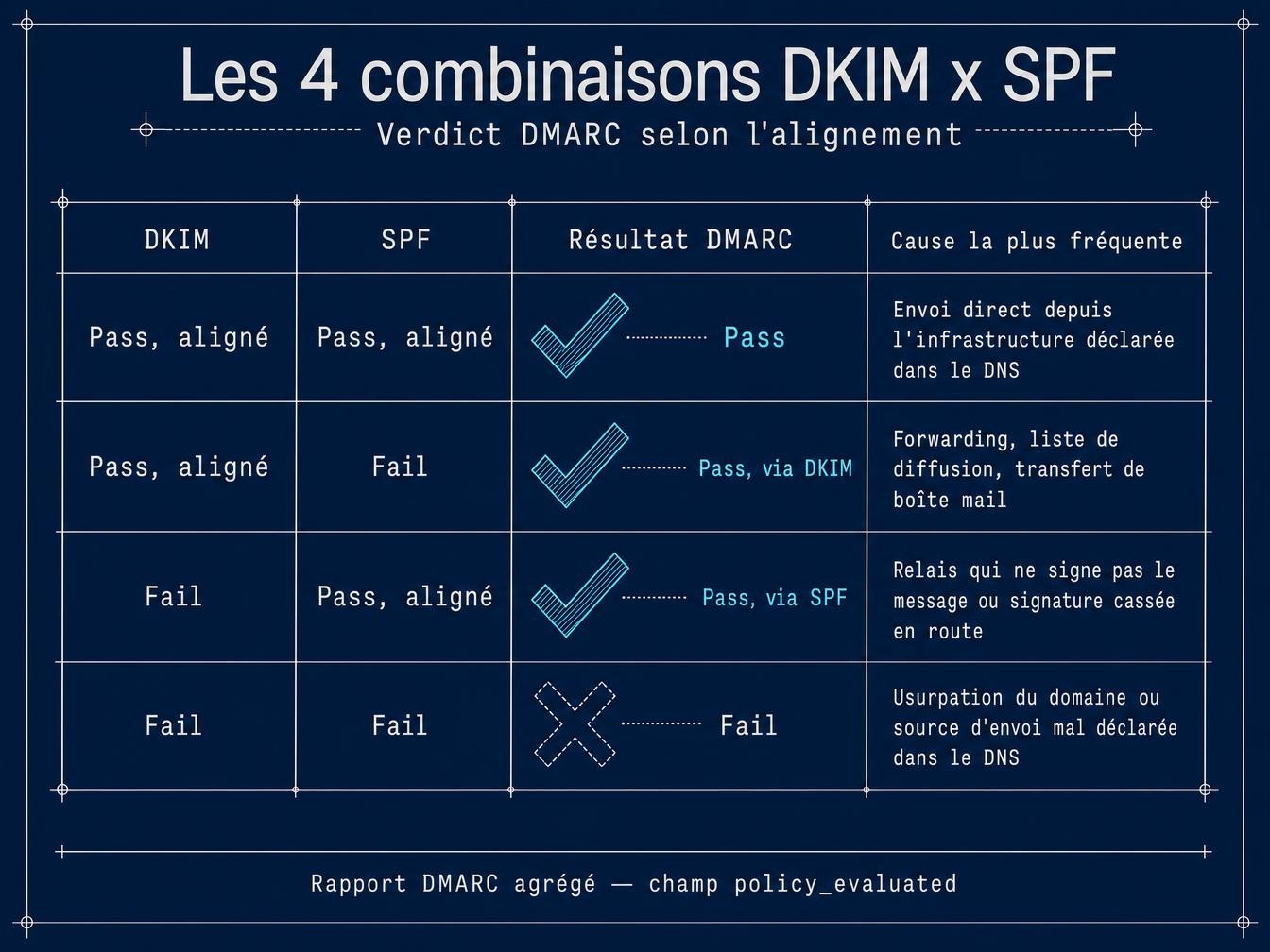
| DKIM | SPF | DMARC Result | Most common cause |
|---|---|---|---|
| Pass, aligned | Pass, aligned | Pass | Direct send from the infrastructure declared in DNS |
| Pass, aligned | Fail | Pass, via DKIM | Forwarding, mailing list, mailbox transfer |
| Fail | Pass, aligned | Pass, via SPF | Relay that doesn’t sign the message, or signature broken in transit |
| Fail | Fail | Fail | Domain spoofing or sending source misdeclared in DNS |
Only the 4th row calls for immediate correction. The first 3 reflect expected behavior of the specification, each with its own interpretation.
SPF failing, DKIM passing: should you worry?
No, in most cases. SPF checks the MAIL FROM address, sent via the command of the same name in the SMTP dialogue right after the initial EHLO exchange, in other words the envelope address. DKIM signs the message content with a private key tied to the sending domain, a signature that travels with the message no matter which server relays it afterward. When a recipient forwards an email to another mailbox, or when a mailing list redistributes a message to its subscribers, the relay server becomes the new sending IP. SPF, which checks the IP against the origin domain’s record, fails as a mechanical consequence. The DKIM signature, on the other hand, stays intact as long as the signed body and headers aren’t modified along the way.
Spamresource documented a Microsoft rejection in November 2025 that illustrates the mechanism well, in reverse: a message with DKIM pass and DMARC pass got blocked because SPF, on its own, failed.
550 5.7.515 Access denied, sending domain doesn’t meet the required authentication level. Spf= Fail, Dkim= Pass, DMARC= Pass
The extended status code 5.7.515 here signals a Microsoft-specific requirement, a layer added on top of the DMARC result itself. Since May 2025, Microsoft has required high-volume senders to pass all 3 mechanisms (SPF, DKIM, DMARC) simultaneously, even though the DMARC specification itself only requires one successful alignment (spamresource.com, 2025). The SPF fail identified in this specific case came, according to the same article, from a forward to a mailbox hosted outside Microsoft’s servers. This is worth knowing before telling a CMO the open rate is dropping: DMARC can show pass in your report while some messages still get blocked by a rule specific to the receiving provider.
Two things set this case apart from an actual configuration problem that needs fixing. First, the volume: a handful of isolated rows with a low count, spread across varied IPs, points to individual forwarding rather than a full campaign. Second, the source: a reverse DNS lookup on those source_ip addresses usually points to a consumer mailbox provider or a mailing list server, never to your own sending infrastructure. A repeated SPF fail on your own sending IPs, with no identifiable forwarding involved, points to a different cause: the SPF record’s 10 DNS lookup limit, worth checking before jumping to the conclusion that it’s simple forwarding.
Common pitfalls when reading an aggregate report
The first mistake is confusing the raw result in auth_results with the alignment result in policy_evaluated. SPF can technically pass on the envelope domain while still failing alignment, because that domain differs from the visible From, a scenario common among senders using a shared IP pool at a third-party provider.
The second is treating a single report as definitive proof. Major providers (Google, Microsoft, Yahoo) send daily reports, and a one-off incident can show up for a single day and vanish the next. Check count and disposition over at least a week before drawing conclusions.
The third is ignoring the org_name field in the report_metadata block. It identifies who produced the report, useful for spotting a secondary provider applying its own filtering policy on top of yours, independent of the ISP feedback loops you’re already subscribed to on your end.
What this means for your deliverability
A clean report, with a consistent none or quarantine disposition on non-third-party rows, confirms stable sender reputation on the authentication side. That’s a different signal from the usual post-send monitoring: open rate or bounce rate shows the effect on the recipient’s end, while the DMARC report shows the cause on the receiving server’s end, before the message even reaches a mailbox. The two complement each other without replacing one another. Gmail Postmaster Tools and the Microsoft equivalent, the SNDS (Smart Network Data Services), give a similar view on IP reputation, worth cross-referencing with the same source_ip addresses spotted in the report.
Once authentication is confirmed clean over several days, the next variable weighing on reputation is the cleanliness of the list you’re sending to. A high hard bounce rate damages sender reputation just as surely as misaligned SPF, and no DMARC report row reveals it. Running a sample of your next list through a verification before sending tells you whether the bottleneck is authentication or list hygiene.
What the aggregate report doesn’t cover
A DMARC report says nothing about the message content, the actual complaint rate on the inbox side, or lookalike (typosquatted) domains that never published a DMARC record and so fall entirely outside this reporting mechanism. Switching to p=reject blocks direct spoofing of your domain, a technical prerequisite for enabling BIMI afterward. It has no effect on a visually similar domain registered by a third party. 5 things DMARC can’t do covers these blind spots beyond reporting.
Save your reports over several weeks before adjusting the policy. It’s the only way to tell a real signal apart from passing noise. An aggregate DMARC report tells the actual journey of a message, row by row, all the way to the inbox.