
Since February 1, 2024, Gmail accepts a DMARC policy of p=none from senders of more than 5,000 messages a day, while BIMI rejects that same policy. The four protocols therefore follow a fixed order: SPF and DKIM first, DMARC next, BIMI last.
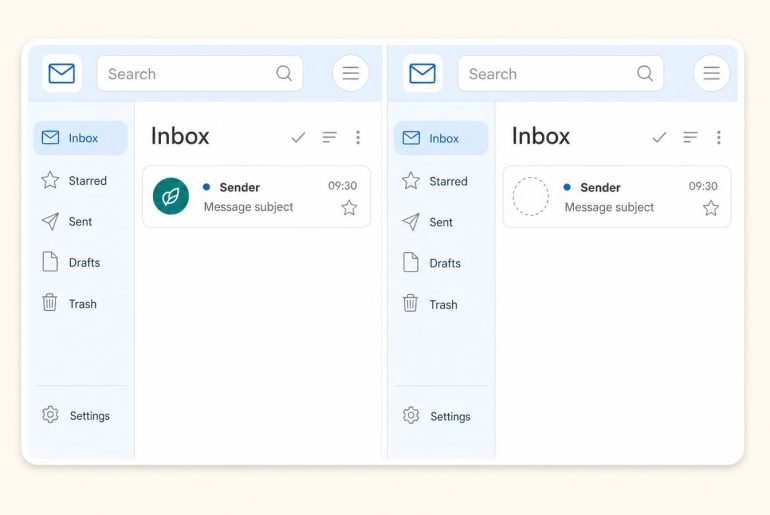
To display a logo with DMARC BIMI, you need an SPF or DKIM result aligned with the From domain, a DMARC policy of quarantine or reject applied to 100% of messages, an SVG Tiny PS logo and a brand certificate for Gmail. This page describes what each piece does and what depends on what. The pages linked along the way cover each one in detail.
What each protocol does and what it leaves out
SPF, DKIM and DMARC prove where a message comes from and limit spoofing of the sending domain. BIMI proves nothing more: it displays a logo once the proofs are in place. The table below puts each DNS record where the receiving server looks for it. The first three are published standards: DKIM in RFC 6376 (2011), SPF in RFC 7208 (2014), DMARC in RFC 7489 (2015). BIMI is still an IETF draft.
| Protocol | Role | DNS record | What it does not do |
|---|---|---|---|
| SPF | Lists the servers allowed to send for the domain | TXT on the domain, starting with v=spf1 | Does not sign the content and ignores the displayed From domain |
| DKIM | Signs the message with a private key, checked through a public key | TXT on selector._domainkey.domain | Does not say what to do with a message that fails |
| DMARC | Requires an aligned SPF or DKIM and sets the enforcement policy | TXT on _dmarc.domain | Does not replace SPF or DKIM: without them, it has nothing to evaluate |
| BIMI | Points to the logo to display next to authenticated messages | TXT on default._bimi.domain | Authenticates nothing itself and does not activate on a p=none policy |

The most cited SPF limit comes from RFC 7208: at most 10 terms that trigger a DNS query (include, a, mx, ptr, exists and redirect). Beyond that, the receiver must return a permerror and SPF fails.
Alignment, the condition that links SPF and DKIM to DMARC
A green SPF result is not enough. RFC 7489 states that a message satisfies DMARC if at least one of the two mechanisms produces a “pass” on an identifier aligned with the From domain. One of the two is enough.
With sending platforms, SPF validates the technical domain of the envelope address (MAIL FROM), which often belongs to the provider. SPF then passes without alignment. A DKIM signature issued with your own domain carries the alignment instead. Yahoo writes it into its sender requirements: the From domain must be aligned with the SPF domain or with the DKIM domain. Relaxed alignment is accepted.
Five steps, in the order they unlock
- Publish the domain’s SPF, listing every service that sends on your behalf. Then count the terms that trigger a DNS query to stay under 10 (RFC 7208, section 4.6.4).
- Enable DKIM signing at each sender with its own selector. Check that the public key answers on selector._domainkey.
- Publish DMARC at p=none with a rua= address to receive aggregate DMARC reports, XML files that list each sending IP with its SPF and DKIM results.
- Fix the sources that fail, then move to p=quarantine or p=reject, with pct=100.
- Prepare the logo and the certificate, then publish the BIMI record.
The first three records look like this, with sample values: v=spf1 include:_spf.example.com ~all on the domain, v=DKIM1; k=rsa; p=MIGf… on s1._domainkey.example.com, then v=DMARC1; p=none; rua=mailto:dmarc@example.com on _dmarc.example.com. The initial p=none is only for observing: it tightens at step 4.
Step 4 takes the longest: the reports reveal forgotten senders (billing tool, CRM, website form). Until they are aligned, reject cuts off legitimate messages.
Gmail and Yahoo require less than BIMI
The requirements of both mailbox providers target deliverability. At Google, since February 1, 2024, every sender must set up SPF or DKIM. Above 5,000 messages a day to personal Gmail accounts, a DMARC record is added, and its policy can stay on “none”. The spam rate shown in Postmaster Tools must stay under 0.3%. Google also asks for a TLS connection, valid forward and reverse (PTR) DNS records and a message that complies with RFC 5322 (2008).
Yahoo asks bulk senders for SPF and DKIM together, with a DMARC of at least p=none. Its spam limit is also 0.3%. It adds a List-Unsubscribe header with one-click unsubscribe (RFC 8058, 2017, POST method recommended) honored within 2 days.
“None” policies or ‘pct’ less than 100 percent are not accepted. (BIMI Group, implementation guide, step 1)
The BIMI Group implementation guide also asks for a policy applied to the organization and its subdomains (p=quarantine; sp=quarantine or reject). A domain that meets Gmail and Yahoo’s February 2024 rules is therefore still ineligible for the logo as long as its DMARC stays at none.
Logo and certificate: the prerequisites specific to BIMI
The Google BIMI help page sets the format: a logo in SVG Tiny Portable/Secure, with the baseProfile=”tiny-ps” attribute and version 1.2. The logo must be at least 96 pixels high and wide, and the server hosting it must use HTTPS. The SVG file must not exceed 32 KB, and Google recommends a logo centered in a square, on a solid background.
On the certificate side, two options exist. The VMC requires a logo registered as a trademark. According to Google, that registration can take 6 to 12 months. The CMC suits logos that are not registered. Both are obtained from a third-party certificate authority. Google points to the BIMI Group’s list of brand certificate issuers for the recognized authorities. Gmail shows a checkmark next to senders verified with a VMC, while the CMC in Gmail is for logos that are not registered.
The final record is a single line, published on default._bimi.yourdomain: v=BIMI1; l=SVG-URL; a=PEM-URL. Google states a delay of up to 48 hours before the logo appears. According to the same help page, Gmail does not accept an SVG alone, without a certificate: a logo declared that way is self-asserted BIMI and does not appear in Gmail.
The errors that block most often
- SPF with more than 10 DNS queries: the result becomes permerror.
- DKIM selector missing from DNS: RFC 6376 queries selector._domainkey.domain to retrieve the public key.
- DMARC left at p=none: Google states that BIMI does not support this value.
- pct below 100: required at 100 by Google and by the BIMI Group.
- Logo outside SVG Tiny PS, or logo URL outside HTTPS.
- BIMI record published on the wrong host: it goes on default._bimi.
Checking the chain in the Authentication-Results header
In Gmail, the “Show original” menu of a received message shows the Authentication-Results header. Look for spf=pass, then dkim=pass, then dmarc=pass. When those results are green but no logo shows, the bimi entry gives the lead: the IETF BIMI draft cites the example bimi=skipped (message failed DMARC), which means the BIMI check was not run because DMARC failed. A DNS check with MXToolbox completes the reading. Google Postmaster Tools tracks the spam rate over time.
Each mailbox provider sets its own display criteria, as the BIMI Group reminds readers at the top of its guide. The group keeps an infographic of adoption status by mailbox provider: read it before a project, especially for Outlook.
Three questions about the sequence
Does BIMI work without DMARC?
No. Google’s help page states that BIMI requires messages authenticated by DMARC. DMARC itself first needs SPF or DKIM.
Is a DMARC at p=none enough for the logo?
No. It satisfies Gmail and Yahoo’s rules for large volumes, while BIMI asks for quarantine or reject with pct=100. The move from one to the other is prepared with the aggregate reports.
VMC or CMC to start?
The CMC fits if the logo is not registered as a trademark. Google presents the VMC as the recommended option. Trademark registration takes 6 to 12 months according to the same help page. The choice therefore depends first on your brand’s situation.
Authentication proves who sends and says nothing about the quality of the list. Run a sample of your list through verification before your next send.