

Nobody suspects the signature. Yet it’s the one block your mail client copies into every outgoing email. A sales rep who sends 80 emails a day from Outlook broadcasts the same logo and the same links 80 times, which means 80 copies of the same HTML. “My campaigns end up in spam and I have no idea why”: before blaming the list or the content, check the signature. It takes 10 minutes.
An email signature that protects deliverability stays light: real text, a logo 70 to 100 pixels tall hosted over HTTPS, 4 links at most, and a short version for replies. This guide gives the exact menu paths for Gmail and Outlook.
What the signature adds to every send
Gmail clips a message’s display beyond roughly 102 KB of HTML, a threshold Google doesn’t document but that Mailchimp and other email vendors have observed. An online signature generator can produce several dozen KB of nested tables and inline styles before the first line of your text. The clipping mechanism is detailed in our article on preventing Gmail from truncating your email. The heavier the signature, the less room your message has before the cutoff. The effect of weight across a whole campaign is covered in how email weight affects campaigns.
A base64 image pasted directly into the code adds the file’s full weight to every send. Shortened links hide their destination, so avoid them. According to Gmail’s help, a signature is capped at 10,000 characters, image included.
Create an email signature in Gmail
The Gmail signature is set up from a computer. Allow 5 minutes.
- Open Gmail, then click the gear icon at the top right.
- Choose See all settings, General tab.
- Scroll down to the Signature section and click Create new.
- Name the signature, then type the text in the field.
- Under the defaults, select the signature for “For new emails” and a shorter version for “On reply/forward.”
- Click Save Changes at the bottom of the page.
For the logo, Google recommends a height of 70 to 100 pixels and a width of 300 to 400 pixels, with a maximum of 100 x 1,000 pixels. An image stored on Google Drive must be shared publicly: otherwise the recipient sees an empty square. If the formatting breaks after a copy-paste from Word, use the Remove formatting option in the Signature settings.
On mobile, the Gmail app has its own signature. On Android, open Menu > Settings, choose the account, then Mobile Signature. On iPhone and iPad, open Menu > Settings, then turn on Mobile Signature. It only accepts plain text, so the logo has to be set from a computer. Without a mobile signature, Gmail uses the desktop one. Each account is set up separately.
If you manage several addresses with “Send mail as,” Gmail accepts a separate signature for each address. This helps when the same team member writes for two brands.
Create an email signature in Outlook
The path depends on the version, and Microsoft maintains three. In classic Outlook, open a new message, then Message > Signature > Signatures. Select the account in the list, click New, then name the signature. Compose it under Edit signature. The same screen also opens through File > Options > Mail > Signatures. Under Choose default signature, two lists appear: New messages and Replies/forwards. Confirm with OK. In Outlook for Mac, open the Outlook menu > Settings, then Signatures under Email.
In the new Outlook and Outlook on the web, click the Settings gear, then Account signatures and Add signature. Check both automatic-apply boxes and click Save (Microsoft Support documentation).
The trap is hidden in the logo. Classic Outlook embeds it in the message as an attached image (a cid: reference). For some recipients, the logo then shows up as an attachment named image001.png. Microsoft describes this symptom of an inline image displayed as an attachment when opening the message in Outlook 2010 and 2013. On the Apple Mail side, signature tool vendors such as Exclaimer and Symprex report that on reply, the client replaces embedded images with their file name, image001.png included. Every exchange in a prospecting thread then drags along one more attachment. There are two fixes: host the image on your domain and call it through an HTTPS address, or put no image in the reply signature.
Classic Outlook stores signatures in the local folder %APPDATA%\Microsoft\Signatures, so a file created on one computer doesn’t exist on another. For a team of 50, copy-pasting machine by machine produces 50 HTML variants, some inherited from Word and its styles. Always paste plain text, then reapply the formatting in the signature editor. You can also centralize the signature on the Microsoft 365 or Google Workspace side.
Gmail and Outlook: the limits side by side
The 3 environments differ on the points that change message weight. The numeric limits come from Gmail’s help. Microsoft publishes no signature cap on the page consulted, which doesn’t mean none exists: always test the real weight of a send.
| Criterion | Gmail | Classic Outlook | New Outlook and web |
|---|---|---|---|
| Path | Gear > See all settings > General > Signature | Message > Signature > Signatures | Settings > Account signatures |
| Documented limit | 10,000 characters, image included | None published | None published |
| Recommended logo size | 70 to 100 px tall, max 100 x 1,000 px | No official guidance | No official guidance |
| Separate signature for replies | Yes | Yes | Yes |
| Risk of image shown as attachment | Low if image is hosted | High with embedded image | Check with a test send |
Size and host the logo
Export the logo as PNG or JPEG at 300 x 80 pixels. A 1,200-pixel file shrunk by the HTML makes the message heavier for nothing. Host it on your domain over HTTPS, with the company name as alt text.
Many clients block remote images until the recipient clicks to show them. Your name and phone number must therefore exist as text in the signature, never only in the image. The risks of a signature built like a banner are described in our reasons to avoid emails that contain only images.
A professional email signature: content and example
A professional email signature has 4 lines, one per piece of information: identity, role with company, direct phone, website. An example signature that fits this frame:
First Last
Head of Acquisition, Example Inc.
+1 555 123 4567
example.com
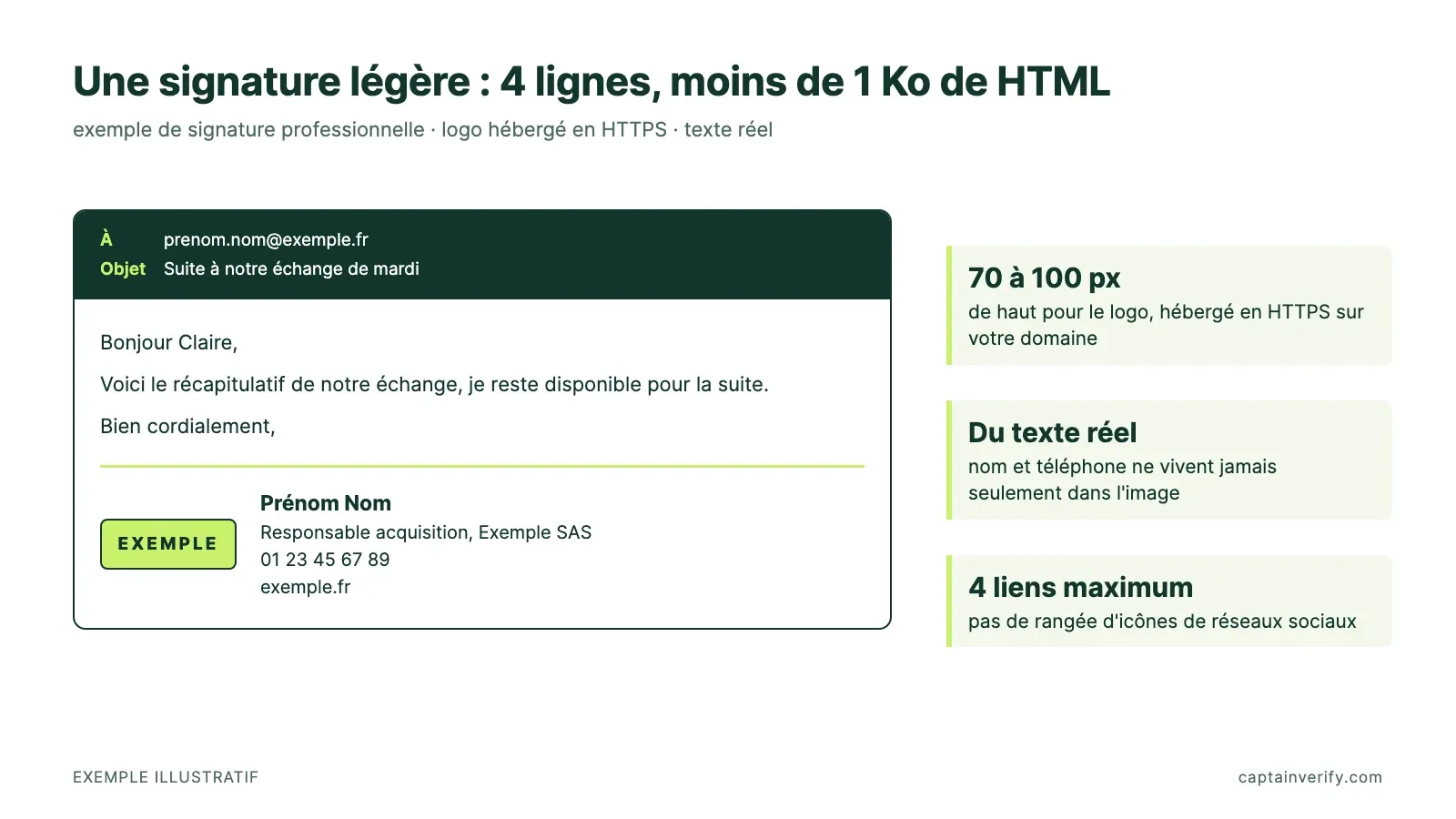
This block weighs less than 1 KB of HTML, and you don’t need a third party tool to build it. Add a single link to a LinkedIn profile or a website. A row of social media icons multiplies the domains called on every open.
A company registered in France must also include on its emails to third parties the details required by Article R123-237 of the French Commercial Code: unique identification number, RCS mention followed by the city of the registry, registered office address. Article R123-238 adds the legal form. SARLs and companies limited by shares also state their share capital. These details go in text below the 4 lines, never in an image.
Plan for 2 versions. The full signature is for new messages. The short version is limited to the name and phone number and is for replies: in a thread of 10 exchanges, the full version repeats the logo 10 times. The line that comes before the signature has its own guide: how to write effective closing phrases.
Prospecting from Gmail or Outlook: what the signature doesn’t fix
“Verifying emails before sending is expensive: can’t we just filter afterward?” That objection forgets that a hard bounce comes back after the send. The nonexistent address has already received the attempt, and your sender reputation has already recorded it.
Google asks you to stay under 0.10% reported spam in Postmaster Tools and to avoid 0.30% or more. Since February 2024, above 5,000 emails a day, SPF, DKIM and DMARC are mandatory (Google’s guidelines for Gmail senders). A lighter signature removes one risk factor. It doesn’t make up for a list full of dead addresses.
Before your next sequence, run a sample of 500 addresses from your list through an email verifier. The hard bounce rate you get tells you whether the list can go out as is.
Test before rolling out to the whole team
Send a test message from each email client to a Gmail address. Allow 2 minutes per workstation. Open it, click the 3-dot menu, then Show original, and check for PASS on SPF, DKIM and DMARC. Also check that no “View entire message” link appears at the bottom. Then send the same message to the address provided by Mail Tester: a score under 8/10 means you need to rework the signature’s HTML.
A good signature reads in one second and is forgotten right away, which is exactly its job.