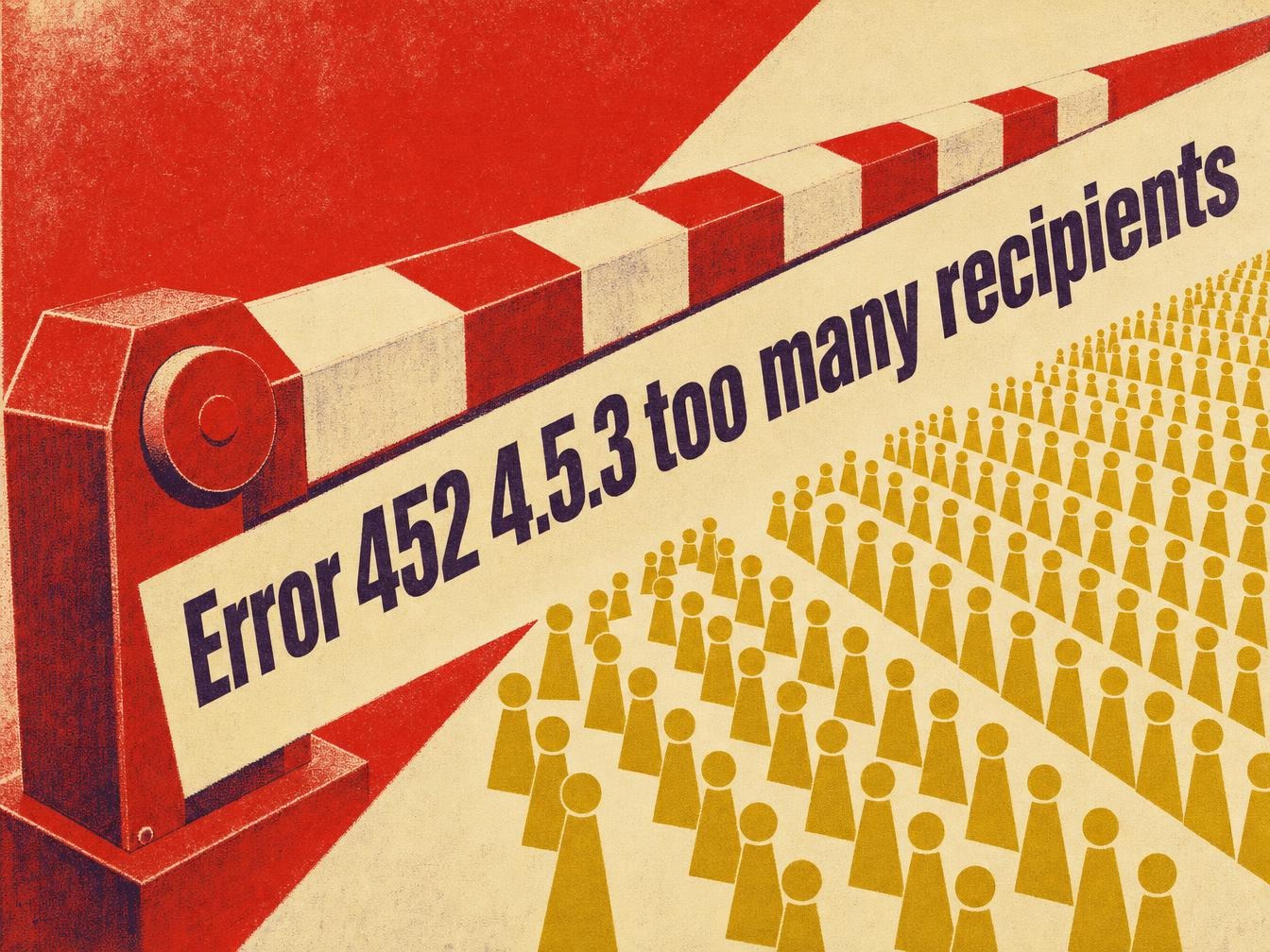


Your campaign goes out, part of the recipient list stays in the queue, and the log shows “452 4.5.3 Your message has too many recipients” while your emailing tool reports that everything is OK. The server is refusing part of the list in that SMTP transaction without closing the connection. Split the send into batches of 100 recipients maximum (the minimum RFC 5321 requires every server to accept), then resend only the rejected addresses.
What a 452 4.5.3 means
The leading 4 classes the error as temporary. RFC 5321, published in October 2008 to replace RFC 2821, corrects RFC 821 from 1982, which wrongly assigned code 552 to this condition. RFC 5321 (section 4.5.3.1.10) requires code 452 when a server exhausts its limit of RCPT commands. A rejection below 100 RCPT commands violates the specification.
A 452 is therefore a soft bounce: the difference from a permanent rejection is detailed in the article on hard bounce and soft bounce. The same excess of recipients produces a 550 5.5.3 (RESOLVER.ADR.RecipLimit on Exchange) when the rejection is permanent, with no new attempt.
The general list of codes is in the SMTP reply codes you should know. A full mailbox, another error case on an existing address, is covered in the article on error 552 mailbox full.
Recipient limits by mail provider
The table compares the caps published by each vendor for a single send. The number that blocks you depends on the path taken: the same Gmail account accepts 2,000 recipients from the web interface and 100 when a tool connects to it over SMTP. Values recorded in October 2026, to be rechecked before sizing a send: Google and Microsoft change them.
| Mail provider or context | Recipients per message | Daily cap | Observed error text |
|---|---|---|---|
| Gmail and Google Workspace (web interface) | 2,000 in total, including 500 external at most | 2,000 messages and 10,000 recipients per user; 3,000 external recipients | Your message has too many recipients |
| Gmail over SMTP (POP or IMAP users) | 100 | same daily caps | Your message has too many recipients |
| Gmail API | 500 | same daily caps | Your message has too many recipients |
| smtp-relay.gmail.com relay | 100 per SMTP transaction | see the relay page | Your message has too many recipients |
| Exchange Online | adjustable up to 1,000 | 10,000 recipients per mailbox per day; tenant limit (TERRL) depending on licenses | Recipients belong to multiple regions (ATTR38) |
| Postfix | 1,000 by default (smtpd_recipient_limit) | none | Error: too many recipients |
| Minimum required by RFC 5321 | 100 to accept | not applicable | 452 4.5.3 |
Read the “error text” column first, because it guides the diagnosis. Two servers can return the same 452 4.5.3 code for opposite reasons: a recipient count cap on one and a domain rule on the other. Always read the sentence that follows the code.
Gmail and Google Workspace: two messages for one code
The 452 4.5.3 code appears under two wordings on Gmail’s SMTP errors page: “Your message has too many recipients” and “Domain policy size per transaction exceeded, please try this recipient in a separate transaction”.
The first points to Google’s sending limits page. According to the Google Workspace documentation on sending limits, a message accepts 2,000 recipients in total, including 500 external. The same page sets 100 recipients per message for users who send over SMTP from a POP or IMAP client. A tool connected over SMTP to a Gmail account is therefore capped at 100.
The second wording is tied to a domain rule: the server asks you to submit the named recipient in a separate transaction. Google does not publish a numeric threshold for this rule. Isolate the address mentioned in the error message and resend it alone.
Daily caps add to per-message caps. Google sets 2,000 messages per day per user, with 10,000 recipients in total, including 3,000 external. 30 batches of 100 from a single account reach the 3,000 external recipients. Beyond that, spread the campaign over several days. The smtp-relay.gmail.com relay, for its part, applies 100 recipients per SMTP transaction (Google Workspace SMTP relay errors page).
Microsoft 365 and Exchange Online
Exchange Online (Microsoft 365) limits each message to a number of recipients adjustable up to 1,000 across the To, Cc and Bcc fields. A separate cap of 10,000 recipients per mailbox per 24-hour period applies to sends (Microsoft Learn documentation, Exchange Online limits, updated in September 2026). Both limits appear on the Exchange Online limits page, along with an additional tenant-level limit that depends on the number of licenses.
The ATTR38 variant is more misleading. The full text is “452 4.5.3 Recipients belong to multiple regions ATTR38″: the refusal comes from the spread of addresses across several Microsoft regions or tenants, regardless of their number. An administrator with a list of about 100 addresses got it on 5 Hotmail addresses with every send (Microsoft Q&A thread). Microsoft does not define the ATTR38 code on the limits page.
To read the actual value on a mailbox, open PowerShell with the ExchangeOnlineManagement module (Connect-ExchangeOnline) and run Get-Mailbox firstname.lastname@domain.com | Format-List RecipientLimits. The Tenant Outbound External Recipients report, in Exchange admin center > Reports > Mail flow, shows your tenant’s TERRL limit. In Mail flow > Message trace, the failure details repeat the full text of the 452.
Remove outlook.com and hotmail.com addresses from the main batch and send them in small groups. According to a 2018 Microsoft Q&A thread quoting Michael Wise of Microsoft, a 452 asks the sending server to immediately retry the rejected recipients, and the author of the answer sees it as a defect on the Outlook.com side. If the refusal persists, switch to one recipient per transaction. The domain’s SPF and DKIM records are not involved. The message text sometimes specifies “retry timeout exceeded”: the server retried the queue until expiry, then gave up on the message.
Postfix
On a Postfix 3.x server that receives mail, the limit is called smtpd_recipient_limit and defaults to 1,000 (Postfix documentation, postconf). Beyond that, the server replies “452 4.5.3 Error: too many recipients”. Logs are in /var/log/mail.log on Debian and Ubuntu: grep "too many recipients" /var/log/mail.log lists the refused sessions. If you administer this server, read the value with postconf smtpd_recipient_limit, then raise it with postconf -e "smtpd_recipient_limit = 2000" (the directive is written in /etc/postfix/main.cf). Then reload with postfix reload.
The smtpd_recipient_overshoot_limit parameter (1,000 by default) additionally lets 1,000 excess recipients through before Postfix counts a session error. On the sender side, Postfix splits its own sends by destination with default_destination_recipient_limit (50 by default) and puts rejected recipients in the deferred queue (deferrals).
Free, OVH and Orange
Free (free.fr), OVHcloud (ovhcloud.com) and Orange (orange.fr) appear in Google results for this code. No per-message threshold appears in these three providers’ official documentation, so no figure is given here.
Look up the cap in your plan’s datasheet or ask support.
Unblocking the send step by step
- Note the exact text that follows the code in the NDR or the SMTP log: “too many recipients” (count cap), “Domain policy size per transaction exceeded” (Google domain rule) or “Recipients belong to multiple regions” (ATTR38 at Microsoft). This text determines the fix.
- Count the recipients in the envelope. To, Cc and Bcc all count (Microsoft documentation): moving addresses to Bcc does not reduce the total.
- Split the list into batches of 100 recipients maximum per transaction. A database of 25,000 addresses gives 250 batches, or at least 3 days of sending from a Google Workspace account capped at 10,000 recipients per day.
- Let the sending server retry the queue first. A 4xx retries on its own, and a manual resend in the meantime creates duplicates.
- If addresses are still refused, resend only those. Recipients accepted in the same transaction received their message, and a global resend would deliver it to them twice.
- Check your reputation after the first batch: open Google Postmaster Tools (postmaster.google.com) and look at the user-reported spam rate (complaint rate) before running the following batches.
- Check the daily cap before relaunching batches, notably 10,000 recipients per day per mailbox on Exchange Online.
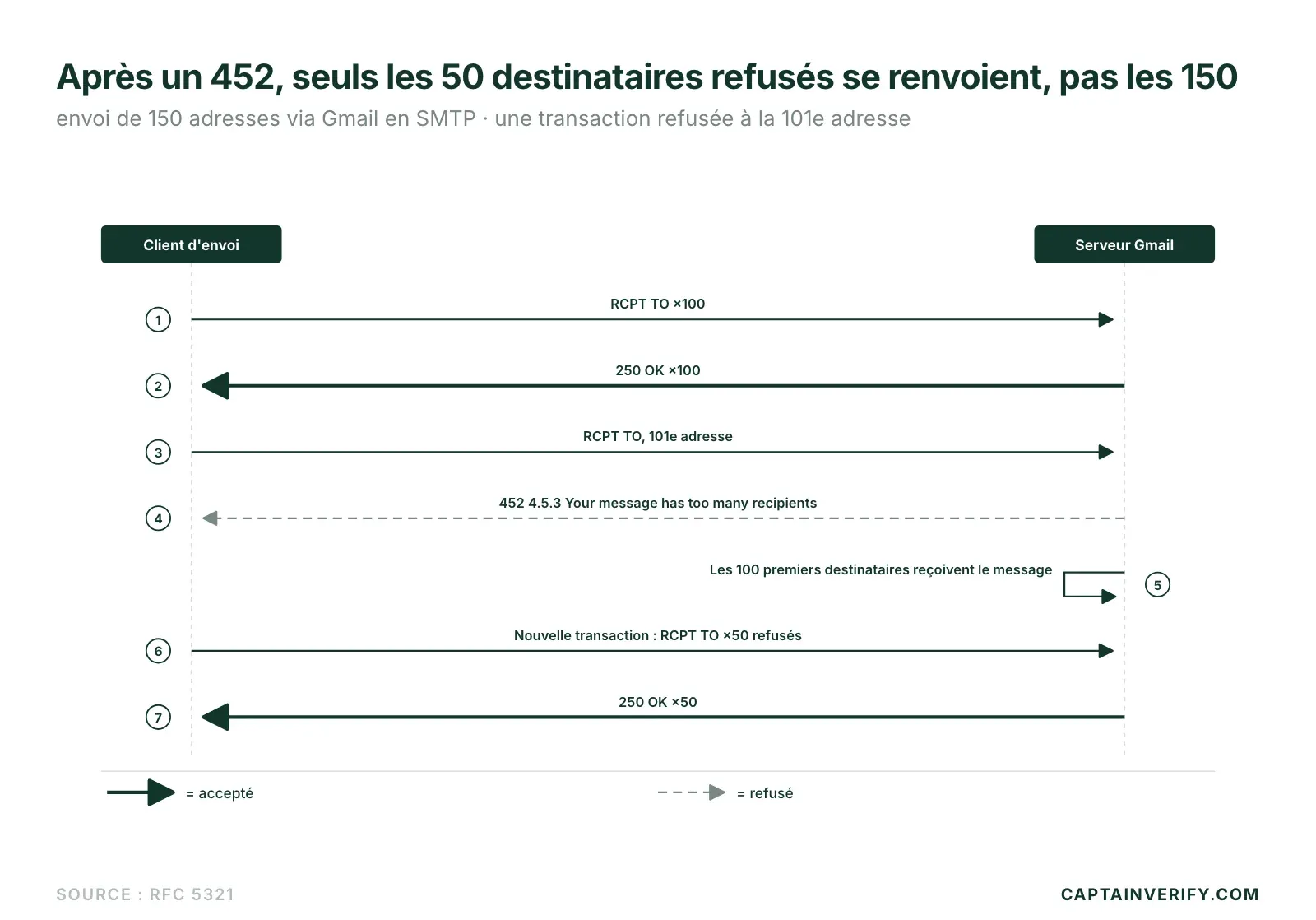
A global resend after a partial 452 is the typical mistake: RFC 5321 provides that the client retries only the rejected recipients, not the whole transaction. Take a send of 150 addresses through Gmail over SMTP: the first 100 RCPT TO commands pass and the 101st receives “452 4.5.3 Your message has too many recipients”. The first 100 recipients have their message. Only the next 50 are waiting for the retry: resending all 150 would send a duplicate to 100 people.
Why clean the list before relaunching batches
A common objection: a 452 is temporary, so there is no need to verify the list. Yet splitting a send multiplies transactions. Each replayed batch exposes invalid addresses to a new refusal. These permanent refusals come back as NDRs and raise the hard bounce rate, and that hurts sender reputation. A clean list (list hygiene) limits this risk. The hard bounce rate can then be read in the NDRs of each batch: a rate that climbs from one batch to the next points to an unverified starting list.
Before relaunching batches, test CaptainVerify’s verification on a sample of your list: the rate of invalid addresses shows up before the NDRs measure it for you.
The first test to run
Open the log of your last send, find the text that follows “452 4.5.3”, then resend only the refused addresses in batches of 100.