Hours after a send, a handful of recipients click “junk mail.” That action doesn’t stay in their inbox: mailbox providers forward it to the sender enrolled in the right program. That’s the feedback loop (FBL), the only channel that tells you how many recipients flagged you, and it weighs directly on your deliverability. Each provider has its own enrollment terms and level of detail. Microsoft, in fact, changed theirs in 2026.
What is a feedback loop (FBL)?
A feedback loop is a service through which a mailbox provider forwards complaints from its own users back to the sender. When a recipient clicks “spam” or “junk,” the provider generates a report and sends it to an address the enrolled sender has registered.
These reports travel in a standardized format, ARF (Abuse Reporting Format), described in RFC 5965. An ARF report looks like a multi-part email. A human-readable summary opens the message, followed by a block of machine metadata that notably carries the complaint type and the source IP address. Then comes a copy of the original message, which some providers trim down to just the headers. This standardization lets you parse complaints from different providers with a single script instead of one per program.
How does a feedback loop work?
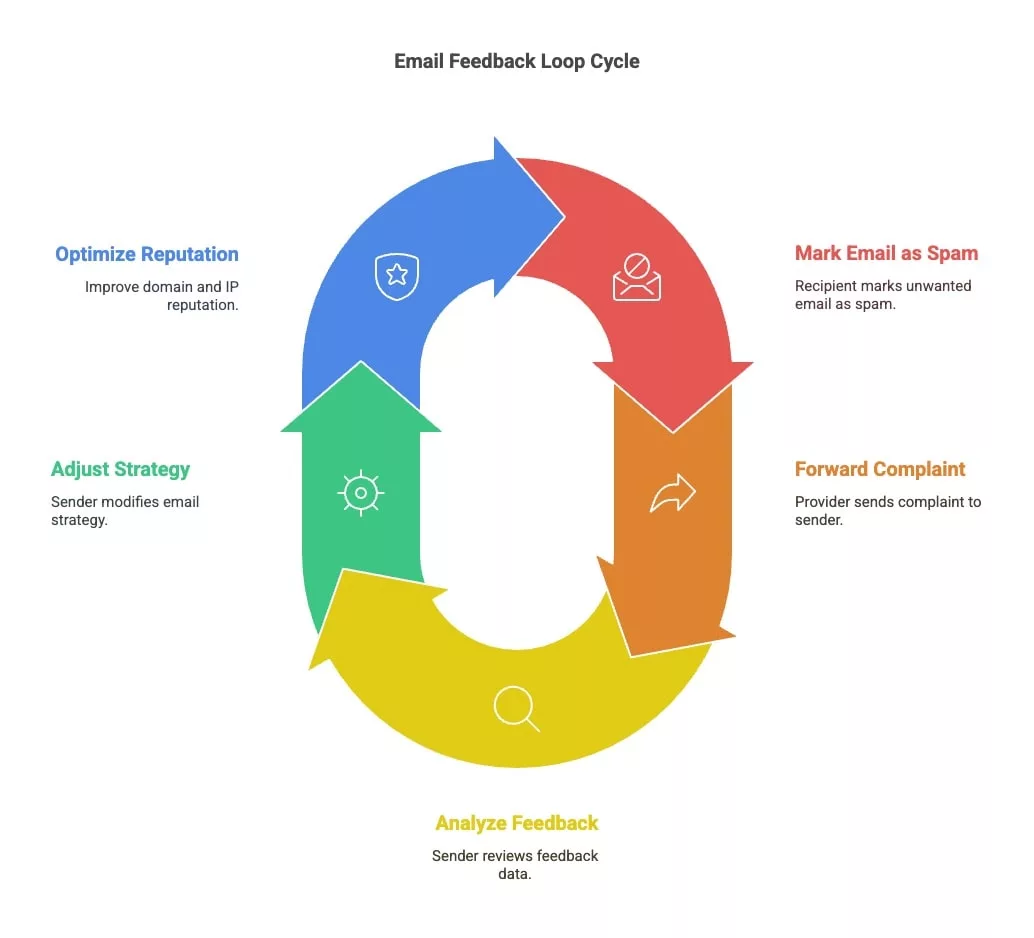
1) A recipient marks an email as spam in their inbox.
2) The mailbox provider forwards that complaint to the sender enrolled in the feedback loop program.
3) The sender removes the complainant from their list, identifies the campaign at fault, and adjusts future sends. This protects the reputation of their domain and IP address.
At what complaint rate should you start worrying?
Google asks bulk senders to stay under 0.3% complaints and recommends never exceeding 0.1% under normal conditions. The threshold applies per day and per sending domain, as measured in Postmaster Tools. Yahoo has aligned its requirements with the same values since the bulk sender rules took effect.
These percentages look tiny, and they are: on a send of 50,000 messages, 150 complaints are enough to cross the 0.3% line. A rate that spikes sharply on a single campaign almost always points to a poorly targeted segment or a purchased list. A rate that climbs slowly over several weeks tends to reveal audience fatigue, which you measure by cross-referencing complaints with the engagement rate.
Microsoft doesn’t publish a numeric threshold. SNDS shows a reputation color per IP and a complaint rate range, leaving the sender to work out their own tolerance floor. In practice, aiming for the same 0.1% as Google spares you from having to guess.
Feedback loops: benefits for everyone
The benefits for marketers
The feedback loop gives the sender the only direct view they’ll ever get into recipient dissatisfaction. An unsubscribe shows up in the router’s stats; an unreported complaint shows up nowhere. Yet it still affects the deliverability of every send that follows.
On the reputation side, providers assign a score to sending IPs and domains. A high volume of complaints drags it down, which first triggers junk folder placement, then outright blocking of sends to that provider. Receiving complaints lets you cut a send off before that drop-off happens, keeping you in the inbox of recipients who are still reading.
On the database side, complaints point to the segments that need removing. A clean list isn’t just about valid addresses: it also excludes contacts who’ve shown annoyance. And when several complaints land on the same campaign, the cause is worth digging for in that specific send’s content or targeting.
The benefits for recipients
The “spam” button primarily serves the recipient, who cleans up their inbox in one click. The loop extends that action further: it turns a local report into an actual unsubscribe at the sender’s end, without the user having to hunt for a link at the bottom of the message. The campaigns that survive this filtering are the ones the audience is willing to receive.
The 4 programs at a glance
| Program | Tied to | Level of detail | Requirements |
|---|---|---|---|
| Microsoft JMRP | Sending IP address | Complaint by complaint, headers only since 2026, complainant address masked | Dedicated IP registered and validated in SNDS, receiving address consistent with rDNS |
| Yahoo CFL | DKIM signing domain (d=) | ARF report per flagged message | Active DKIM signature, Sender Hub profile, domain verified by DNS record |
| Gmail loop | Feedback-ID header | Aggregate by identifier in Postmaster Tools, no address returned | Domain validated in Postmaster Tools, DKIM, sufficient volume per identifier |
| Signal Spam | Sending IP and domain | Aggregated report volumes for Orange, SFR, and laposte.net | Association membership |
Microsoft’s JMRP program: integrating feedback from Hotmail and Outlook
What sets JMRP apart from other loops
The Junk Mail Reporting Program (JMRP) is Microsoft’s feedback loop for Outlook.com, Hotmail, Live, and MSN mailboxes. It differs from other programs in one respect: it works by IP address, whereas the others rely on the signing domain. Microsoft wants to know which IPs you’re sending from, so you need to register them beforehand in Smart Network Data Services (SNDS).
Second distinction: JMRP assumes a dedicated sending IP. A sender going through a shared pool can’t enroll on their own behalf, since the IP belongs to their router. It’s the router that receives complaints and decides whether to pass them on.
SNDS and JMRP together answer two different questions. SNDS shows an IP’s reputation along with its volume and aggregated complaint rate. JMRP delivers complaints one by one, as they come in, straight to your inbox.
Steps to enroll in JMRP
Enrollment always follows the same order. You first register your IP ranges in SNDS and validate the request through the address Microsoft associates with the block, usually the technical contact for the IP owner. You then open the JMRP page from the SNDS portal and create a feed.
The form asks for the company name, the address that will receive complaints, and the maximum daily volume you’re willing to accept. The receiving address must belong to a domain consistent with the reverse DNS of your IPs, which is the main reason for rejection. Finally, you select the IPs covered by the feed and accept the terms.
Since June 2026, the SNDS portal has moved from its old address to a new URL. JMRP feeds not tied to an active SNDS account were removed in the process. If you had a feed set up years ago and complaints stopped arriving with no explanation, that’s the first thing to check.
What JMRP returns since 2026
Microsoft tightened the content of its reports as part of the same round of changes. Complaints now all arrive in ARF format, which simplifies parsing. In exchange, the original message body is no longer attached and the complainant’s address is masked: all that remains are the original headers, along with a selection of authentication headers like Authentication-Results and Received-SPF.
This anonymization breaks legacy processes that used to pull the recipient’s address directly from the report to move it to a suppression list. The workaround comes down to one line: inject your own headers at send time. A campaign identifier, an opaque recipient identifier, and a list identifier are enough to trace who complained back in your database, since these headers survive Microsoft’s filtering.
Reading Microsoft complaint rates and fixing sends
SNDS ranks each IP by complaint rate and shows a reputation color. An IP that turns red sees its messages routed to the junk folder at Outlook before the rate even becomes visible in your own stats, which makes the SNDS dashboard a leading indicator.
The fix depends on the shape of the curve. An isolated spike is handled by removing the offending segment and pausing the sequence involved. A steady drift calls for cutting volume to Microsoft mailboxes for 2 to 3 weeks, keeping only contacts active over the past 90 days, then ramping back up gradually. On a fresh IP, this protocol matches the one for resuming after a long break.
How do you set up a feedback loop with other providers?
Yahoo: a loop tied to the DKIM domain
Yahoo’s Complaint Feedback Loop works the opposite way from JMRP. It’s not concerned with IPs but with the domain that signs your messages in DKIM, the value of the d= field. You create a profile on Sender Hub, add that domain, verify it with a DNS record, then enroll it in the loop. Yahoo then sends back an ARF report for every message signed by that domain and flagged by a user. A sender who isn’t signing their sends yet needs to deploy DKIM first.
Gmail: an aggregated loop, driven by the Feedback-ID header
Google does offer a feedback loop, contrary to a common misconception. It simply never returns a complainant’s address. The principle: you add a Feedback-ID header to your messages, made up of a mandatory sender identifier of 5 to 15 characters, plus up to 3 free-form fields where you place the campaign or segment. Google aggregates complaints by identifier and surfaces in Postmaster Tools the ones whose rate stands out.
Access is gated by 3 conditions. The domain must be validated in Postmaster Tools and sends signed with DKIM. An identifier only surfaces once it’s been seen on a sufficient number of messages and complaints. The data only covers @gmail.com recipients. For Google Workspace mailboxes hosted on a company domain, you’ll get nothing.
Going through a router that manages the loops
Most email platforms are already enrolled in the major providers’ loops for all their IPs. They automatically remove complainants and surface the complaint rate in their own stats. Enrolling directly only makes sense if you run your own IPs or want to cross-check your router’s data against the source.
Processing and analyzing complaint reports
A report that’s received and never read is useless. Minimal processing means routing complaints to a dedicated inbox, then parsing them to move each complainant to a permanent suppression list, one that never gets reactivated. A contact who clicked “spam” and receives a message 3 months later will click it again.
Useful processing goes further. By matching the report’s campaign identifier against your sending stats, you get a complaint rate by campaign and by acquisition source. That last angle tells you the most: an acquisition source generating 5 times more complaints than the others gets cut without debate.
Loops on the French side: Signal Spam, Orange, SFR, and laposte.net
English-speaking programs only cover part of a French list. The rest plays out with national operators. The mandatory stop is Signal Spam, a public-private partnership that collects reports from French internet users and redistributes them to its members.
Orange and SFR go through this channel. The data is aggregated: you get report volumes by IP and by domain, never the identity of complainants. Laposte.net can also be reached through this route. Free offers no feedback loop at all, leaving a blind spot over a sizable share of French consumer addresses.
For a member sender, reports concerning their own messages are treated as unsubscribe requests. The trade-off is administrative: access requires joining the association, whereas Microsoft and Yahoo settle for an online form.
The limits of the feedback loop
No loop covers business mailboxes hosted on Microsoft 365 or Google Workspace, where the bulk of a B2B list often sits. The JMRP program stops at Outlook.com consumer mailboxes. The Gmail loop stops at @gmail.com addresses.
The delay is the second blind spot. Reports arrive with a variable lag, sometimes several hours, which is enough time to send out the next step of an automated sequence before the complainant has been suppressed. A loop also doesn’t flag spam traps: a trap address clicks on nothing and just degrades the IP’s reputation. Finally, an anonymized complaint is only as useful as the headers you thought to add at send time. Without an in-house identifier in the message, the report tells you a complaint exists without telling you who it came from.
The impact on domain reputation
Beyond the IP, complaints weigh on the reputation of the sending domain. This matters even more now that authentication has become standard: with SPF, DKIM, and DMARC, the signing domain becomes the sender’s stable identifier, regardless of which IPs are used. A downgraded domain stays downgraded after an infrastructure change, while a burned IP can simply be replaced. That’s why it’s worth watching your IP and domain reputation together.
Reducing false positives
Some complaints say nothing about the content. The user just wanted to unsubscribe, and the “spam” button was quicker to find than the unsubscribe link. Making that link visible near the top of the message, adding the List-Unsubscribe header with one-click unsubscribe, and reminding recipients where their address was collected all bring this background noise down. On older lists, an explicit reminder of how someone signed up beats a slicker design.
Putting FBL data to work: scoring, CRM, and suppression
A complaint is the strongest negative signal a contact can send, far stronger than a missed open. It deserves maximum weight in an engagement score: permanent exclusion from sequences rather than a shift to a watch-list audience.
On the tooling side, connecting the complaint feed to the CRM or customer data platform automates what follows: immediate removal of the contact, then an alert to customer support if the complainant is a paying account. On a small list, an inbox filter and a weekly export are enough.
Best practices to limit complaints
Loops surface the problem; they don’t fix it. What durably lowers the complaint rate comes down to a few upstream settings:
- Collect explicit consent (double opt-in preferred) and keep a record of the date and source.
- Use a recognizable sender name and a subject line that reflects the actual content of the message.
- Place the unsubscribe link in plain sight, with no intermediate page or password prompt.
- Segment your sends and match frequency to each group’s actual engagement level.
- Verify address validity before sending to keep bounces from damaging your reputation alongside complaints.
- Track the complaint rate campaign by campaign rather than just the monthly average, which smooths over incidents.
One last point that’s often overlooked: complaints and bounces damage the same reputation. A list that’s never cleaned racks up both. Running your list through a pre-send check removes dead addresses, leaving feedback loops to handle the one problem they’re actually built for: recipients who are alive and well but no longer want your messages.