

A Gmail address with an almost empty inbox can return a mailbox full on every send. The whole Google account is saturated: emails share their storage with Drive and Photos. On the campaign side, the result is a hard bounce rate that climbs while neither the content nor the IP has changed. Your sending tool only shows “mailbox full”.
Treat a 552 5.2.2 or a 452 4.2.2 as a temporary incident. Suspend marketing sends to the address for 7 to 14 days, then retry. Remove it from the list if it still bounces after about 2 weeks or across several distinct campaigns, the rule proposed by Al Iverson on Spam Resource (August 31, 2026).
Reading the code: 452 4.2.2, 552 5.2.2 or 554 5.2.2
An SMTP rejection carries two codes. The first, with three digits, tells you whether the failure is temporary (4xx) or permanent (5xx). The second, the Enhanced Status Code (three numbers separated by dots), names the cause. In the IANA registry derived from RFC 3463, X.2.2 means “Mailbox full”, tied to code 552, with the instruction to use it as a persistent transient failure. A 4.2.2 follows that instruction. A 5.2.2 contradicts it. Both versions still coexist in your logs.
For Gmail, the Google Workspace documentation (accessed October 8, 2026) lists both versions:
452 4.2.2: “The recipient’s inbox is out of storage space.”
552 5.2.2: “The recipient’s inbox is out of storage space and inactive.”
The permanent version adds account inactivity to the lack of space. Al Iverson, for his part, sees Gmail return 552 for a simple quota overrun, with no mention of inactivity. The table gives the source of each code.
| Full code | Class | Source | Handling |
|---|---|---|---|
| 452 4.2.2 | Temporary | Google Workspace documentation | 7 to 14 day suspension |
| 552 5.2.2 | Permanent in appearance | Google Workspace documentation (mailbox full and inactive), IANA registry (X.2.2) and Al Iverson | Same suspension before any removal |
| 554 5.2.2 | Permanent in appearance | Exchange Online, public folder case | Full shared company address: same suspension |
| 450 4.2.1 | Temporary | Google Workspace documentation | Not a storage issue: the mailbox is receiving too fast |
| 552 5.3.4 | Permanent | Google Workspace documentation, IANA registry (X.3.4) | Not a storage issue: the message is too large |
The last two rows are reading traps. Google documents 450 4.2.1 for a mailbox receiving at too high a rate. It documents 552 5.3.4 for a message that exceeds its size limits (X.3.4 designates, in the same registry, a message too big for the system). For a personal Gmail account, the attachment limit is 25 MB according to Gmail Help. Neither code signals a full quota: the first is retried, the second requires a lighter message. Read the text of the rejection before classifying.
Why an almost empty mailbox rejects everything
A full Google account can no longer send or receive emails. Messages addressed to it are returned to the sender, according to Google’s help page on shared storage. The free 15 GB quota covers Gmail, Drive, Photos and mobile backups. A few 4K videos or an automatic photo backup are enough to exhaust it, whether the inbox is empty or not.
The account holder often notices only at the first bounce. They empty the trash and delete videos, unless they buy Google One storage. Google states that an account still full 30 minutes after cleanup needs a deeper sort. An account over its quota for 2 years risks having its content deleted.
A 452 4.2.2 on a Gmail address means the account’s shared storage has overflowed. The 552 5.2.2 adds, according to Google, an inactive account. Removal then becomes likely: nobody is going to clean that account before the next attempt, which bounces in turn.
Outlook.com follows the same logic. The free account has 15 GB for emails. Attachments, meanwhile, count against the 5 GB of cloud storage that the Microsoft account shares with OneDrive. If those 5 GB are exceeded, Microsoft specifies that the mailbox is blocked for both sending and receiving, even under its mail quota. Every incoming message is then returned to the sender.
What the bounce does to your stats
Everything depends on the class your tool assigns. A 552 filed as a hard bounce inflates the rate and can cost you the address: at Mailchimp, an address with a hard bounce is automatically cleaned from the audience in most cases. A 4xx filed as a soft bounce does not trigger immediate removal. Repetition still ends up counting: the same tool converts a soft bounce into a hard bounce after 7 soft bounces for an address with no subscriber activity. The threshold rises to 15 for a contact that is already active. Simple math: out of 50,000 sends, 250 full mailboxes classified as hard bounces add 0.5 points to the rate. That half point weighs on your sender reputation. Platforms tolerate little margin on this rate, as shown by acceptable bounce rates by platform.
Applying a delay rule in your sending tool
The rule has 5 actions, to configure once in the tool or to apply by hand on the bounce export.
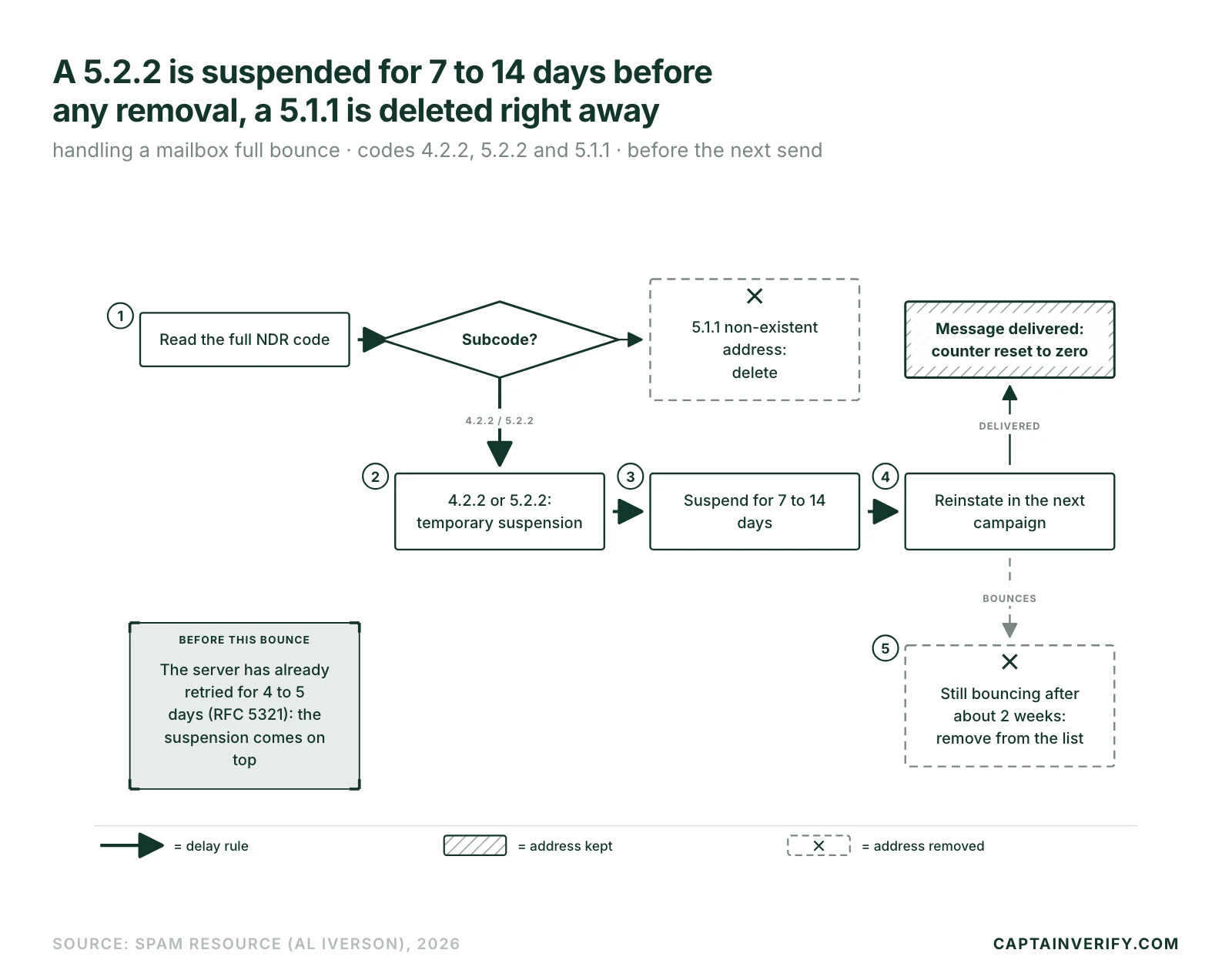
- Open the campaign log and read the full code of the NDR (non-delivery report): look for 4.2.2 or 5.2.2, not just 552.
- Classify the address as a temporary suspension. If your tool forces hard or soft without a subcode, export these addresses to a separate segment.
- Suspend the address for 7 to 14 days. With a weekly newsletter, it skips one send; with a monthly newsletter, it waits for the next one.
- Reinstate it in the next campaign. If the message goes through, reset its bounce counter to zero.
- Remove it if the bounce persists beyond about 2 weeks. A second bounce on a distinct campaign earns the same verdict.
Iverson does not put a number on the “several distinct campaigns” threshold. The rule above uses 2 campaigns, the strictest reading of his recommendation.
This rule applies to marketing sends. For a transactional email (invoice, password reset), waiting makes no sense: notify the customer by SMS or in their customer area so they can free up space.
When a full mailbox becomes an abandoned address
Endlessly retrying a saturated account wastes sends. If delivery fails over an extended period, Iverson considers that the account is abandoned or that its owner is not fixing the problem: the address leaves the list. An address that produces soft bounces for months is dead in practice, as our guide on hard bounce and soft bounce describes.
Filtering after sending doesn’t solve it. The message that bounces has already gone out, so the bounce is counted in the campaign stats. Upstream verification removes nonexistent addresses, the only ones to delete without delay. Full mailboxes follow the rule above. Addresses that are valid but silent for months call for a different treatment, described in what to do with inactive contacts.
Two traps before suspending
Your server has already retried. RFC 5321 recommends that sending servers retry a deferred delivery for at least 4 to 5 days before giving up (section 4.5.4.1). Your tool may set a shorter period: SendGrid, for example, retries a deferred message for 72 hours at most. For a 4xx, the bounce you read therefore arrives after this retry period. The 7 to 14 day suspension comes on top of it.
Second trap: the subcode. A 5.2.2 is handled with a delay. A 5.1.1 (nonexistent address) gets deleted. The other subcodes each have their own handling, detailed in the SMTP reply codes you need to know and in the error code guide.
Filter the 5.2.2 and 4.2.2 bounces from your last campaign and apply the delay rule before the next send. Have a sample of the list verified at the same time to measure the share of nonexistent addresses.