

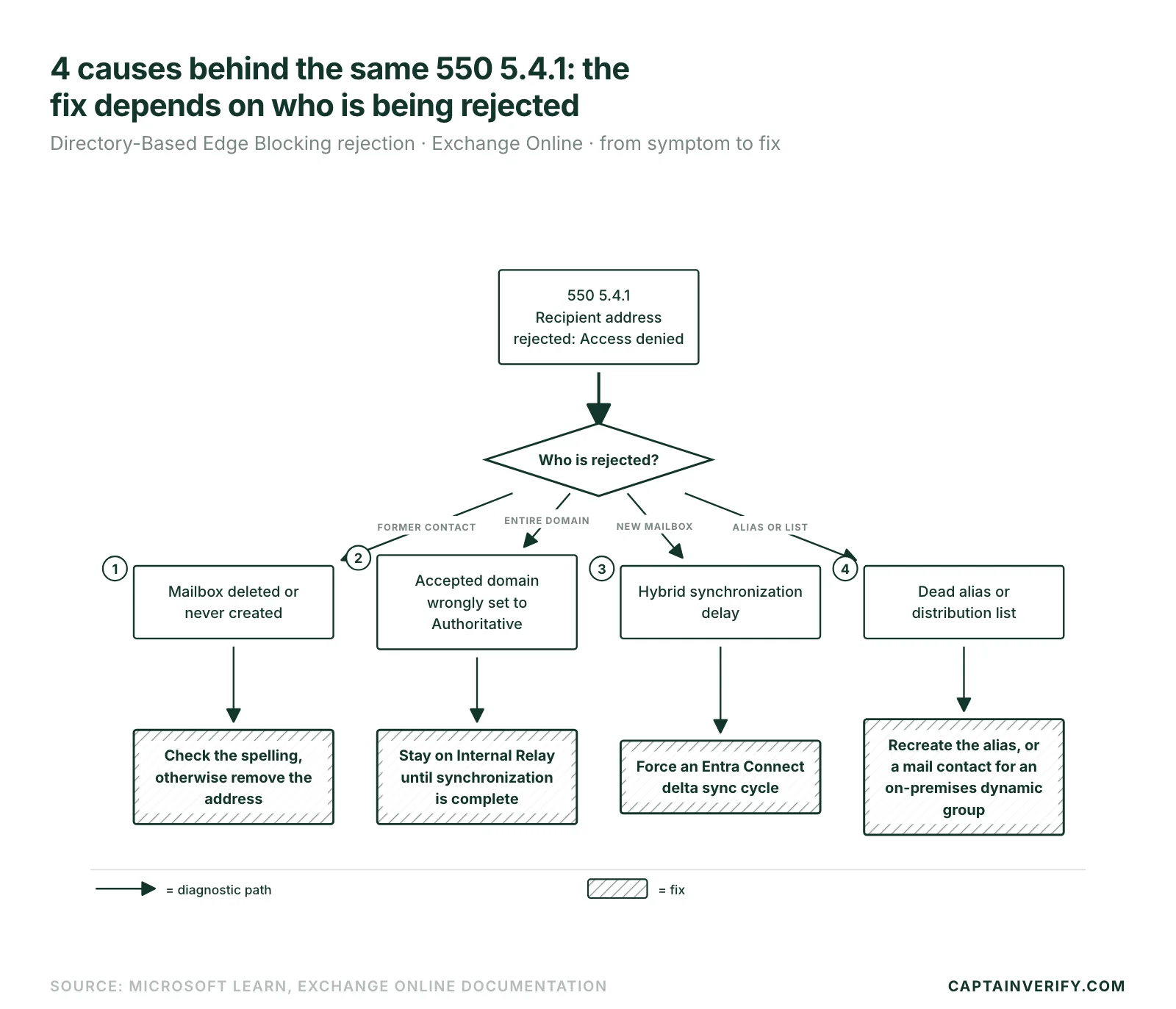
A 550 5.4.1 bounce at a Microsoft 365 customer, while SPF/DKIM/DMARC authentication shows PASS. The rejection has nothing to do with authentication. The 550 5.4.1 code means the recipient’s address doesn’t exist in the receiving server’s directory, or access to it is explicitly denied. It’s a directory rejection, separate from sender reputation rejections. The context points to one of 4 causes, and a single address and an entire domain are not handled the same way.
On Exchange Online, this response usually comes from Directory-Based Edge Blocking, a mechanism that filters out invalid addresses before the message content is even examined. Many campaigns stall here: your CMO asks why the open rate is dropping, your emailing tool shows a flawless technical setup, and the NDR (Non-Delivery Report) stays incomprehensible unless you know how to read its exact text.
What the 550 5.4.1 code means
550 is a permanent status code (class 5yz of RFC 5321, published in October 2008). The server won’t retry the delivery, unlike temporary 4xx errors, which the same RFC says should be retried for at least 4 to 5 days. The 5.4.1 subcode (Enhanced Status Code, defined in RFC 3463 from January 2003) points to a routing or access problem on the recipient side, not a content or blocklist issue. That’s the main difference from 550 5.7.1, where the rejection comes from a filtering policy or a degraded sender reputation. Here, the EHLO and MAIL FROM exchange went through without a hitch, the RCPT TO command was syntactically accepted, and the address was then rejected when it was resolved in the directory. For an overview of the 4xx and 5xx code families, the complete taxonomy of SMTP errors lays out the general framework.
Deleted or never-created mailbox: the most common case
The NDR displays “550 5.4.1 Recipient address rejected: Access denied”. The address never existed in the Exchange Online directory, or it was deleted after an employee left or an account was closed. No retry will change the outcome, since the recipient simply doesn’t exist on the receiving side.
Start by checking the exact spelling of the address: a mistyped domain is enough to produce this rejection. If the address is correct and the rejection persists over several days, the address is dead. It belongs to a former contact or a deleted position, often inherited from a CRM import that was never updated.
Accepted domain misconfigured as Internal Relay or Authoritative
One symptom points to this cause: the rejection hits every recipient at a given domain, not just a single address. In Exchange Online, an accepted domain is either Authoritative (the M365 directory is the source of truth, and any address missing from it is rejected by DBEB) or Internal Relay (some mailboxes live elsewhere, and mail keeps flowing to another system through a connector).
The problem typically shows up in a hybrid environment: the Microsoft 365 tenant is set to Authoritative while some mailboxes still sit on an on-premises Exchange server that isn’t fully synchronized. Exchange Online then rejects perfectly valid addresses because it doesn’t know they exist. According to Microsoft Learn, the DBEB procedure keeps the accepted domain as Internal Relay while users are being synchronized, and the switch to Authoritative comes once all recipients are present in Microsoft 365.
The standard admin fix, when the domain is supposed to be correct but valid addresses still bounce: switch the accepted domain from Authoritative to Internal Relay in the Exchange admin center (Mail flow > Accepted domains), save, then switch back to Authoritative. In PowerShell, the same switch goes through the Set-AcceptedDomain cmdlet and its -DomainType parameter. It forces Exchange Online to reprovision the directory state and clears a stale directory cache.
Directory-Based Edge Blocking: rejection at the border before any filter
“If the address isn’t in the directory, the service blocks the message before filtering even begins.” (Exchange Online documentation, Microsoft Learn)
DBEB (Directory-Based Edge Blocking) rejects unknown addresses at the service’s network perimeter, before the message enters the Microsoft 365 anti-spam pipeline. It differs from a relay block or an upstream connection refusal, covered separately in the article on SMTP error 554 5.0.0, where the connection itself is refused. Here the connection succeeds and only the address resolution fails afterward. In a hybrid environment, DBEB only works if the domain’s MX record points to Microsoft 365, according to the same page. Microsoft estimates DBEB takes 5 to 10 minutes to activate.
The full NDR often carries an additional code: “550 5.4.1 Recipient address rejected: Access denied. AS(201806281)”. It signals a DBEB rejection and confirms the block comes from the Exchange Online directory, without saying why the address is missing. When it appears right after a mailbox is created in a hybrid environment, the likeliest cause is a synchronization delay between the on-premises directory (Microsoft Entra Connect, the former Azure AD Connect renamed in 2023) and Exchange Online: the mailbox exists on-premises and the change is waiting to be replicated. The admin can force a delta cycle with the Start-ADSyncSyncCycle -PolicyType Delta command on the Entra Connect server before digging further.
Dead alias or distribution list
The fourth case is a rejected address that is a disabled alias or distribution list. A deleted distribution group and an alias removed from a shared mailbox produce exactly the same symptom on screen. The toughest version is the on-premises dynamic distribution group in a hybrid environment: structurally, it can’t sync to Exchange Online, however long you wait.
The documented workaround for that case is to create a mail contact in Exchange Online that carries the external address of the on-premises dynamic group. For a simple deleted alias, recreate it on the target mailbox or tell the sender the address has changed.
What the 550 5.4.1 reveals about the state of your list
“My campaigns end up bouncing, yet my emailing tool shows a spotless technical setup”: growth and lifecycle managers who hit the 550 5.4.1 for the first time often say exactly this. The temptation is to dig into SPF, DKIM, IP warming and sender reputation, as with any standard deliverability rejection. For this code, that work is pointless, because all 4 causes above sit on the recipient side, in their directory.
The SPF and DKIM reflex comes from a good habit. But no ESP checks by default whether an address still exists at the recipient, only whether its format is valid. A list verification covers that blind spot without adding a layer to monitor day to day.
A deleted address, a dead alias, an entire domain misconfigured for lack of synchronization: in all 4 cases, the list contains dead entries, and they pile up fast. CaptainVerify verified 126 million addresses in 2025, and only 57% were valid. A list also loses about 23% of its valid addresses each year, according to the analysis of what an email address is really worth.
Upstream list verification acts before sending and removes the whole error category, without touching DNS or the Exchange configuration. An address that no longer exists in the recipient’s directory is caught at verification time, before the bounce hits a campaign that has already gone out. Before your next send, running a sample of the list through verification shows how many addresses would land in a 550 5.4.1, with no IP warming spent for nothing. It’s a list hygiene question, solved before any sending infrastructure work.
Frequently asked questions
Is the 550 5.4.1 the same as the 550 5.7.1? No. The 5.4.1 signals a routing or address access problem in the directory, while the 5.7.1 signals a filtering policy or a degraded sender reputation. The fixes are completely different: directory-side for one, reputation-side for the other.
How long should I wait after a hybrid directory resync? Microsoft Entra Connect syncs every 30 minutes by default, according to Microsoft Learn, and then Exchange Online still has to pick up the change. Allow a few hours before concluding it’s another cause, since retrying sooner reproduces the same rejection.
Does a 550 5.4.1 rejection raise my overall hard bounce rate? Yes, each occurrence counts as a hard bounce in your emailing tool’s statistics and in those of the recipient mailbox providers. An accumulation of this type of rejection on a single list degrades sender reputation even if no other deliverability error is involved. For a broader look at the rise in these rejections, the article on SMTP rejections and why they’re increasing details the degradation mechanics.