

At what bounce rate does an emailing platform actually stop sending a campaign? The acceptable bounce rate doesn’t fit into the 2% figure that circulates on every blog: it changes value depending on the router. Amazon SES puts an account under review at 5% bounce and cuts off sending at 10%; MailerLite suspends starting at 5%; Brevo, meanwhile, publishes no numeric threshold at all. Campaigns end up in spam while the emailing SaaS shows a green dashboard: this pattern keeps recurring for teams sending at volume. The SaaS is telling the truth about its own numbers. The threshold that triggers the penalty sits one step further down the chain, at the recipient’s router.
Where the 2% threshold comes from, and what it’s actually worth
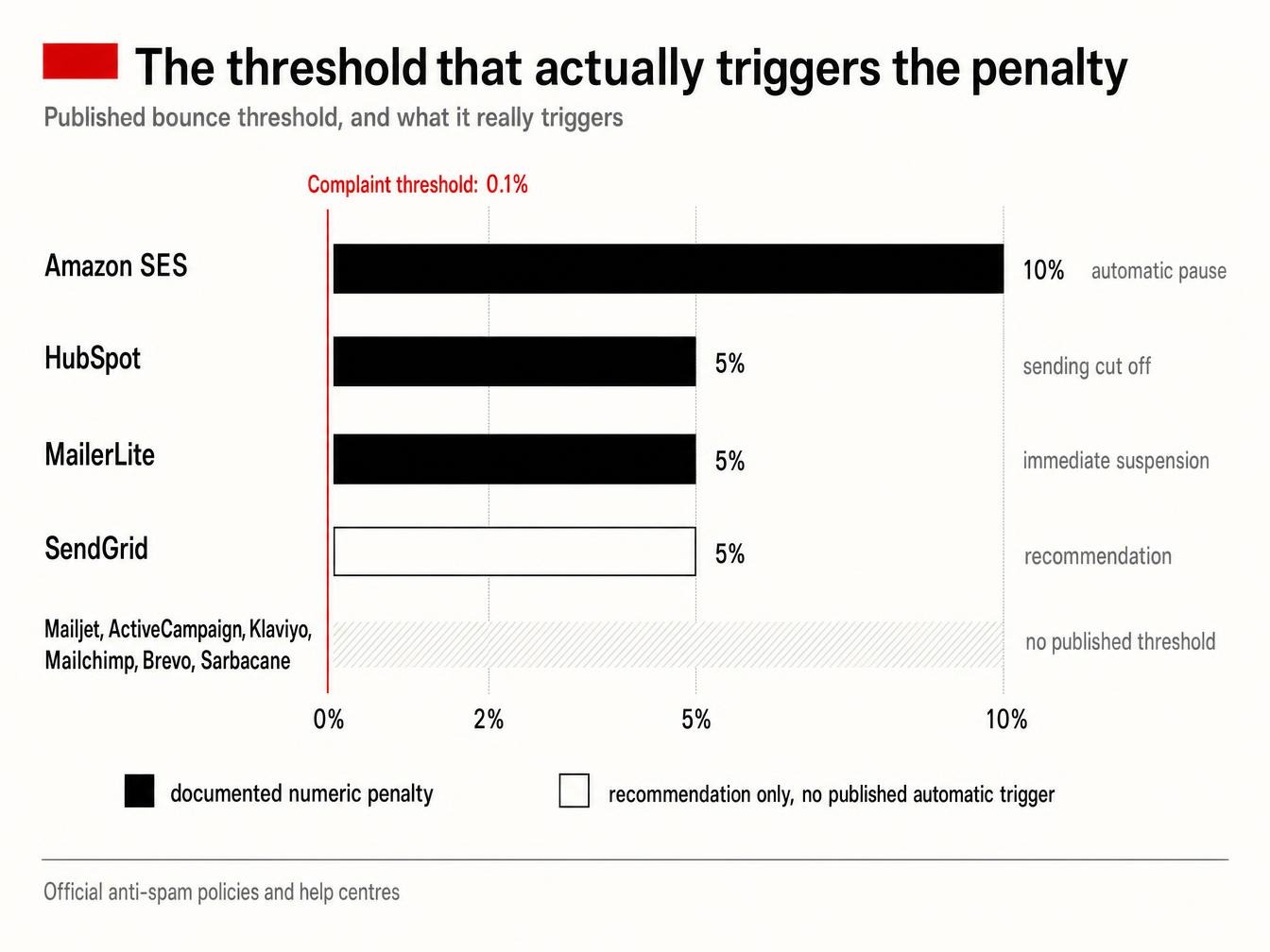
The 2% figure circulates as a market benchmark rather than a single official policy. It comes from an implicit consensus among mailbox providers like Gmail or Outlook, which also don’t publish their own exact thresholds, for fear of handing spammers a roadmap. Of the 10 platforms checked here, 4 publish a numeric threshold and 6 publish none. Amazon SES is the only one to tie the 2% figure to written penalty tiers: below 2%, the account stays in the green zone; at 5%, it goes under review; at 10%, sending can be suspended. HubSpot and MailerLite also publish a threshold linked to an automatic cutoff, bringing to three the number of platforms where the numeric penalty is spelled out in black and white. SendGrid shows a figure, as a recommendation, with no suspension tier. ActiveCampaign puts forward the 2% mark on its blog, while its help center describes a review triggered by “too many bounces” without ever writing down a percentage. No threshold value at all from Mailchimp, Brevo, Mailjet, Klaviyo, or Sarbacane.
The table of real thresholds, platform by platform
The table below cross-references three elements that generalist comparisons rarely combine: the bounce threshold, the complaint threshold, and the penalty that actually follows. The last column matters just as much: it shows whether the figure comes from a dated written policy or an official help center. Absent either one, it’s an observed practice, for lack of a published document.
| Platform | Tolerated bounce threshold | Complaint threshold | Penalty when exceeded | Source of the figure |
|---|---|---|---|---|
| Amazon SES | <2% recommended, review at 5%, pause at 10% | <0.1% recommended, review at 0.1%, pause at 0.5% | Automatic sending pause, reversible | Official AWS SES documentation |
| HubSpot | 5% cumulative hard bounces over one month | 0.1%, or one complaint per 1,000 messages | Sending cut off by the deliverability protection system | HubSpot knowledge base |
| MailerLite | Suspension beyond 5% | 0.2%, specified in the same policy | Immediate account suspension and investigation | MailerLite anti-spam policy |
| Mailjet | No published threshold | No published threshold | Temporary 7-day sending limit, reapplied for repeat occurrences | Mailjet help center, which reserves the right to change its thresholds without notice |
| SendGrid (Twilio) | Hard bounce recommended under 5% | 0.1% per mailbox provider, an alert threshold with no penalty | Sending restriction for repeated overages, with no published automatic suspension threshold | Twilio SendGrid documentation |
| ActiveCampaign | No threshold published in the help center; the 2% figure in circulation comes from the vendor’s blog | No threshold published; complaints “higher than normal” are enough | Automatic review, campaigns blocked until resolved | ActiveCampaign help center |
| Klaviyo | No account threshold in %, contact removed on hard bounce and beyond 7 consecutive soft bounces counted over 2 years | Not published as a % | Profile removal; no account suspension documented at a specific threshold | Klaviyo help center |
| Mailchimp | Not published (ISP limits vary and aren’t disclosed by Mailchimp) | Not published | Automatic account suspension, followed by an email from the compliance team | Mailchimp help center |
| Brevo | No numeric threshold in the anti-spam policy | No figure published on the official page | Account suspension or restriction, general wording with no percentage | Brevo anti-spam policy |
| Sarbacane (now Positive User) | No published threshold | Not published | No numeric penalty documented, risk of ISP blacklisting mentioned | No numeric usage policy published; the editorial blog, migrated to the Positive User site, puts forward no tier |
The number that matters: hard bounce rate, not the overall rate
A list can show an overall bounce rate of 3% and still look healthy to a router. The distinction between hard bounce and soft bounce explains why: AWS SES, HubSpot, and, to a lesser extent, MailerLite only count the hard bounce rate for penalty purposes. HubSpot sets this limit at 5% cumulative hard bounces over a calendar month; beyond that, the deliverability protection system cuts off sending, regardless of the overall rate shown on the dashboard. An isolated spike in soft bounces almost never triggers a penalty by itself; it weighs on reputation in a more diffuse way. The technical causes behind each bounce, from DNS to the receiving server, are covered separately in a bounce-fixing guide.
The complaint threshold, faster to trigger than bounce
0.1%. That’s the complaint threshold that puts an Amazon SES account under review, versus 5% for bounce: this threshold is 50 times lower, which mechanically makes it the first penalty trigger on platforms that publish one. HubSpot uses the exact same figure, 0.1%, or one complaint per 1,000 messages sent. The complaint rate topic gets its own detailed look. A list can fall below the acceptable bounce line and still get suspended, on complaints alone.
What actually happens when the threshold is crossed
The word “suspension” covers very different realities depending on the router. At Amazon SES, the process is mechanical and documented.
“For the best results, keep your bounce rate below 2%; at 5% or higher, your account goes under review; at 10% or higher, we may suspend your ability to send.”
Official Amazon SES documentation. Crossing 10% bounce or 0.5% complaints triggers an automatic pause, reversible once the cause is fixed. At Mailchimp, the mechanics work differently. No percentage is communicated: an email arrives from the compliance team with specific questions about where the list came from, and sending stays blocked until the answers are convincing. MailerLite and ActiveCampaign follow a similar pattern, based on human review and a back-and-forth of questions, with no automatic API error message. Sarbacane and Brevo, which publish neither a threshold nor a tier, leave the user to discover the penalty in real time rather than in a help center checked beforehand.
Why the same list shows a different rate depending on the router
Two accounts sending the exact same list, on the exact same day, can show two different bounce rates. The cause lies in the routing itself: the same receiving server can return a different enhanced status code (the SMTP server’s detailed status code) depending on the originating IP, the server used for the MAIL FROM command, or the exact state of the domain at the moment of the attempt. A shared IP pool widens the gap further: the sender reputation factored into the calculation is no longer just the client’s, it includes that of every account sharing the same IP during warm-up. This explains the pain growth teams keep reporting: the emailing SaaS shows a clean rate on its own dashboard, ISP feedback loops included, while the bounce or complaint actually happened one step further down, at the receiving provider. The Gmail postmaster tools regularly confirm this gap, showing a degraded reputation when no alert ever surfaced on the ESP side.
A growth team’s stack already includes a sequencer, sometimes a warm-up tool. List verification before sending plays a different role: it measures an address’s real status before the hard bounce ever reaches AWS or HubSpot, at a point where fixing it still costs a contact exclusion rather than an account suspension. That’s what CaptainVerify does: a contact file goes in, a list cleaned of its invalid addresses comes out. The real-time validation API plugs into signup forms so bad addresses stop entering the database in the first place. A pre-send check captures one specific moment: an address valid today can belong to a vacant position tomorrow, which makes list hygiene a recurring item on the calendar, at the same pace as regular database cleaning. Before the next campaign, running the list through validation shows which side of the threshold it will land on, AWS’s as much as Brevo’s unwritten one.
Frequently asked questions about bounce rate
How do you calculate your bounce rate?
The calculation divides the number of bounced emails by the number of emails sent, multiplied by 100. A campaign sent to 20,000 addresses with 600 bounces therefore shows a 3% bounce rate. The detail that changes everything sits in the denominator: most platforms count emails sent, while a manual calculation often relies only on accepted messages, which produces two different figures for the same campaign.
What bounce rate should you expect from a list that’s never been cleaned?
Of the 126 million addresses submitted to its verification in 2025, CaptainVerify measured 57% valid addresses and 8.2% purely invalid addresses, meaning those whose domain has disappeared or whose mailbox has been deleted. That 8.2% goes straight to hard bounce on the very first send, four times the 2% mark. The sample skews toward questionable lists, since these are databases their owners specifically chose to have checked. It gives an order of magnitude for the risk on a list left as is. The details are in the analysis of what an email address is really worth.
Why does a list below the threshold cross back above it?
A database degrades by about 23% a year, or nearly 2% a month, at the pace of job changes and abandoned domains. A list measured at 1.5% bounce in January therefore crosses the 2% mark by spring without anything having changed in sending practices. That’s what makes re-verification every 3 to 6 months more effective than a one-off cleanup after an incident.
AWS states its thresholds down to a tenth of a percent. Brevo and Sarbacane reserve the right to suspend an account without ever having written down at what rate.