

A corporate server that answers “250 OK” to your SMTP DATA command has not filed the message in a mailbox. Microsoft 365 may send it to quarantine, where, depending on the policy, only the administrator can release it. It may also drop it into the user’s folder under a rule you will never read. Your emailing tool shows “delivered.” The open rate collapses on the B2B segment. Inbox placement depends on the type of recipient. In B2B, sorting falls to the recipient company. In B2C, a webmail provider judges sender reputation and engagement. So measure and manage the list separately for each segment.
What happens to an email once the company’s server accepts it?
It often passes through two filters before reaching the mailbox: the company’s security gateway, then the mail platform itself. Take a message addressed to firstname.lastname@company.com. The domain’s MX record points to the first stop. It may point to a hosted service such as Microsoft 365 or Google Workspace. It may also point to an in-house server or a security gateway, a filter placed in front of the mail platform to scan mail before it reaches the mailbox (Proofpoint and Mimecast are well-known examples). When the MX points to such a filter (with Exchange Online Protection behind it, for example), the message reaches Microsoft 365 with the IP address of the last hop, which is the filter’s. The Enhanced Filtering for Connectors option exists to restore the original IP and to catch some DKIM signature failures caused by filters that modify the message.
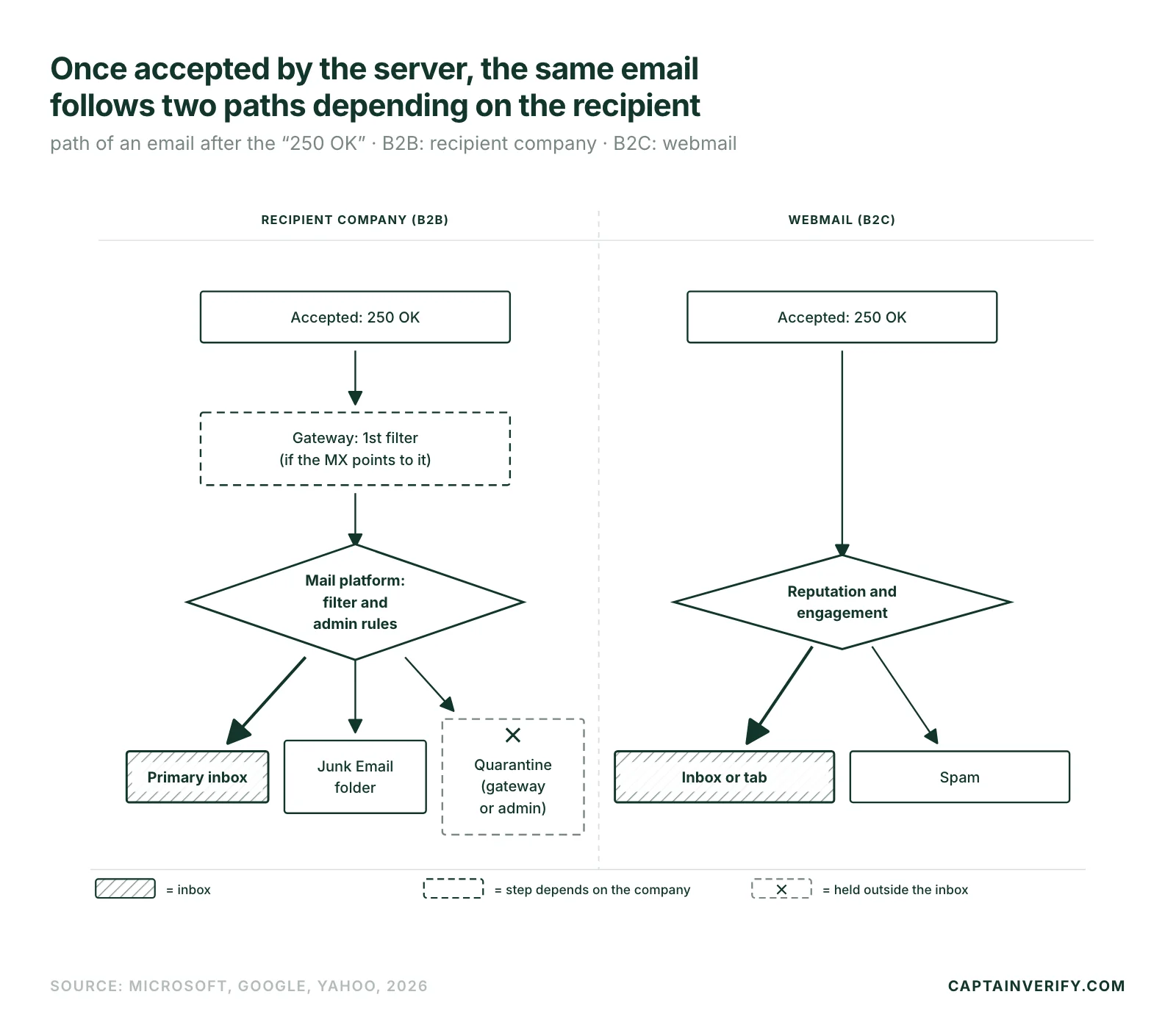
An accepted message can therefore be judged twice: by the gateway, then by the mail platform behind it, each with its own rules. To find out which mail platform runs at which companies, the article on the email providers companies use gives the overview.
“Accepted by the server” and “visible to the recipient” are two separate events, and the second depends on local filtering.
What the administrator can change without telling you
Quarantine in a Microsoft 365 tenant belongs to the administrator. Quarantine policies define what users can do with their held messages and whether they receive notifications, sent at an interval ranging from 4 hours to one week. A message classified as high-confidence phishing always goes to quarantine. Users cannot release it themselves: they can only request its release (Microsoft documentation on quarantine policies). Malware follows the same rule, with no setting to change it. A message held by an anti-spam policy stays in quarantine for 15 days by default, or 30 days with the Standard and Strict preset policies; after that, it is permanently deleted. An administrator can also choose the Junk Email folder instead of quarantine: the same message then lands in the user’s spam folder, with no notification.
The tenant’s allow and block list, the Tenant Allow/Block List, is configured in the Microsoft Defender portal at security.microsoft.com (Email & collaboration > Policies & rules > Threat policies > Tenant Allow/Block Lists). Block entries override allow entries. A blocked link or domain inside a message can get it classified as high-confidence phishing, even if the sender is legitimate. On the Google Workspace side, the “Spam” setting in the Admin console offers an “Email allowlist” for IP addresses and an “Approved senders list.” The administrator can allow IP addresses and approve senders whose messages bypass Gmail’s spam filters. They can also send certain messages to quarantine for review. An approved recipient can still see the banner “This email seems suspicious.”
The same email can land in quarantine at one company and in the primary inbox at another. No test can predict a configuration that only the administrator knows, and a seed mailbox shows just one case.
Safe Links and rewritten links
Safe Links, a Microsoft Defender for Office 365 feature, scans URLs during delivery, rewrites the links in incoming messages and rechecks the address at the moment of the click. It only handles HTTP, HTTPS and FTP formats, does not protect messages in RTF format and ignores S/MIME-signed messages. With no Safe Links policy configured, the “Built-in protection” preset already covers all recipients in an organization that holds at least one Defender for Office 365 license. The rewritten link takes the form of an address on safelinks.protection.outlook.com, visible in the message source: the recipient no longer reads the link you inserted.
On timing, with the recommended option, a message containing URLs stays on hold until the scan finishes and therefore arrives later. On the administrator’s side, a “Do not rewrite the following URLs” list provides exceptions, with at most 3 wildcards (*) per entry; Teams and Office web apps do not recognize it. If the domain of your tracking link appears on a tenant block list, the entire message risks quarantine.
How Gmail, Yahoo and French webmail providers sort mail on the B2C side
Gmail publishes numeric thresholds for senders writing to @gmail.com. Since February 1, 2024, all senders to personal Gmail accounts must keep the spam rate shown in Postmaster Tools below 0.3%. Those who exceed 5,000 messages per day must also publish DMARC (a p=none policy is enough), align the sender domain with SPF or DKIM and offer one-click unsubscribe. Google states the target itself:
“Keep spam rates reported in Postmaster Tools below 0.10% and avoid ever reaching a spam rate of 0.30% or higher.”
The Google sender guidelines add technical requirements. The connection must use TLS with a valid PTR record, and DKIM keys must be 1024 bits or longer (2048 bits recommended). Google may reject an unauthenticated message with error 5.7.26. Yahoo has applied its standards since February 2024 with the same 0.3% ceiling and adds a detail that matters for teams calculating their complaint rate: its spam rate is calculated on the mail delivered to the inbox. The Yahoo Sender Hub also warns that writing to users who do not read messages, or who report them, degrades delivery metrics and reputation. Yahoo also asks senders to process unsubscribes within 2 days.
For Orange, SFR, Free and La Poste, only the seed mailboxes described below show what happens there. The market shares of these services appear in the analysis of the webmail services that dominate the market.
Measuring: one set of seed mailboxes per recipient type
A single mixed seed testing set gives an average that describes neither world. Separate the sets:
- Open B2C seed mailboxes on Gmail, Outlook.com, Yahoo Mail and with a French internet provider such as Orange or Free.
- Set up B2B seed mailboxes on a Microsoft 365 tenant with Exchange Online Protection and on a Google Workspace domain you administer, so you can read quarantine from the inside.
- Send the same message to both sets, then note where it lands: primary inbox, tab, spam or quarantine.
- Read Postmaster Tools for Gmail only. For everything else, look at the NDRs and the deferrals on the sending server.
The fourth point matters: Postmaster Tools data only applies to messages sent to personal Gmail accounts, those ending in @gmail.com or @googlemail.com. Recipients hosted on Google Workspace do not appear there. Postmaster Tools shows the spam rate and domain reputation, among other things. The Google Postmaster setup guide walks through the installation.
The list: catch-all domains and departures in B2B, abandoned addresses in B2C
A corporate domain set up as catch-all accepts any address; the server says nothing about whether the mailbox really exists. The hard bounce rate stays deceptively low. Addresses of departed employees pose the same problem: sometimes a clean rejection, sometimes an alias that keeps absorbing mail. The article on catch-all emails explains how such a domain works. A Microsoft 365 refusal at the door comes back in the NDR with Enhanced Status Code 5.4.1. It has its own page: SMTP error 550 5.4.1.
In B2C, the opposite risk dominates. The list ages through disinterest: abandoned addresses and mailboxes that have not been opened for months. Yahoo describes these recipients as harmful to reputation. No bounce flags them; the absence of interaction gives them away.
Sending: spread the volume and watch the links
A batch of 200 addresses at the same company lands on a single server: spread it out. To Gmail, where the 5,000-messages-per-day threshold triggers the DMARC requirement, Google asks you to increase volume gradually while monitoring server responses. Track the spam rate and the sending domain’s reputation in parallel. A quota overrun is generally signaled by code 4.7.28, after which Google advises pausing sending for at least 10 minutes. On the content side, the gateway will examine a questionable link domain, and so will Safe Links. The article on high-volume inbox placement brings together the factors common to both worlds. Cold outreach has its own guide: B2B cold email.
Take one sample from the B2B segment and another from the B2C segment. Run them through address verification before the next campaign, then compare the two hard bounce rates before sending the rest.