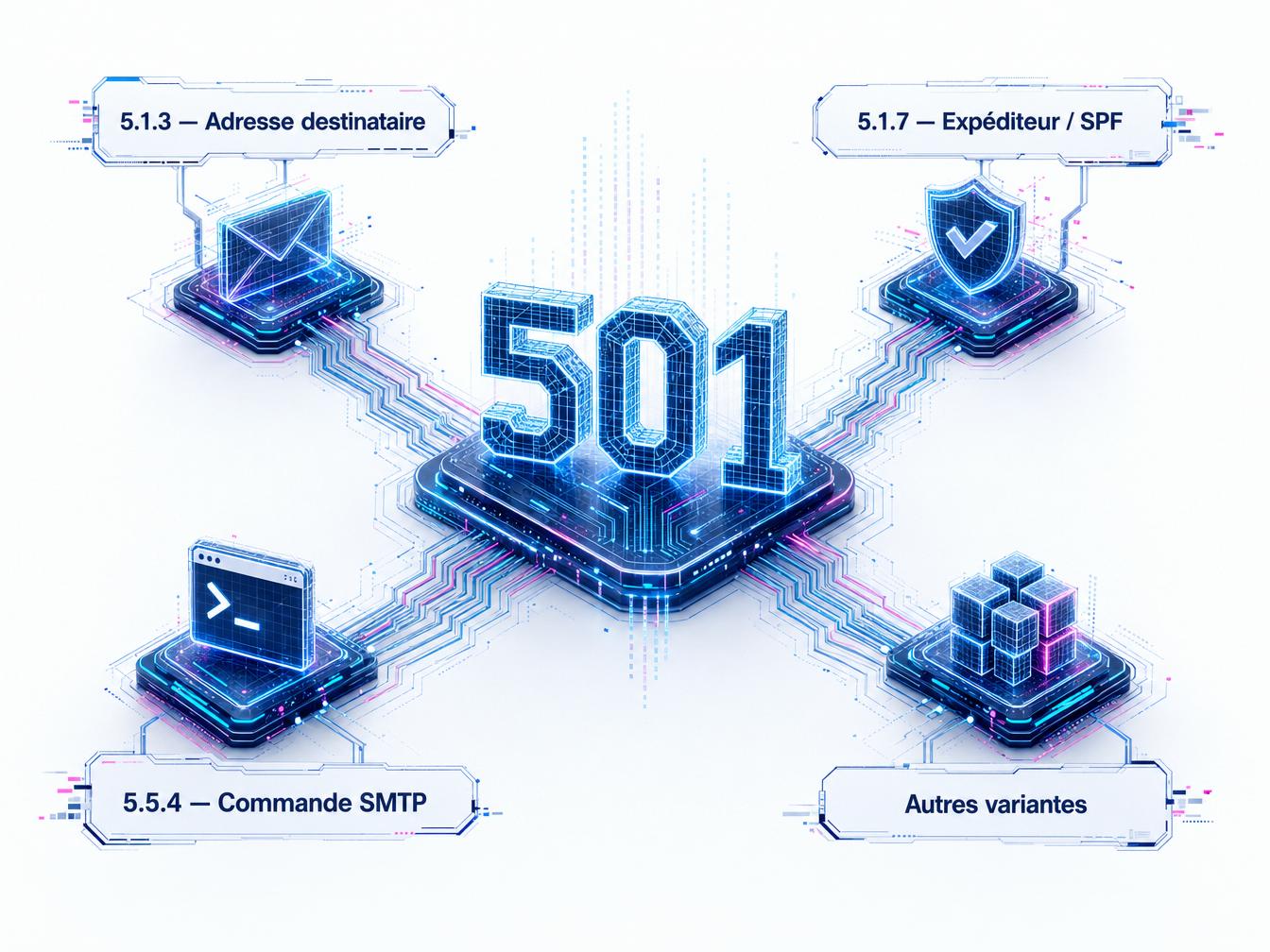


The thresholds have been public since February 2024: Gmail’s sender guidelines set a hard requirement at 0.3% spam complaints, and most platforms consider a hard bounce rate above 2% per campaign to trigger throttling. The SMTP 501 code is one of the permanent bounces that factor into this calculation, and it misleads by omission. Its true nature is hidden in the Enhanced Status sub-code that follows: 5.1.3, 5.1.7, 5.5.4, or other variants depending on the receiving server. Each sub-code has a distinct cause and a fix that looks nothing like the previous one. Retrying the send without reading that sub-code is the same as logging a second hard bounce in your queue, which directly damages your sender reputation.
What SMTP 501 really means
An SMTP code that starts with 5 is a permanent rejection. The remote server is saying it will not attempt to deliver this message. Not now, not later. Unlike 4xx errors (temporary), a 501 is not resolved by waiting or retrying the same send.
The full syntax of a 501 error message looks like this in your NDR (Non-Delivery Report):
501 5.1.3 Invalid address format
The first digit (5) indicates permanent rejection. The second digit indicates the Enhanced Status category: 1 = address issue, 5 = protocol or command syntax issue. The third digit narrows the exact diagnosis. It’s this three-digit combination, after the 501 code, that should guide your fix.
In practice, many teams read the “501” and stop there. The sub-code gets lost in ESPs’ (Email Service Providers) reporting logic. The result: they treat a sender-side issue as a recipient-side issue, or the reverse.
Sub-code 5.1.3: Invalid recipient address format
Sub-code 5.1.3 signals that the recipient’s address contains a formatting error that the remote SMTP server refuses to process. The server doesn’t try to determine whether the mailbox actually exists: it detected a syntax anomaly before even reaching that stage.
The most common causes:
- Double at sign:
firstname@domain@example.com - Missing domain:
firstname.lastname@ - Forbidden characters in the local part (unencoded spaces, parentheses, brackets outside quotation marks)
- Missing domain extension:
firstname@domain - Leading or trailing dot in the local part:
.firstname@domain.com
These addresses enter your lists through forms with no server-side validation, poorly cleaned CSV imports, or manual CRM entries. The fix doesn’t happen at the SMTP level: it happens upstream, before sending.
To fix: run your list through a format validator that applies RFC 5321 syntax before each campaign. 5.1.3 addresses are recoverable: either find the correct address by reaching the lead through another channel, or permanently remove the contact from the list. Keeping it with that status guarantees a hard bounce on the next send.
Sub-code 5.1.7: Invalid or rejected sender address
Here the problem shifts sides. Sub-code 5.1.7 concerns the sender’s address, not the recipient’s. The remote server rejected your MAIL FROM command because the sending address is not valid according to its criteria.
This sub-code appears in two distinct situations. First: your sending address itself contains a formatting error (non-existent domain, invalid syntax). Second: the receiving server applies a strict policy that blocks senders whose From or Return-Path address fails authentication checks.
A 5.1.7 can therefore reveal a misconfigured SPF record on your sending domain. If your SPF record does not include the IP address or domain of your ESP, some receiving servers will reject the MAIL FROM command with this sub-code rather than a standard 550.
First thing to check: open the full NDR and find the flagged address. If it’s your Return-Path (the technical bounce address), confirm that your SPF record includes your sending platform’s domain. If it’s your visible From address, verify that the sending domain matches your authorized SPF domain.
Also check your DMARC alignment: a sender whose From domain differs from the SPF (or DKIM) domain can trigger 5.1.7 rejections on servers that enforce a strict DMARC policy on the receiving side.
Sub-code 5.5.4: Invalid SMTP command
Sub-code 5.5.4 differs from the previous two. It no longer concerns the address but the SMTP command itself. The remote server received a malformed command or parameters it does not recognize.
In practice, this sub-code rarely appears in standard sends via a reputable ESP (Brevo, Mailgun, Postmark, Amazon SES). It is more common when sending via a self-hosted SMTP server, a manually configured SMTP relay, or an API integration that builds the SMTP session directly.
Typical causes of a 5.5.4:
- Malformed SMTP headers (incorrect encoding in the
EHLOorMAIL FROM) - Unsupported parameters passed in the command (e.g., SMTP extensions not negotiated via
EHLO) - Mismatch between the hostname announced in
EHLOand the actual IP address of the sending server - A connector or middleware inserting control characters into the session
The fix requires raw SMTP logs, not just the NDR. Enable debug mode on your server or relay to capture the full transaction and identify the exact command triggering the rejection.
Other 501 variants: read the text message
Not all servers implement Enhanced Status codes uniformly. Some return a 501 with no sub-code or with a proprietary sub-code (5.0.0, 5.7.1, etc.). In that case, the diagnosis relies entirely on the text message accompanying the code.
Some examples of 501 messages without a standardized sub-code that you may encounter:
501 Syntax: MAIL FROM: <address>, format issue in the MAIL FROM command, sender-side501 Bad recipient address syntax, variant of 5.1.3, recipient-side issue501 Domain must be present in address, missing domain in the address, 5.1.3 variant501 Too many invalid addresses, the server has reached its tolerance threshold for a session with multiple invalid recipients
If your list contains a high rate of invalid addresses targeting the same recipient domain, some servers will cut the entire session after N consecutive errors. You’ll then get a 501 on addresses that would have gone through otherwise. The apparent hard bounce rate ends up higher than the actual rate of genuinely invalid addresses.
Reading the NDR to identify the right sub-code
Your ESP typically surfaces a summary of the error. That summary is often truncated. For a proper diagnosis, you need the full NDR.
On Gmail / Google Workspace: the NDR lands in the sender’s inbox. Open the message, click the three-dot menu in the top right, select Show original. The full SMTP code appears in the Diagnostic-Code header.
On Outlook / Exchange: same approach. The NDR contains a Diagnostic information for administrators section with the full code returned by the remote server.
On your ESP (Brevo, Mailchimp, Postmark): go to the message activity or the bounce report. Most ESPs expose the Enhanced Status code and the raw text message in the activity record for each send. If your ESP doesn’t show it, export the activity logs and filter on code 501.
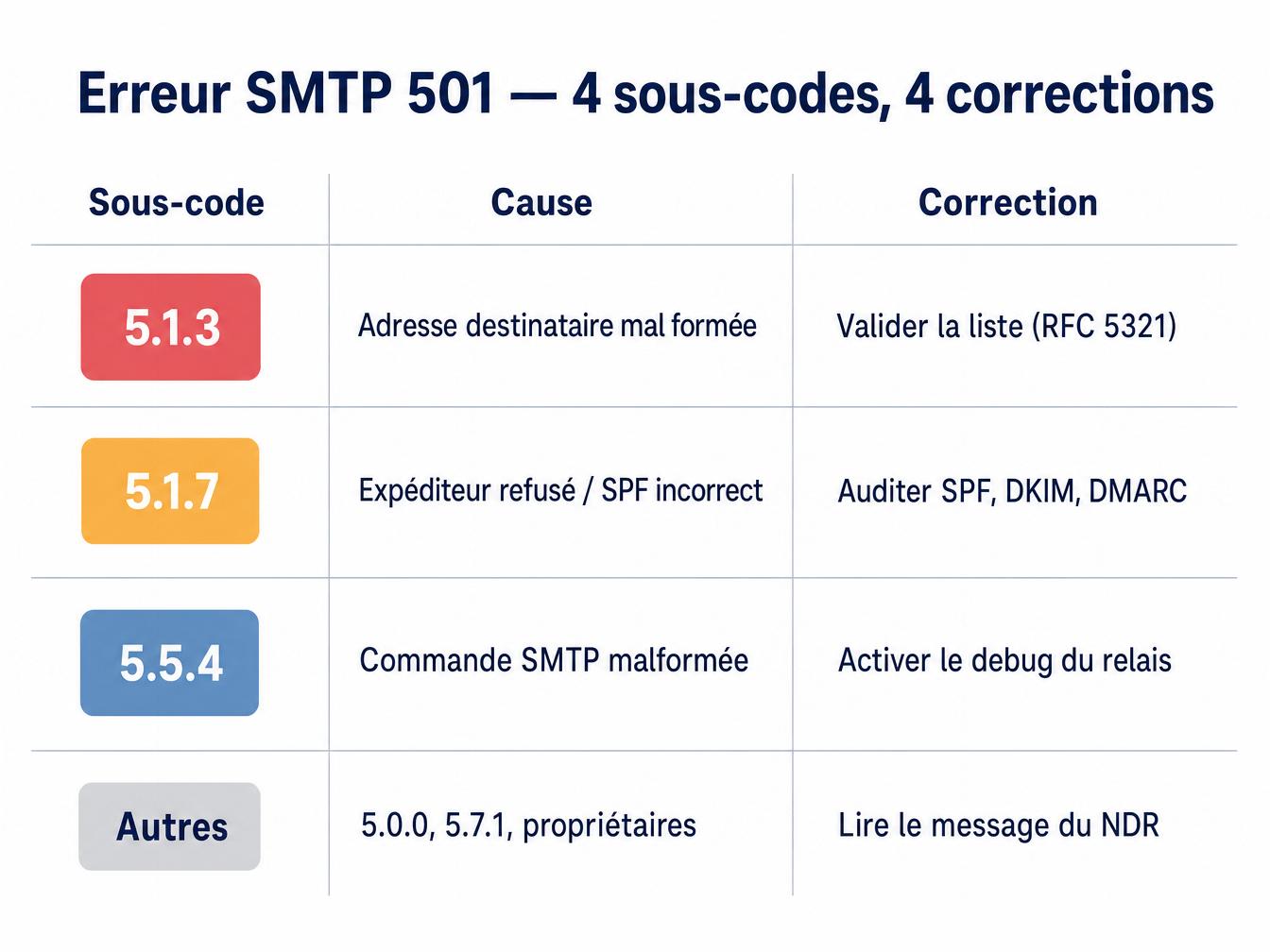
Once the sub-code is identified, apply the corresponding fix. Fix the address for 5.1.3, fix the sender or SPF for 5.1.7, fix the SMTP session for 5.5.4.
Preventing 501s before sending: address verification
Fixing after a bounce is costly: a hard bounce on record, a contact to remove, your sender IP reputation taking a hit. Prevention acts earlier in the cycle.
For 5.1.3 errors (invalid address format), syntax validation before import is a first line of defense. It catches double at signs, missing domains, and forbidden characters. It costs nothing and applies at file import or form submission.
To go further, a live SMTP check (pinging the recipient server without sending a message) detects domains that don’t exist or no longer accept mail, a category that also generates 5.1.x bounces. Services like Captain Verify combine syntax validation, DNS resolution, and SMTP ping in a single pass, returning a per-address result that distinguishes catchall, invalid, and valid addresses.
For 5.1.7 errors, prevention means auditing your authentication configuration (SPF, DKIM, DMARC alignment) before touching your list. A misconfigured sending domain will generate 5.1.7s regardless of the quality of your recipient addresses.
Regular list hygiene (removing bounces, long term inactive contacts, and unverified catchalls) reduces the likelihood of 501s accumulating within a session.
What guides don’t tell you: the compounding effect on reputation
One isolated 501 doesn’t destroy a reputation. The problem comes when they stack up across multiple consecutive campaigns from the same IP or sending domain. Gmail Postmaster Tools and Microsoft SNDS track the permanent rejection rate by sender domain. A hard bounce rate above 2% on a single campaign is enough to trigger throttling or a temporary block from some servers.
What most guides on SMTP errors don’t mention: receiving servers communicate with each other through shared reputation systems (Spamhaus, Senderscore, Microsoft SNDS). A sender that accumulates permanent bounces on Gmail can see their IP warmup compromised on Outlook a few weeks later, even without ever having had a direct issue with that server.
Best practice, as documented in Gmail’s updated 2024 sender guidelines, recommends keeping the spam rate below 0.1% and sets the hard rejection threshold at 0.3%. The tolerance for repeated permanent rejections is in the same range.
A 501 can be read. It takes thirty seconds more than ignoring the bounce. That’s the only difference between a fix that holds and a retry that makes things worse.