

Why is your inbox flooded with non-delivery reports for campaigns you never launched? Your email tool’s dashboard shows zero sends. Yet NDRs have been piling up since yesterday. This phenomenon has a precise name: backscatter. A spammer used your domain as the return address on their fraudulent sends; the servers that reject these messages afterward send you the bill in the form of bounces. This has nothing to do with your account being hacked or your contact list leaking.
How backscatter works: visible From and Return-Path, two separate addresses
The mail client displays a sender. The SMTP command MAIL FROM carries a different one, invisible in the interface. This second address, the Return-Path, is where bounces get sent. A spammer spoofs this technical field, not necessarily the visible From that the final recipient sees in their mailbox. They enter your domain in the SMTP envelope at the MAIL FROM command, without the message body ever displaying your name. This distinction drives everything that follows, including the choice of setting that cuts off the flow. The full mechanics of spoofing, from a falsified From to complete identity forgery, are covered in our article on how email spoofing works. Here, the target is narrower: the technical envelope, the one the protocol uses to route error reports, separate from the message the final recipient actually reads.
Why the recipient’s server sends the bounce back to you
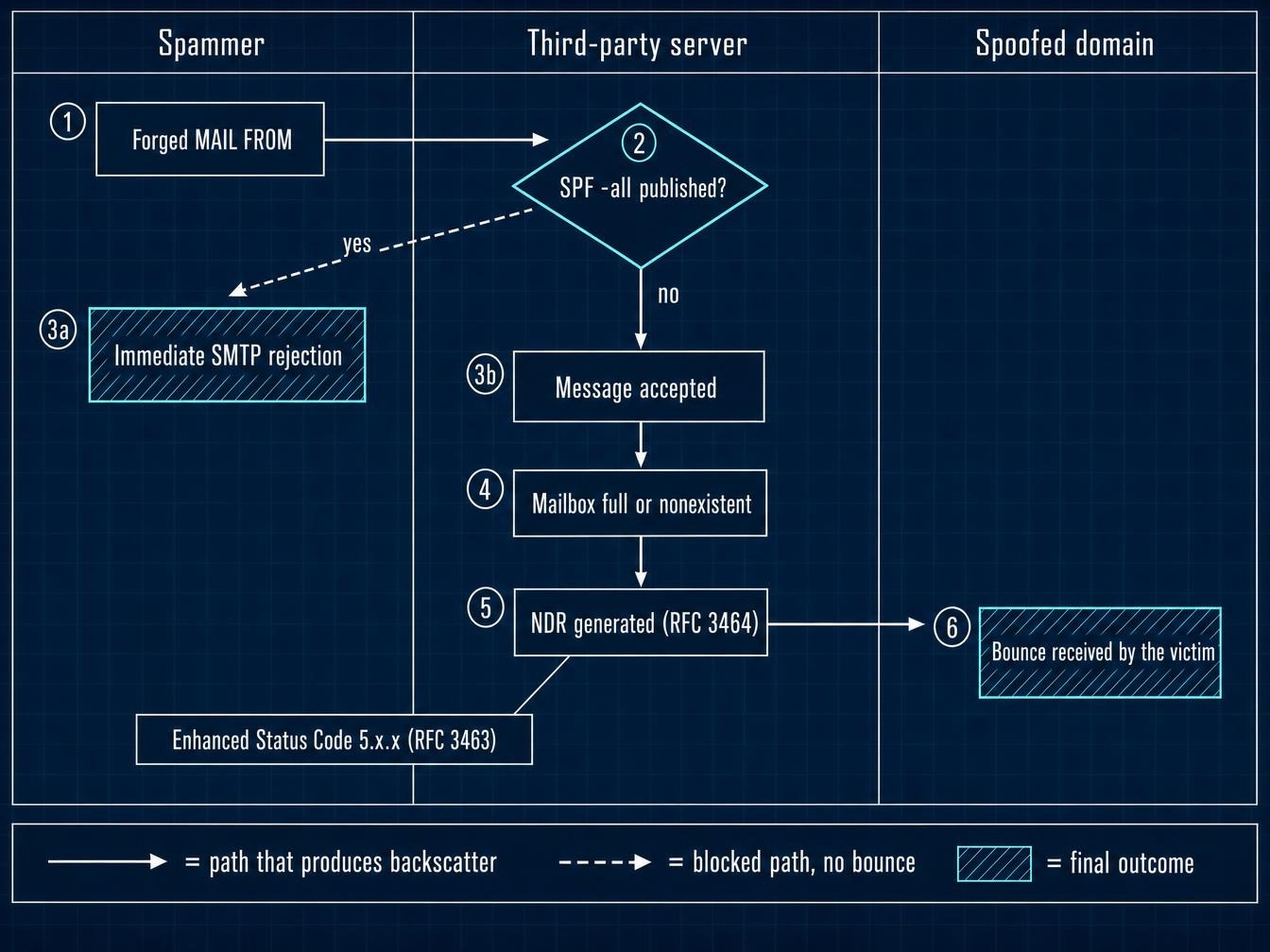
Because it sends the error report to the address listed in the envelope. That address carries your domain. Nothing in the protocol lets it know the address was spoofed. In practice, a server receiving a fraudulent email behaves in one of two ways. The first rejects the connection outright, during the SMTP transaction, with an immediate error code; no bounce is ever generated, and the problem stops dead on the spam sender’s side. The second accepts the message. It discovers the problem too late: the mailbox is full or the recipient doesn’t exist. This second case is what produces backscatter: the server generates an NDR (Non-Delivery Report), in the format defined by RFC 3464 (IETF, 2003), then sends it in good faith to the spoofed Return-Path.
A researcher who received 49,000 backscatter messages over four months ran his bounces through four blocklists: of 4,177 bounces with an identifiable sending IP, 19% of those IPs weren’t listed yet, with SpamCop flagging 73% and CBL 69% (Christopher Fuhrman, École de technologie supérieure de Montréal, 2008).
That old finding still holds true. Misconfigured servers that accept a message and then reject it, rather than refusing it at the door, form a residual pool that keeps running, often corporate mail systems run by teams no longer following current SMTP recommendations. The full breakdown of different reasons for undelivered emails is covered elsewhere. Backscatter fits in as a special case: generated by a third party, with no link to your own sending activity.
Reading bounce headers to confirm the send didn’t come from you
A suspicious bounce shows up. Three checks are usually enough to settle it, in this order:
- The Received chain, at the top of the raw message, lists every server the message passed through, first to last. If none of them match your usual sending infrastructure, IP, MTA, identified email platform, the origin is external.
- The Message-ID of the original message, usually included in the bounce body as a partial quote. A Message-ID that your own sending logs never generated confirms the message never left your systems.
- The report’s Enhanced Status Code, in the 5.x.x format, spells out the exact cause of the rejection on the recipient server’s side: nonexistent mailbox or quota exceeded.
A backscatter bounce is identified by a total lack of match between its Message-ID and the legitimate sender’s send logs, regardless of which sending platform is used, Twilio SendGrid, Mailjet, or an in-house SMTP setup. Without that match, no further investigation is needed.
What this doesn’t mean: no hacking, no list leak
The first instinct, on discovering dozens of unfamiliar NDRs, often leans toward a compromised account. That’s understandable. But backscatter requires no access to your domain, mailbox, or email tool, and no leaked contact database. The spammer only needs one piece of public information, your domain name, to slot it into the envelope of a send that never touches your servers. You might also assume an ESP is enough to cover this risk, since it already handles outbound authentication. But SPF and DMARC are declared at the domain’s DNS level, not at the sending tool’s level: switching ESPs closes nothing as long as those records stay absent or permissive.
One worry comes up next, every time: will this flood get me blacklisted? Backscatterer.org, the blocklist dedicated to this phenomenon, tracks servers that emit backscatter, never the spoofed domains that receive it. You land on that list by sending bounces to innocent third parties. Receiving thousands of them changes nothing.
What you can actually do: publish an SPF record in hard fail
An SPF record published as -all is the only setting that acts on the source of backscatter. This hard fail tells the receiving server to reject, during the SMTP transaction, any message that lists your domain in MAIL FROM without coming from your authorized servers. The message dies at the door, no NDR gets generated, nothing comes back to you. Full syntax is detailed in our article on what happens when SPF is missing. The overflow trap is covered in this guide on the 10 DNS lookup limit. What no configuration will do, though: stop a spammer from writing your domain into an envelope, or force a poorly configured third party server to honor SPF.
DMARC operates on a different level. The distinction determines what you can realistically expect from it here. A p=quarantine or p=reject policy is evaluated against the domain in the header From field, the one the recipient sees, after verifying that a DKIM signature or SPF check authenticates that domain. That’s the alignment rule. When the spammer only spoofs the envelope and signs the message with a From address unrelated to your domain, your DMARC policy never gets consulted by the receiving server. It protects your brand against visible spoofing; on its own, it doesn’t stop stray bounces: that job falls to SPF, with DMARC taking over once the spammer also spoofs the displayed From.
On the receiving side, BATV (Bounce Address Tag Validation) sorts things out at the root. Your server signs the return address of every outbound send with a dated token, then rejects any NDR addressed to an unsigned address. A backscatter message can’t carry that token, since it’s replying to an envelope you never sent. Monitoring aggregate DMARC reports (rua) also gives you a picture of the volume and origin of the spoofing, without ever stopping it at the source, with the same caveat as above: these reports only surface messages carrying your domain in the header From. Spoofing limited to the envelope won’t show up there. Reading these XML files is covered in full in our guide to reading an aggregate DMARC report.
This hardening has a ceiling. An SPF hard fail doesn’t silence servers that ignore the policy, haven’t updated their resolver, or apply a partial evaluation of DNS records. That leftover pool keeps producing stray bounces, even after a correctly deployed domain setup. The -all setting also has a side cost worth knowing: a legitimate message relayed through an alias or a forwarding mailbox fails the SPF check at the final recipient, since the IP presenting the message is no longer yours. Well-maintained forwarding servers rewrite the envelope via SRS to avoid this; the rest will break your forwards.
Checking that your own server isn’t producing backscatter
The logic flips here. This half of the topic almost always goes unmentioned. A server that accepts everything and then sends back an NDR produces exactly the noise described above, for someone else. The settings that cause this behavior are well known:
- a catch-all address that absorbs any recipient before discovering the mailbox doesn’t exist;
- an out-of-office autoresponder that mechanically replies to a spoofed envelope;
- an antispam gateway that filters after acceptance, instead of refusing during the SMTP transaction.
The fix comes down to one rule: validate that the recipient exists at RCPT TO and reject right there, with a 5.x.x code, rather than accepting and apologizing afterward. That’s what separates a server that protects others from one that ends up on Backscatterer.org.
Don’t confuse backscatter with a genuinely dirty list
A sudden spike in bounces in your sending stats looks, at first glance, like declining sender reputation. Most of the time it’s nothing of the sort, if the bounces relate to campaigns that were never sent. That confusion gets expensive when it pushes you to purge a contact list based on a signal that has nothing to do with it: delivery errors reported by Google Postmaster Tools, like the hard bounce counters on your sending platform, stay blind to backscatter that never passed through your own campaigns, since no real send ever triggered them. Before concluding your list hygiene has failed based on a flood of NDRs, check the headers described above to see whether these bounces correspond to a real send or a spoofed envelope: cleaning the contact list won’t fix anything if the problem lies elsewhere.
DMARC adoption is growing, driven by the rules Google and Yahoo have imposed on bulk senders since February 2024, which require at minimum a policy published as p=none. The standard’s revision, published in 2026 under the name DMARCbis (RFC 9989), doesn’t raise that bar: it rewords the protocol and replaces the public suffix list with DNS tree walking, without imposing a strict policy on anyone. The residual pool of misconfigured mail systems, meanwhile, follows a much slower timeline, one set by DNS updates nobody has scheduled.