

Adding a DMARC record to the DNS zone doesn’t finish the job: the record does nothing until someone reads the reports it generates every day. Domain monitoring refers to this ongoing work, spread across 4 pillars: DMARC reports, DNS records (MX, SPF, DKIM), the domain’s expiration date, and lookalike domains registered by third parties. Without it, a growth team discovers the outage after the fact, when the CMO asks why the open rate dropped. A classic case circulates on email marketing forums: a sender reputation that drops 30% in three months with no campaign content changed, and the cause almost always turns out to be a DNS record modified without anyone noticing.
The 4 pillars of domain monitoring
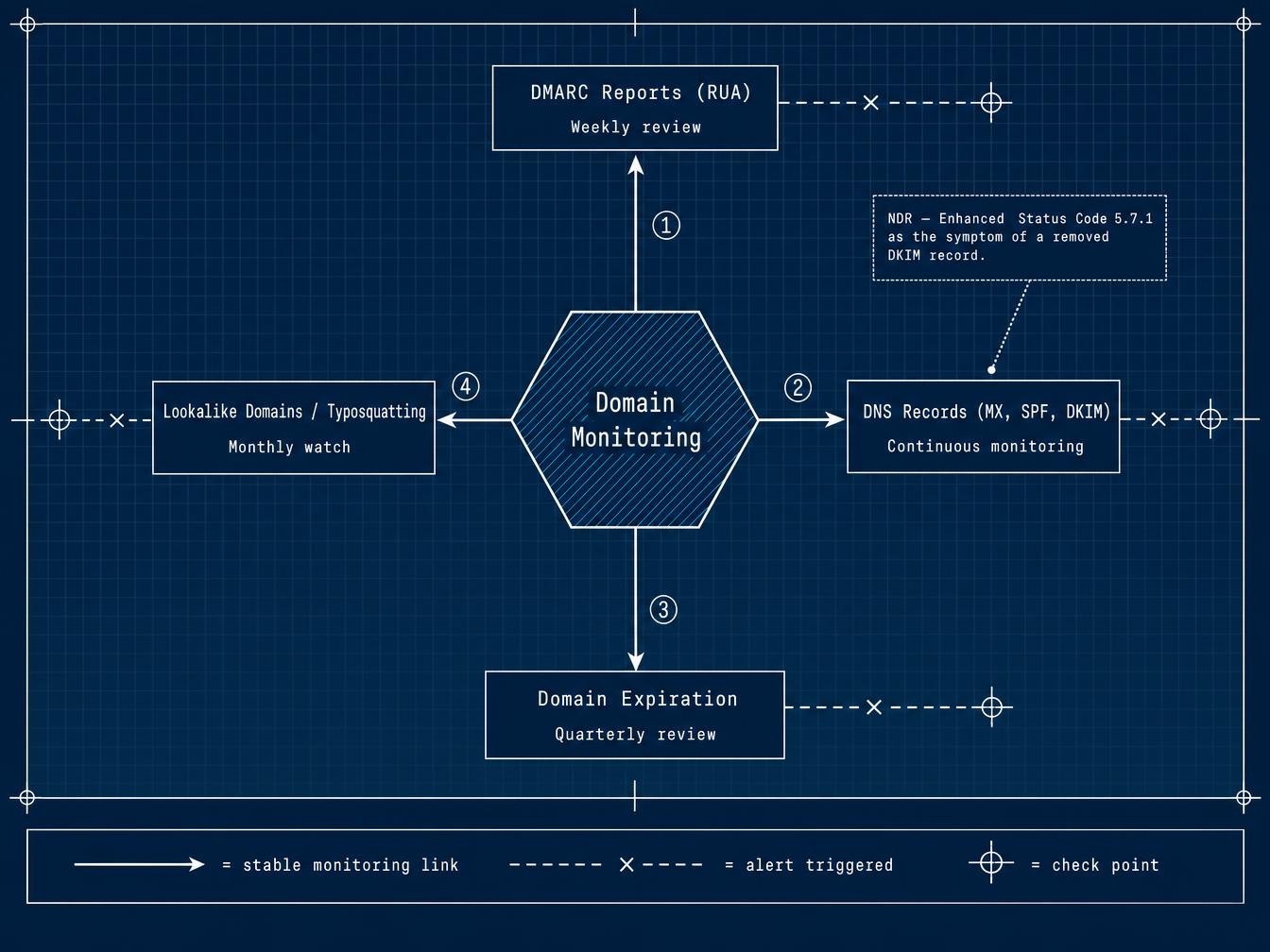
A poorly monitored domain loses control on 4 fronts at once, rarely just one. The first involves aggregated DMARC reports (RUA), which arrive daily in a dedicated mailbox that few teams ever open. The second covers the DNS records themselves: SPF, DKIM, and the DMARC record can be changed by an external provider or a migration script, with no alert going out. The third pillar involves domain expiration, an administrative task nobody wants to own. The fourth involves domains that resemble yours by a single character, registered to deceive your customers through impersonation; the mechanics of this threat are covered further down. Domain monitoring doesn’t block a single attack on its own. It triggers the alert early, on all 4 fronts at once.
Reading DMARC reports instead of just publishing them
A DMARC record set to p=none doesn’t reject or quarantine a single message. It triggers the sending of aggregated reports (RUA), in XML format, roughly once a day, from every provider that receives mail signed by your domain: Gmail, Outlook, Yahoo, as well as corporate servers that enforce DMARC. Forensic reports (RUF), on the other hand, detail an individual failed message. Google no longer sends them. Microsoft and Yahoo still do, intermittently. Decoding the fields of an aggregated report (source IP, SPF/DKIM alignment, disposition applied by the receiving server) is a technical exercise in its own right, covered in detail in our article on how to read an aggregated DMARC report without getting it wrong. Here, the practical point fits in one sentence: without regular reading, the policy stays stuck at p=none. That’s the case for most protected domains worldwide, since nobody is around to comb through the XML feed and move the policy up to p=quarantine, then p=reject.
Detecting an unauthorized DNS change on MX, SPF, DKIM, DMARC
Tools like MXToolbox, CaptainDNS, or DNS Assistant query the DNS zone at regular intervals and trigger an email or Slack alert as soon as an MX, SPF, DKIM, or DMARC record changes value, after comparing it against the previous value. The difference between the old and new value appears in the alert, which avoids re-running a full diagnostic for every incident. An SPF record that exceeds its 10 DNS lookup limit fails without a bounce or any visible alert on the sender’s side, a scenario detailed in our article on the SPF 10 DNS lookup limit. A DKIM record removed after a hosting migration likewise breaks the signature on every outgoing email; the only visible symptom is sometimes an NDR (non-delivery report) showing Enhanced Status Code 5.7.1, with no obvious link to the DNS change that happened the day before. A planned protocol shift, such as the removal of the pct tag under DMARCbis, produces this same type of change that looks suspicious but is legitimate: comparing before and after remains more reliable than reacting blindly. You don’t need to check anything every morning in a stack already loaded with alerts: these services run in the background and only surface a signal when a value actually moves. A single case justifies setting this up. A domain rarely changes its DNS configuration once it’s stabilized. When it does, it’s almost always a deliberate change made by someone on the team. Monitoring exists to catch the one no internal ticket announces, the most common cause behind a hijacked record without any registrar account compromise, a scenario documented by Infoblox and Eclypsium under the name Sitting Ducks.
Nearly 800,000 vulnerable domains identified and more than 30,000 confirmed hijackings since 2019, with no registrar account ever compromised (Infoblox and Eclypsium, 2024).
Monitoring domain expiration and renewal
The cycle following an expiration has three phases: a grace period of about 30 days where renewal stays simple, a redemption period of about 30 days with a penalty of €80 to €200, then a final deletion window of 5 to 15 days before the domain goes back on public sale. 13% of expired company domain names get re-registered by a third party, according to internal research from CSC published in 2024. That figure climbs for legacy domains left in the blind spot of a brand portfolio never audited after a merger or a provider switch. A domain lost at this stage takes the website and the company email addresses down with it. It also wipes out the Google ranking built up over several years.
Spotting lookalike domains and typosquatting
A domain copied with a single character swap (replacing a lowercase l with an uppercase I, adding a hyphen, using a .co extension instead of .com) is enough to set up a credible phishing page or a sending address that fools a customer in a hurry. More than 30,000 lookalike domains imitating well known brands were identified between February and July 2024 by Zscaler ThreatLabz, over 10,000 of which were flagged as malicious. In March 2025 alone, more than 26,000 domains impersonating brands or government services were detected by Palo Alto Networks Unit 42 during smishing campaigns. The technical mechanism behind this impersonation, how an attacker forges an email’s sender, is covered in detail in our article dedicated to email spoofing. Catching it upstream, before the first fraudulent campaign goes out, limits the damage. A monitoring service tracking close variants of the registered brand name rounds out the approach.
Recommended check frequency by pillar
| Pillar monitored | Recommended frequency | Trigger signal | Action if alerted |
|---|---|---|---|
| DMARC reports (RUA) | Weekly review | Unidentified source IP, failed SPF/DKIM alignment | Identify the sender, adjust SPF, or move the policy up to p=quarantine |
| DNS records (MX, SPF, DKIM) | Continuous monitoring with automatic alerts | Value changed with no planned update | Compare old vs. new, restore if unauthorized |
| Domain expiration | Quarterly portfolio review | Renewal due in under 60 days | Enable auto-renewal and the registrar lock |
| Lookalike domains / typosquatting | Monthly watch | Registration of a close variant of the brand name | Report to the registrar, UDRP procedure if fraudulent use is confirmed |
This cadence holds for most configurations observed on domains that are already stable. A domain that just migrated to a new email provider warrants daily DMARC review for the first month, until SPF and DKIM alignment settles on the new infrastructure.
What domain monitoring doesn’t cover
The cause of dropping deliverability sometimes lies somewhere other than the domain: almost always the list itself, with a rising hard bounce rate and catchall addresses piling up from imports over time. A domain can be perfectly monitored (DMARC reviewed, DNS stable, renewal handled early, no typosquatted variant detected) and still see its deliverability drop. The complaint rate climbs too, visible through the feedback loops of several mailbox providers. These signals damage sender reputation just as much as a broken SPF record. No DNS monitoring tool catches them, and Microsoft’s equivalent to Gmail’s Postmaster Tools (SNDS, Smart Network Data Services, less commonly checked but just as telling) doesn’t cover the quality of the addresses being sent to either. The only way to know whether the list has drifted at the same time as the DNS is to screen it before the next send, rather than discovering the problem on a dashboard once reputation is already damaged.
The BIMI standard, which displays the sender’s logo in the inbox, requires a DMARC record set to p=reject and stable for several weeks to be activated with most providers. Few domains still meet that condition in 2026.