

Update, August 25, 2026: Apple has walked back part of this announcement. Hide My Email addresses will stay on icloud.com after all; only Sign in with Apple is moving to private.icloud.com. The full story is in our article on Apple dropping the new Hide My Email domain.
Should you now block every address ending in icloud.com on your signup forms? No. On June 15, 2026, Apple announced a change that directly affects email list management: addresses generated by Hide My Email and Sign in with Apple will migrate to a single domain, private.icloud.com, later this summer. The old domains, icloud.com and privaterelay.appleid.com, keep working; addresses already in circulation don’t change. On a list that loses 30% deliverability in three months with nothing changed on the content side, the cause sometimes hides in an overly broad filtering rule that rejects these aliases as simple disposables.
What actually changes with this new domain
The mechanism is simple to describe, less simple to roll out everywhere at once. Until now, a Hide My Email address carried the generic icloud.com domain, mixed in with the real iCloud inboxes of regular users. A Sign in with Apple address, on the other hand, carried the privaterelay.appleid.com domain, generated at signup in an app or on a site. Starting this summer 2026, both types of addresses will be issued under private.icloud.com, a single domain dedicated to relays. Apple states in its June 2026 developer note that account systems, email validation logic, and, above all, allowlists must now accept this new domain, in addition to the two legacy domains, which remain active. No existing address changes format; the new domain only applies to aliases created after the switchover.
An alias that lasts longer than a typical disposable
“I don’t really consider Hide My Email addresses to be traditional disposables; they don’t expire automatically and are created or deleted manually,” writes Al Iverson on Spam Resource, in July 2026.
The distinction matters for how you handle your list. A typical disposable expires on its own after a few minutes or hours. An email alias from Hide My Email, by contrast, stays active until its owner disables it manually, sometimes for years. A Hide My Email address works the opposite way from a corporate catchall, which absorbs any message sent to a domain without individual validation: each alias maps to a single use, a single signup form. The difference comes down to lifespan and who decides to cut it off.
Why Apple is unifying these two domains
Al Iverson raises exactly this possibility on Spam Resource: putting Hide My Email behind a dedicated domain would make it easier to identify, and therefore easier for platforms that want to block it. He remains skeptical about how widespread the practice actually is, since Sign in with Apple, which now shares the same domain, remains a widely used feature in mobile apps. Blocking one without alienating the other looks hard in practice. What this announcement leaves out isn’t the domain itself, but how fast major mailbox providers and ESPs update their own filters.
What this changes for your validation rules and your lists
The most common reflex is a blanket rejection: as soon as an address carries a domain associated with a relay, it gets kicked off the signup form. That reflex is costly. A team that blocks icloud.com and privaterelay.appleid.com without distinction also loses legitimate signups made through Sign in with Apple, a login method many iOS users prefer precisely to avoid entering their real address. Verifying each address before sending costs time and a bit of budget; filtering after the fact, once the campaign has already gone out, costs even more. Any alias disabled in the meantime comes back as an immediate hard bounce, with a 5.1.1-type error code, and it’s these bounces that damage sender reputation on a shared IP pool still in IP warming, long before the CMO asks why the open rate is dropping. The complaint rate rarely follows the same path with this type of address, since the user has already left the channel by disabling the alias rather than clicking report as spam. The right approach is to treat these addresses like any other alias: accept them at signup and monitor them over time, without removing them from the list until they actually bounce.
Steps to update your rules before the switchover
The migration is gradual, and both legacy domains survive the change. Updating your rules comes down to a few steps:
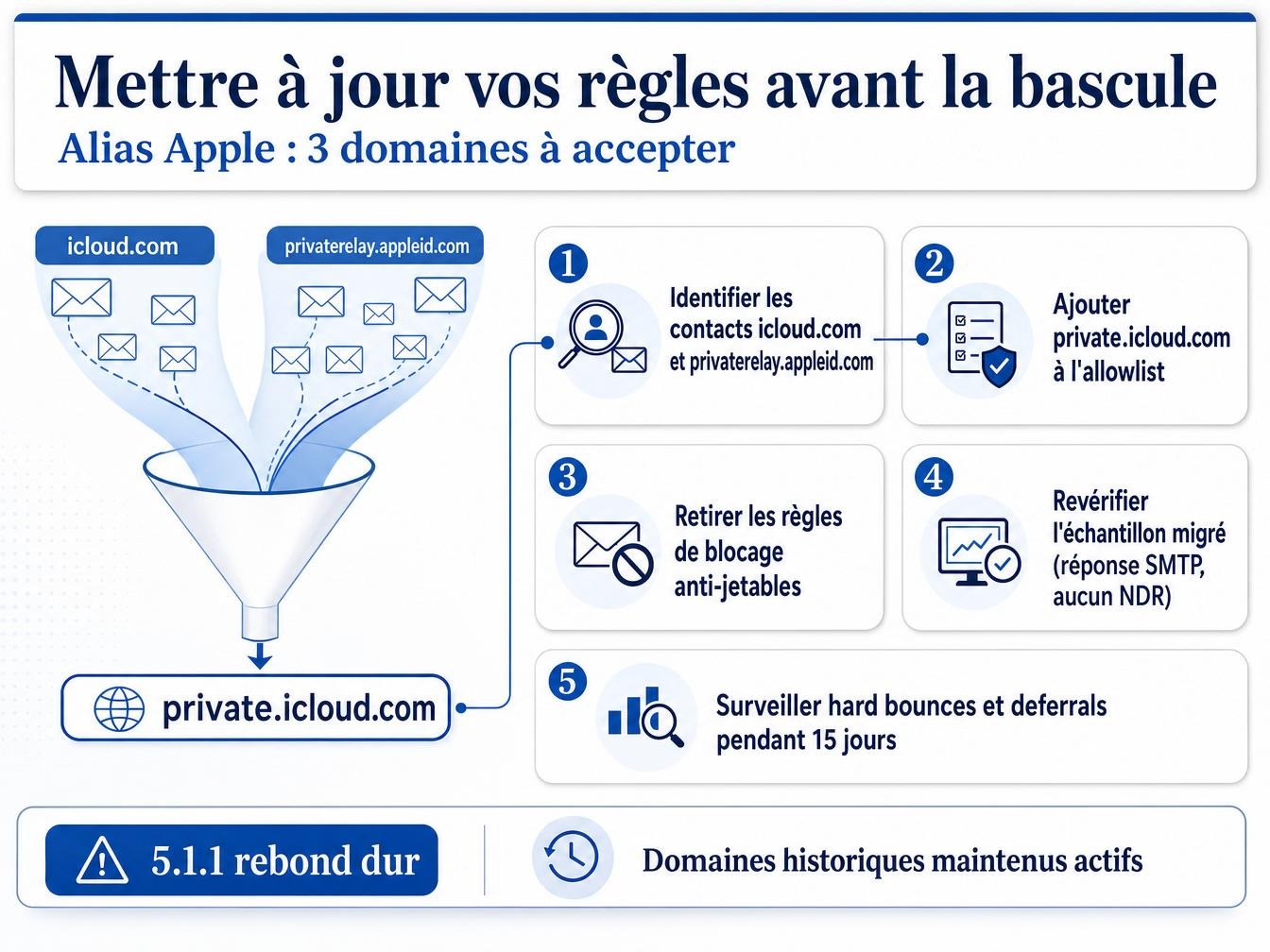
- Identify, within your current list, the share of contacts already registered under icloud.com and privaterelay.appleid.com.
- Add private.icloud.com to your validation systems’ allowlist, without removing the two legacy domains.
- Remove automatic blocking rules that treat these domains as disposables on par with Yopmail or Guerrilla Mail.
- Re-verify the migrated sample once the switchover is live, to confirm the aliases still respond on the SMTP side: EHLO accepted, MAIL FROM validated, no immediate NDR.
- Monitor the hard bounce rate and deferrals over the 15 days following the rule update.
Segment instead of blanket rejecting
Best practice is to accept the alias at signup and keep the associated consent, letting verification sort things out afterward. An active Hide My Email address responds normally to deliverability tests; one disabled by its owner comes back as a hard bounce on the very first send, unambiguously. This distinction has a real limit: nothing, neither in the header nor in the domain name, gives advance warning that a user just cut off their alias the day before a campaign. The only signal is the bounce itself, once the email has already gone out. The only way to reduce this risk is to verify the most recent sample of the list before the next send, rather than discovering the problem mid-campaign.
What this doesn’t change: Apple Mail Privacy Protection and other masked emails
The domain change is limited to the address itself. The open tracking and IP masking that Apple Mail Privacy Protection has applied since 2021 is a separate mechanism: Hide My Email masks the sender’s identity on the form, while Apple Mail Privacy Protection masks reading behavior behind a proxy. Google is exploring a similar approach with its Shielded Email, still in testing in summer 2026. An email alias follows its own unsubscribe and deletion logic, much closer to a work address than to a temporary disposable email, where expiration is automatic and immediate. List hygiene hinges on this activation criterion, far more than on the domain name carried by the address.
Apple hasn’t announced any retirement date for the two legacy domains, nor any automatic migration for addresses already active under icloud.com. The major mailbox providers that currently filter traditional disposables haven’t yet said whether their own rules will extend to private.icloud.com as soon as it rolls out, or whether the topic will wait until complaint volume justifies it.