You’re working the register on a Saturday afternoon. A regular customer pays, you slip them a newsletter signup card, and they scribble down their address between the next two customers waiting in line. Three weeks later, you send your first promotion to 600 contacts collected that way, at the counter. Result: 80 emails bounce, your email provider flags an abnormal bounce rate, and your next messages go straight to spam. The cause comes down to one word: list quality.
Local email marketing works for brick-and-mortar businesses, as long as you lay the right foundations. This guide covers clean list building, geographic segmentation, useful automations, and campaign ideas by industry. Set aside half a day to get the basics in place, then a few hours a month to keep things running.
Why email still works for local businesses
A local business runs on repeat customers. Email gives you a direct channel to them. No middleman, no algorithm deciding who sees your message. The organic reach of a Facebook post hovers around a few percent of your audience. A well-delivered email lands in the inbox.
The ROI remains strong. European marketing benchmarks put the average email ROI at around €36 generated for every €1 spent. For a wine shop or hair salon spending a few dozen euros a month on an email tool, the math is straightforward the moment a newsletter brings in three bookings.
Average deliverability often caps at 85–90%. That means roughly one in ten emails never reaches the inbox. The smaller your list, the heavier each invalid address weighs.
Clean list first: why every contact matters
With a list of a few hundred to a few thousand contacts, you don’t have the cushion of a major brand sending to 500,000 people. A single hard bounce out of 200 sends is a 0.5% bounce rate. A handful of addresses typed incorrectly at the counter and you’re already crossing the thresholds that trigger Gmail and Outlook’s filters.
In-person collection means errors. A handwritten address becomes “jean.dupont@gmial.com”. A QR code form filled in a rush on a phone slips in an extra space or period. These addresses become hard bounces, and every bounce chips away at your sender reputation with mailbox providers.
Since late 2025, Google and Microsoft require a spam complaint rate below 0.3% and a low bounce rate, or they’ll reject your emails outright. A dirty list puts you directly at risk. That’s where an email verification tool comes in: you run your list before the first send, it flags invalid addresses, typos, and spam traps, and you clean up before your reputation takes a hit. On a small list, that one step matters more than any subject line tweak.
One objection comes up often: why verify upfront rather than filtering after a few sends? Because the damage is already done. By the time your email provider flags bounces, your reputation has already dropped, and recovering it takes weeks. Verifying in advance costs a few euros for a local business list. Rebuilding your sender reputation costs far more, in time and in lost deliverability.
Building your list in-store and online
A solid list gets built in the two places your customers encounter you: at your checkout and on your website.

In-store:
- A QR code placed near the payment terminal links to your signup form. Offer something immediate: 10% off their next visit, a free coffee, access to private sales.
- A paper form at the counter is straightforward, but requires clean re-entry the same evening. That’s where errors creep in. Enter them promptly and verify the addresses before importing.
- At a Christmas market, a tasting event, or an open house, a tablet with a digital form captures emails on the spot and cuts down on transcription errors.
Online:
- A footer form and a pop-up triggered after a few seconds, with an offer exclusive to local subscribers.
- Add a signup link to your Google Business Profile listing. Customers looking up your hours will see it.
- Put a link in your Instagram and Facebook bio, with a clear reason to sign up.
Whatever channel you use, ask for explicit consent (an unchecked opt-in box) to stay GDPR-compliant. And never buy a list: those contacts don’t know you, they’ll mark your emails as spam, and they’ll wreck your reputation in a single campaign.
Segmenting by geography and behavior
A local business has something national brands don’t: proximity. Use it. If you have two locations, segment by location and only send an event announcement to contacts in the right area. A customer from your downtown location has no use for a promotion at your suburban one.
Beyond geography, tenure and purchase frequency split your contacts into distinct profiles: new subscribers still getting to know your offer, regulars, and dormant contacts who haven’t been in for months. Each profile calls for a different message. The new subscriber gets an introduction; the regular gets a loyalty offer. The dormant contact needs a concrete reason to come back.
Personalize the essentials: first name in the subject line or opening hook, and content that matches the customer’s history. A florist who knows a customer ordered for Valentine’s Day can follow up the following year. That’s enough to make a difference without overcomplicating your workflow.
Automations that work while you don’t
An automation runs on its own once you set it up. Four cover the basics for a local business.
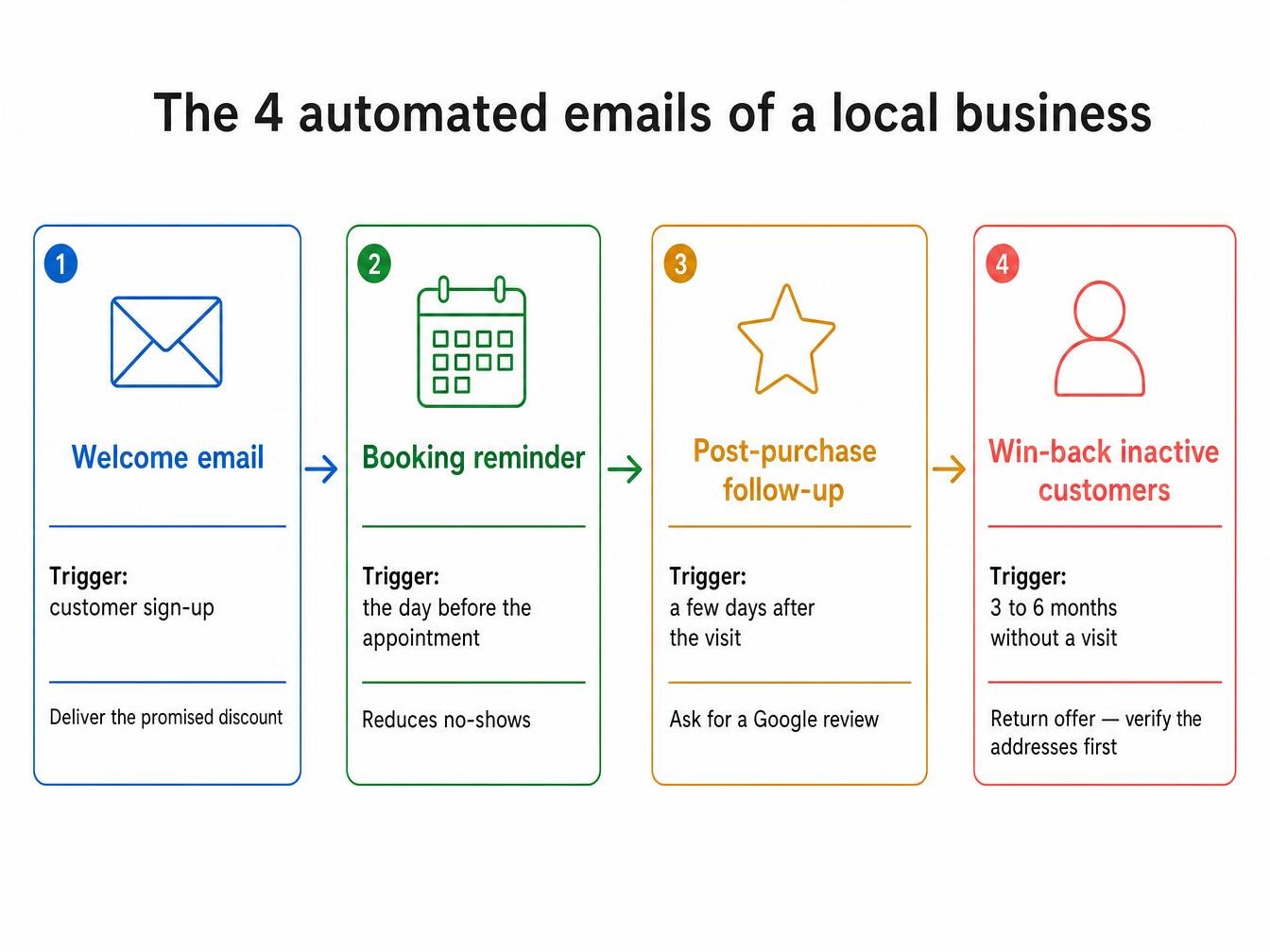
The welcome email. It goes out automatically as soon as a customer signs up. It’s your most-opened message, because the customer just thought of you. Use it to deliver the discount you promised at signup and introduce your business in a few lines.
The reservation or appointment reminder. Essential for a salon, restaurant, or practitioner. A day-before email reduces no-shows, which are costly in lost slots. Connect it to your booking tool if it supports it.
The post-purchase follow-up. A few days after a visit, a message asking for a review or suggesting a complementary product. Reviews feed your Google listing, which brings in new local customers.
Re-engaging inactive customers. A customer who hasn’t been in for three to six months gets a come-back offer. A word of caution: before re-engaging an old list of dormant contacts, verify those addresses. They’re the most likely to have been abandoned or recycled into spam traps, and they’re the ones that sink a re-engagement campaign.
Campaign ideas by industry
The right message depends on what you sell and how often your customers come in.
| Industry | Recurring campaign | Event campaign | Priority automation |
|---|---|---|---|
| Restaurant | Weekly special, sent Thursday for the weekend | New menu, themed evening, holiday menu | Reservation reminder |
| Hair salon / beauty | Seasonal care tips | New service, January slow-season promo | Appointment reminder |
| Gym | Monthly class schedule | Back-to-school challenge, monthly challenge | Re-engagement of absent members |
| Retail boutique | New arrivals | Subscriber private sales, early access to sales | Post-purchase follow-up with review request |
| Wine shop / artisan | Monthly selection, latest arrivals | Tasting event, wine fair, holiday gift set | Welcome with first-order discount |
One rule applies everywhere: consistency beats volume. An expected monthly newsletter is worth more than five emails in quick succession followed by six months of silence. Your customers get used to your rhythm and open out of habit.
Measuring performance and keeping your list healthy
Track three metrics after every send: open rate, click-through rate, and above all bounce rate. Bounce rate is your early warning signal. If it climbs, your list is deteriorating and your deliverability will follow. Keep in mind that open rates have been inflated since Apple Mail Privacy Protection, so rely more on clicks to gauge who’s reading.
Clean your list on a regular schedule. Remove long-term inactive contacts rather than continuing to email them, and verify any new contacts collected in-store before adding them to your sends. A small, clean list delivers better than a large, dirty one, and costs less in email tool fees.
A local business is built one customer at a time. Your email list reflects that: it’s only as good as the care you put into it. Send your first test campaign to your most loyal contacts. Watch the bounce rate and clean up before going wider.