Since iOS 15 (announced by Apple in June 2021 and rolled out in September 2021), Mail Privacy Protection stops senders from knowing when an email is opened in the Mail app. The open rate alone can no longer flag dormant contacts. A reliable email re-engagement campaign relies on clicks, on a list verified before sending and on a sequence of 3 emails spread over 14 days. The full subject lines and copy follow.
What is an email list re-engagement campaign?
A re-engagement campaign sends a short sequence of emails to inactive contacts. Those who click stay on the list, the others leave it. In 2015, Mailchimp found that 61% of retail recipients were active (opened or clicked in the last 6 months): almost 4 contacts in 10 were already dormant.
According to Google (2024), the spam rate shown in Postmaster Tools must stay below 0.3% for all senders. The recommended level is 0.1%. Yahoo (2024) sets the same 0.3% limit for spam complaints. Every spam report counts toward these rates. The stricter rules for senders of more than 5,000 messages a day have applied since February 1, 2024.
The sequence is itself commercial prospecting. In France, article L. 34-5 of the CPCE requires prior consent when you write to individuals. For professionals, it remains possible without consent if the message relates to their job and every email carries an unsubscribe link. A contact who has objected receives none of the 3 emails.
Three months without a click makes a contact inactive
Allow longer, 6 or 12 months, when your customers rarely buy. Only send the sequence to contacts that the 3-year retention period still allows you to approach.
Count a click or a purchase as activity. A direct reply counts too. Litmus (October 2026) measures that Apple clients account for 75.84% of email opens. Mail Privacy Protection distorts part of them. An open alone no longer proves anything: do not count it as activity.
| Contact cycle | Recommended threshold | Example activities |
|---|---|---|
| Weekly sends or frequent purchases | 3 months without a click | E-commerce, media, app |
| Monthly newsletter or seasonal purchase | 6 months without a click | B2B software, training, ticketing |
| Yearly or rare purchase | 12 months without a click | Insurance, travel, real estate |
Isolate these contacts in a dedicated segment of your sending platform. Our article on inactive contacts covers the segmentation criteria to combine with this threshold.
Why verify the list before the sequence goes out
A dormant list contains dead addresses. Every hard bounce the sequence triggers damages your deliverability and your sender reputation before a single contact has had the chance to react.
An old signup has had years to be abandoned: a closed mailbox, a new employer. Sending to those addresses returns a hard bounce (NDR, Non-Delivery Report, with Enhanced Status Code 5.1.1: mailbox does not exist) and the mailbox provider logs it. Filtering after the send means paying for the bounce before you know about it. List hygiene therefore happens upstream, on the inactive segment, before the first message.
Export the segment, then verify the list to sort every address. 3 families get different treatment:
- invalid or nonexistent addresses: removed immediately, no send;
- catchall domains, which accept everything without guaranteeing that a person reads it: a separate batch, sent last;
- valid addresses: they enter the sequence.
Spam traps are the trickiest case. A trap address does not bounce, so no error signal warns you. Verification catches some of them and no tool detects them all, which is why you should never relaunch a whole list in one block.
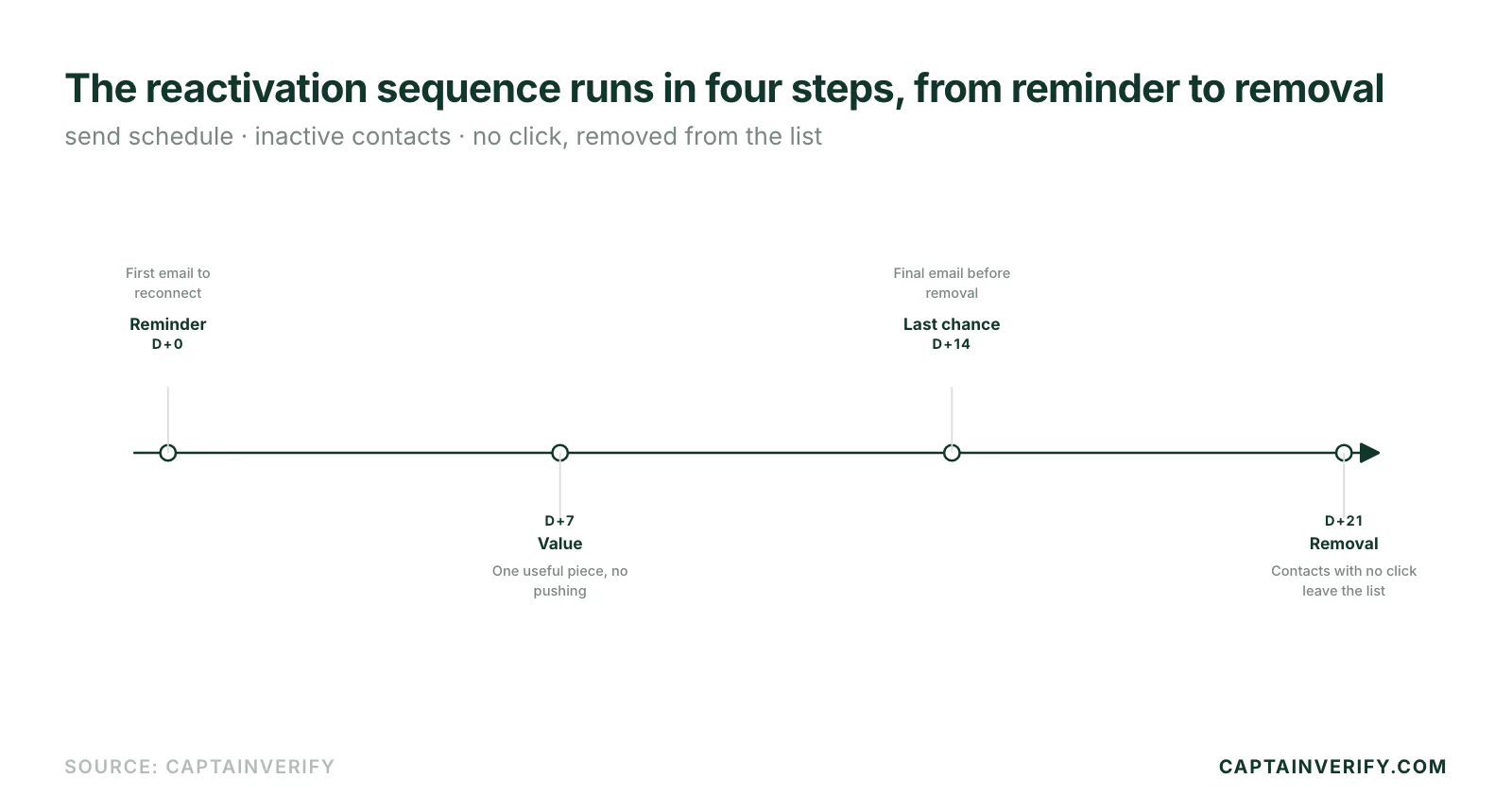
The calendar: 3 emails 7 days apart, removal at D+21
Send 3 emails spaced 7 days apart, then remove the contacts with no click at D+21.
A 7-day gap lets a weekend and a working week go by. We stop at 3 messages because a 4th email teaches you nothing more.
- D+0, reminder: recall why the contact signed up and offer a choice of sending frequency.
- D+7, value: a single piece of content such as a guide or a replay, no heavy ask.
- D+14, last chance: announce the date of removal from the list and add a button to stay subscribed.
- D+21, exit: contacts with no click on any of the 3 emails are removed.
Which subject lines work on inactive contacts?
A good subject line asks a question or announces a deadline.
- D+0: “Still interested in [topic]?”
- D+0: “[First name], choose how often you hear from us”
- D+7: “What you missed since [month]”
- D+7: “[First name], our pick on [topic]”
- D+14: “Our last email to you”
- D+14: “No answer by [date] and we remove you from the list”
Test 2 subject lines from the same step on 10% of the segment before sending the rest, changing only the subject line: that is the principle of A/B testing. Pick the winner on clicks, because Apple Mail’s automatic opens skew the comparison.
Each email also has its preheader, the short text shown next to the subject line. It extends the subject line instead of repeating it:
- D+0: “Tell us how often you want to hear from us”
- D+7: “A pick chosen for you, in a few minutes”
- D+14: “One click is enough to stay subscribed”
Send the 3 emails on the day and at the time of your usual sends: an unusual schedule would skew how you read the results.
Copy for each of the 3 emails
Each email runs a few lines: a reminder, a single action and a clear way out. Here are the 3 emails written for a content publisher, to adapt with your own variables. For customers who have already bought, the angle changes: our article on win-back emails covers the revenue-oriented rules.
Email 1, the reminder
Subject: Still interested in [topic]?
Hi [First name],
You have received our emails on [topic] since [signup month]. You have not clicked on any since [threshold duration]. We would rather ask than fill your inbox for nothing.
Pick the pace that suits you: [One email a week] or [One email a month]. If [topic] no longer matters to you, [Unsubscribe me] in one click.
Best,
[Name], [Brand]
Email 2, the value
Subject: What you missed since [month]
Hi [First name],
Since [month], we have published [new item]. Our readers opened this one most: [content title + link].
It takes a few minutes to read. If you want to keep hearing from us, one click is enough: [Keep me subscribed]. Otherwise: [Unsubscribe me].
[Name], [Brand]
Email 3, the last chance
Subject: Our last email to you
Hi [First name],
Our last 2 messages went without a click. If we hear nothing from you by [D+21 date], we stop writing and remove you from our sends.
To stay subscribed: [Keep me subscribed].
[Name], [Brand]
Keep the register plain: a subject line in ordinary lowercase, simple punctuation, no attachment. Each link matches a single action (choose a pace, read a piece of content, stay subscribed), so that every click has a clear meaning.
Sending the sequence without hurting your sender reputation
Send in batches, starting with the most recently active contacts. A batch never exceeds your usual daily volume.
An inactive list of several tens of thousands of contacts is handled like an IP warm-up: gradual ramp-up, with a check between each step.
A simple split: a first test batch of 10% of the segment, then larger batches as long as bounces and complaints stay low. If the test batch bounces heavily, the list is not ready: go back to verification before going further. Addresses that bounced leave the segment before the next batch, since a hard bounce is removed at once.
Each batch follows its own calendar, removal included.
Between two batches, open the Spam rate dashboard in Postmaster Tools for Gmail. Note the complaint rate and the hard bounce rate of the previous batch. If the hard bounce rate exceeds that of your usual campaigns, pause the rest.
Verify the segment again at that point. The catchall batch goes last, once you have confirmed that your reputation holds. Contacts who never clicked since signing up go after those who have clicked at least once.
If the spam rate of a batch goes above 0.10%, pause the send: Google recommends staying under that threshold and avoiding 0.30%. Watch soft bounces and deferrals too: when Gmail, Outlook or Yahoo defer your messages (SMTP 4xx code), they are asking you to slow down.
How do you measure reactivation?
A contact is reactivated if they click at least once on one of the 3 emails. The reactivation rate is the number of reactivated contacts divided by the number of contacts who entered the sequence.
The click also matters legally: the CNIL cites a click in an email as an example of a prospect’s last contact. Track the unsubscribe rate per email and the hard bounce rate alongside. The best re-engagement campaigns typically bring back about 10% of inactive subscribers; the age of the list and your usual sending frequency move that rate. Set your baseline on the first sequence, then compare each new sequence with the previous one.
Tag each contact by outcome in your sending platform: reactivated, unsubscribed, no reaction, bounced. A click on the unsubscribe link does not count as reactivation. A click on the frequency choice in the first email does: the contact receives the chosen frequency and leaves the sequence. Contacts tagged “reactivated” return to your normal flow with a follow-up at the threshold duration: the same inactivity threshold applies again.
A click can also come from a security filter that visits links on delivery. On a B2B list, a click recorded within a second of the send deserves a second look before you count the contact as reactivated.
What to do with contacts who do not react
After D+21, a contact with no click receives nothing more. Delete or archive the record afterward, within the period you have set yourself.
The GDPR requires keeping data only as long as necessary. In France, the CNIL sets retention for a prospect at 3 years (reference framework on managing commercial activities, Q&A of January 28, 2022). The period runs from collection or from the last contact, a click in an email included. For a customer, the 3 years run from the end of the commercial relationship. Without an explicit positive answer at the end of those 36 months, the CNIL says the data should be deleted or archived.
Removal concerns sending only: a prospect record is kept 3 years at most. An inactive contact who has bought falls under the customer rule. Their 3 years only start at the end of the commercial relationship, whose date you set in your retention policy. Unsubscribed people stay on a suppression list so they are never re-imported: the CNIL recommends keeping only the necessary information there for at least 3 years.
Frequently asked questions
Should you offer inactive contacts a discount?
An incentive offer is optional. The specific content of the 2nd email is enough to test interest. Keep discounts for contacts who have already bought: sent to contacts with no interest, a discount teaches them to wait for the next promotion.
How many emails should you send before removing a contact?
3, spaced 7 days apart, as in the calendar above. Beyond that, the contact leaves the sequence.
Can you contact someone again at the end of the retention period?
Yes, once, when the 3 years come to an end, to ask the prospect whether they want to keep receiving your emails. Without a positive answer, the record is deleted or archived.
Export your inactive segment and test the verification on a sample before opening your sending tool: the share of invalid addresses will tell you whether the sequence can go out.