

Why does Gmail reject an email when both SPF and DKIM pass? Your email tool’s dashboard shows “sent.” Some of your Gmail recipients still never receive anything. The explanation lies in a code few people know how to read: 550 5.7.25.
Error 550 5.7.25 means the sending IP has no valid PTR (reverse DNS) record, or that PTR doesn’t resolve back to the same IP in the opposite direction (forward-confirmed reverse DNS, FCrDNS). 3 DNS checks are enough to isolate which of the 2 causes applies to you. The fix then depends on who controls the reverse zone: the host on a VPS or dedicated server, the provider on an ESP.
What the 550 5.7.25 code actually means
When your server contacts Gmail, the exchange starts with an EHLO, then a MAIL FROM that announces the sender. At this point, Gmail checks the network identity of the source IP, before even reading the message content. The code 5.7.25 is an Enhanced Status Code. Class 5.7.x covers rejections related to security and authentication. The .25 suffix points specifically to a reverse DNS issue. That precision is a plus: a generic rejection like the SMTP 554 5.0.0 error leaves 5 possible causes open, while 5.7.25 points to just one.
“550-5.7.25 [IP] The IP address sending this message does not have a PTR record setup, or the corresponding forward DNS entry does not match the sending IP. As a policy, Gmail does not accept messages from IPs with missing PTR records.”
That’s the exact text the receiving server returns. 2 DNS records are involved. The PTR (pointer) translates an IP into a hostname: that’s the reverse lookup. The A record (or AAAA for IPv6) does the opposite. It translates a hostname into an IP. Gmail requires the two to match: your IP’s PTR must point to a hostname, and that hostname must resolve back to the same IP. Without that closed loop, the message lands in your server’s NDR (Non-Delivery Report) with the code 550 5.7.25, before it’s even filtered for spam.
Why this rejection has become more common since December 2025
The 5.7.25 code has existed for several years. Rejections were rare before late 2025. According to Spam Resource (December 2025), Google has tightened enforcement of this rule: IPs with incomplete or inconsistent reverse DNS, which used to slip through, are now blocked more systematically.
This tightening follows a trend that started in February 2024, when Gmail and Yahoo began enforcing common sender requirements, with a spam complaint threshold set at 0.3%. Our article on rising SMTP rejections and Gmail’s sender requirements covers all these thresholds in detail. The PTR is just one item on that checklist, but it’s one of the few that blocks the connection before the message content is even examined.
Diagnosing the PTR in 3 checks
Before contacting anyone, check 3 things in order. Each one rules out a possible cause.
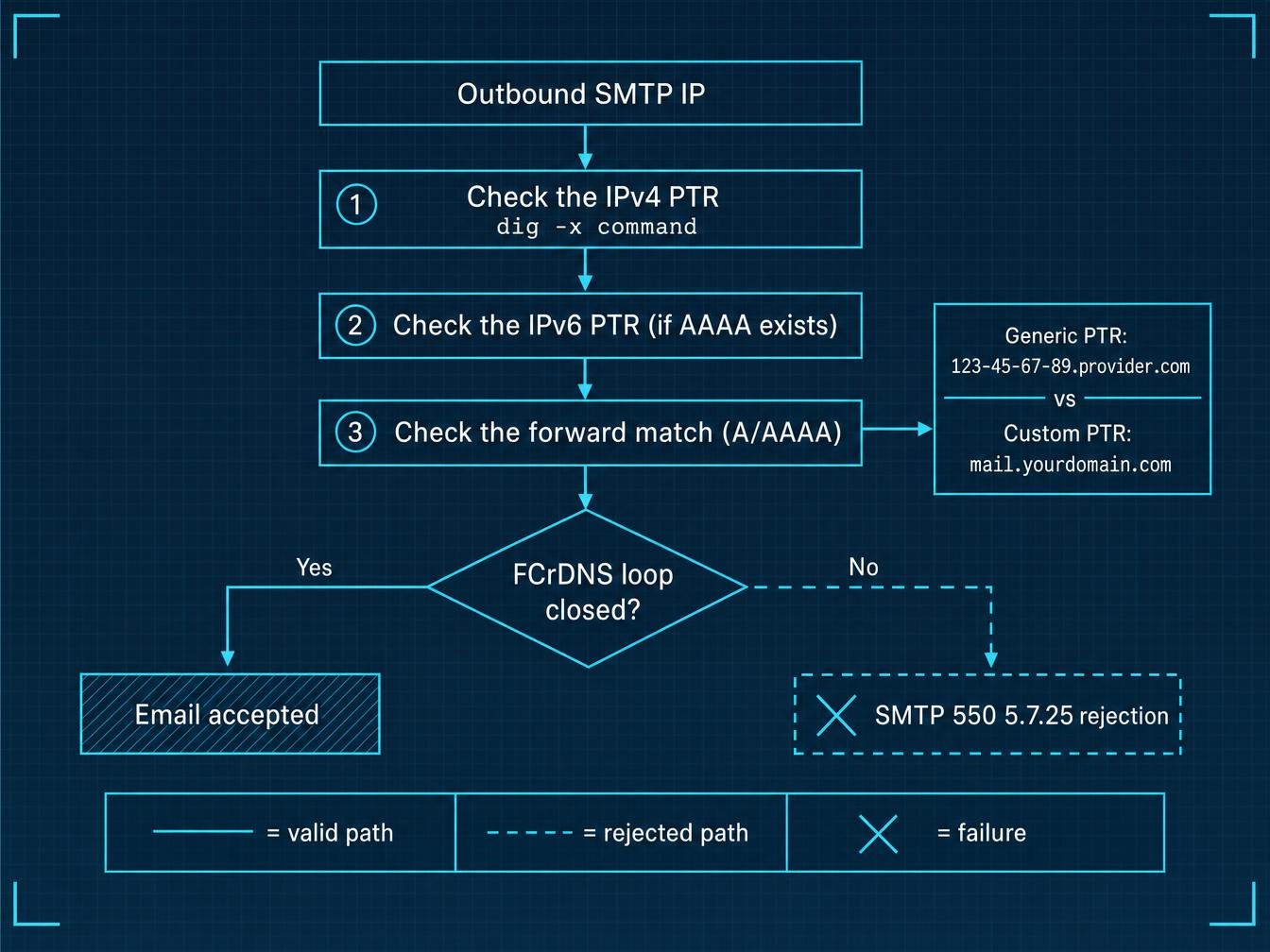
- Check the IPv4 PTR of the IP that’s actually sending the message, not your web server’s IP but the outbound SMTP IP. The bounce gives it to you: it appears in brackets right after the code 550-5.7.25. Run
dig -x 203.0.113.10 +shortfrom any machine. On Windows,nslookup 203.0.113.10gives the same answer. An empty response signals a missing PTR: cause #1. - Check the IPv6 PTR with
dig -x 2001:db8::25 +shortif your server can send over that protocol. This is the step most checklists skip. A server with IPv6 connectivity opens the connection to Gmail over IPv6 by default, since Gmail’s MX records publish AAAA entries. Google’s official sender guidelines are explicit on this: an IPv6 authorization error most often comes from a PTR that exists only in IPv4. A flawless IPv4 PTR paired with a missing IPv6 PTR gets those connections rejected too, either with a 550 5.7.25 or the 550 5.7.1 reserved for IPv6 requirements, depending on the case. - Check the forward match: the hostname returned by the PTR must have an A (or AAAA) record that points back to the same starting IP. Take the hostname from the previous step and run
dig A mail.yourdomain.com +short, thendig AAAA mail.yourdomain.com +shortfor IPv6. The returned IP must be exactly the starting one. Any mismatch at this step, even a small one, breaks FCrDNS.
The step-by-step details of these checks, commands included, are covered in our guide on reverse DNS lookup.
Fixing it based on who controls your reverse DNS
A PTR is never changed from your domain admin panel: it belongs to the owner of the IP address block. The steps to take differ entirely depending on who owns that reverse zone.
| Hosting type | Who controls the PTR | Steps to take | Propagation time |
|---|---|---|---|
| VPS or dedicated server (OVH, Hetzner, DigitalOcean, AWS EC2) | The host, via their network panel or a support ticket | Rename the droplet or instance with the desired hostname (DigitalOcean), request the PTR through elastic IP settings (AWS), or add it in the network section of the client panel (Hetzner, OVH) | A few minutes to a few hours |
| Shared hosting | The host only, often on a shared IP pool | Open a support ticket specifying the exact outbound IP and the expected hostname | Varies, sometimes several days depending on the provider |
| ESP or email SaaS (Brevo, Mailgun, SendGrid, Google Workspace) | The provider, on their own IPs | Nothing to do on your end for the PTR: check SPF, DKIM, and DMARC alignment on the sending domain instead | Not applicable, already managed |
On AWS, the PTR is requested from the EC2 console (elastic IP section) or via a ticket if the IP isn’t elastic. On DigitalOcean, renaming the droplet with the desired FQDN is enough: the PTR updates automatically. Then confirm with a test send that the A/PTR loop is properly closed. Actual propagation time typically falls between a few minutes and a few hours. Allow a 2 to 4 hour window before retesting if the first check still fails.
The generic PTR trap that passes the technical check
One case comes up often: the PTR exists and even resolves correctly both ways. The rejection persists anyway. The most common cause is a generic PTR automatically assigned by the host, something like 123-45-67-89.provider.com.
Technically, this PTR passes the FCrDNS check: it points to a hostname, and that hostname points back to the same IP. The problem lies elsewhere. An IP that has only ever been used for generic hosting, with no dedicated sending history or custom hostname, matches the profile of compromised servers used for mass spam. Gmail treats this as a weak signal, even when the technical loop is closed. The fix is to request a custom PTR that uses the domain or subdomain actually used for sending, for example mail.yourdomain.com instead of the server’s default hostname.
Another common objection: “I send through an email platform, this doesn’t apply to me.” That’s true for the PTR itself: major ESPs manage their own IPs and their own reverse DNS. But the same symptom, a Gmail rejection despite everything seeming properly configured, can come from a sending domain that’s misaligned on DKIM, a separate issue from the PTR. Checking which of the two is at fault saves time you’d otherwise waste contacting the wrong party. An aggregated DMARC report shows which sending source is failing alignment.
Once the PTR is fixed, check that nothing else is dragging down your sender reputation
Fixing the PTR resolves the immediate SMTP rejection. It guarantees nothing beyond that. Sender reputation at Gmail builds up from several combined signals: hard bounce rate, complaint rate, and the IP’s sending history. DNS compliance alone isn’t enough.
On an IP in a shared pool, this builds up collectively: if another client on the same pool generates a high hard bounce rate, your own deliverability suffers the consequences even with a spotless PTR. On a dedicated IP going through IP warm-up, every send to an invalid or inactive address weighs more heavily on the trust curve Gmail is building, because the reference volume is still low.
“Verifying emails before sending costs money, might as well filter afterward.” The order matters precisely here: a hard bounce recorded by Gmail after sending already damages the IP’s reputation the moment it happens. An invalid address removed before sending leaves no negative trace. Running a sample of your next list through a pre-campaign check shows the real gap between the 2 approaches in actual hard bounce rate.
Gmail’s postmaster tool (Google Postmaster Tools) remains the most reliable source for tracking this reputation over time, at both the IP and domain level. Our guide on IP address reputation details how to read this data and spot an emerging blocklisting.
Frequently asked questions about the 550 5.7.25 error
Does the 550 5.7.25 code block all my emails or just some of them?
The rejection applies per IP. It can even be limited to a single protocol if the IPv4 PTR is correct but the IPv6 PTR is missing. If your infrastructure sends from multiple IPs, only the traffic going through the faulty IP gets rejected, while the rest keeps arriving normally.
My emails forwarded to a Gmail address bounce with 550 5.7.25, why?
Gmail checks the PTR of the machine opening the connection, not the original sender’s. On an automatic forward, say a business inbox redirecting to a personal Gmail, it’s the relaying server that needs a valid PTR, even when the original sender is perfectly configured on their end. The same mechanism applies to a secondary SMTP relay or an antispam gateway placed in front of your server. Read the IP in brackets in the bounce: that’s the one whose reverse needs fixing. It often belongs to a machine you’d have thought of last.
How long does it take for a PTR fix to take effect?
Propagation typically takes between a few minutes and a few hours. Allow a 2 to 4 hour window before retesting, giving DNS resolvers time to refresh their cache.
Does using an ESP automatically protect me from this error?
Yes, for the PTR itself: major platforms manage their own reverse DNS on their IPs. A Gmail rejection that persists despite using an ESP usually comes from a DKIM alignment issue or a misconfigured sending domain, rarely from the PTR itself.
Is an IPv4 PTR enough if my server also sends over IPv6?
No, see check #2 above to diagnose this specific case. If your host doesn’t offer an IPv6 PTR, disabling outbound IPv6 sending on the server side remains a faster fallback than a support ticket waiting for a reply.