
Your email never arrived. The server responded with 554 5.0.0, and that was it. No explanation. Just a permanent bounce.
The real problem with this error: it’s intentionally vague. It can mean five different things. While you’re figuring out which one, your emails keep bouncing. And each bounce further damages your sender reputation.
What the 554 5.0.0 code really means
The SMTP 554 code indicates a permanent rejection. The receiving server has refused your message and won’t retry. The sub-code 5.0.0 is the most generic of them all: permanent error, period. The server doesn’t tell you why.
This is different from codes like 554 5.7.1 (relay denied) or 554 5.7.5 (DMARC failure) which directly point out the cause. With 5.0.0, you have to diagnose. The cause lies in one of these five areas, and the order you check them in matters a lot.
The five causes to check, in order
Most guides give you seven parallel actions. This is a mistake. Fixing your SPF before knowing if your IP is blacklisted wastes an hour for nothing.
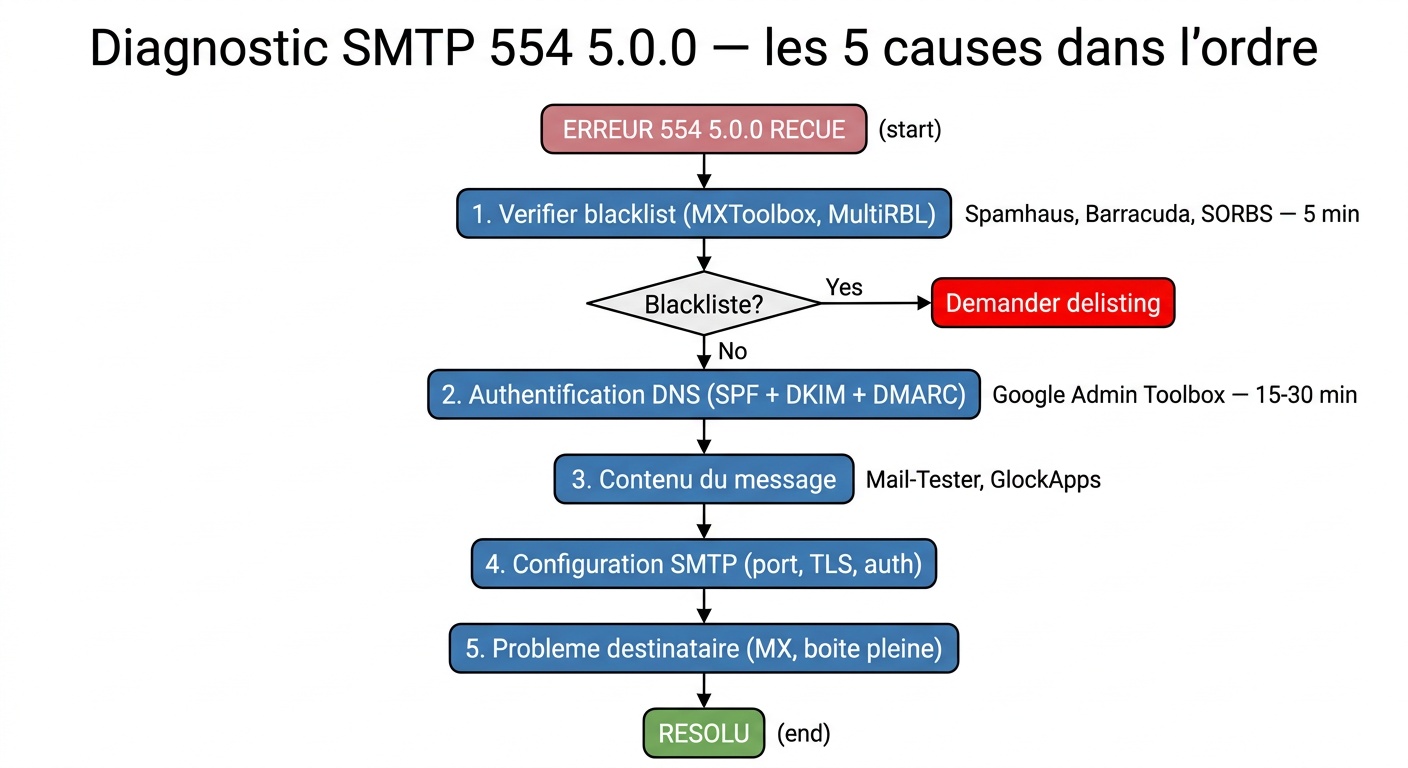
Start with the blacklist. This is where most teams waste time: they change their SPF while their IP has been blacklisted for three weeks. MXToolbox or MultiRBL check in 30 seconds. If you appear on Spamhaus, Barracuda, or SORBS, the receiving server likely rejected your message before even reading the content. Each list has its delisting procedure: Spamhaus accepts requests via a form, Barracuda requires domain verification.
If you’re not blacklisted, check your authentication records. SPF, DKIM, and DMARC are no longer optional. Since early 2024, Google and Yahoo require them for volume senders. In November 2025, Gmail made a leap: non-compliant messages are no longer filtered to spam, they are actively rejected. A misconfigured SPF allows unauthorized servers to send on your behalf. Missing DKIM? The recipient can’t verify the message’s integrity. And if DMARC isn’t published, the receiving server has no guideline on what to do when authentication fails. Check your DNS with MXToolbox or Google Admin Toolbox. On a dedicated server or VPS, also check the reverse DNS (PTR record): without a valid PTR pointing to your domain, many servers reject the connection before even checking SPF or DKIM.
If you’re deploying DMARC for the first time, start with p=none to collect reports without blocking messages. Once your flows are identified, move to p=quarantine and then p=reject. Staying on p=none indefinitely protects against nothing.
Third possible cause: the content. Some servers reject messages as 554 for looking like spam without mentioning a blacklist. Common triggers: shortened links (bit.ly, tinyurl), executable attachments, images without text, malformed headers.
Fourth possible cause: an SMTP configuration issue between your client and your sending server. Wrong port, incorrect encryption, disabled authentication. The table below lists reference settings.
| Provider | SMTP Server | Port | Encryption |
|---|---|---|---|
| Gmail | smtp.gmail.com | 587 | TLS |
| Outlook / Microsoft | smtp-mail.outlook.com | 587 | TLS |
| Yahoo Mail | smtp.mail.yahoo.com | 587 | TLS |
| OVH / LWS | ssl0.ovh.net | 465 | SSL |
Fifth case: the issue is with the recipient. Full mailbox, expired domain, corrupted MX records. The 554 5.0.0 error doesn’t always originate from you. Send to a different address on the same domain. If the error repeats only for this recipient, the problem is on their end.
How to read the full error message
The 554 5.0.0 code alone isn’t enough. It’s the text that follows that contains the real information.
Open the non-delivery report (NDR) you received. Look for a line starting with Remote server returned or Diagnostic-Code. You’ll often find a more explicit message:
554 5.0.0 Service unavailable: reputation or server configuration issue554 5.0.0 Message rejected: content or filtering policy554 5.0.0 NXDomain: the recipient domain doesn’t exist or the MX records are invalid554 5.0.0 smtp; 5.1.2 Bad destination host: DNS error on the recipient domain
This text guides you to the cause. Don’t try to fix it without reading it.
Gmail, Outlook, Exchange: Key Differences
Gmail limits personal accounts to 500 emails per day and Google Workspace accounts to 2,000. Beyond that, sending is blocked. Gmail also requires SPF, DKIM, and DMARC to be set up for any sender sending over 5,000 messages a day.
Outlook and Exchange Online apply filters based on IP reputation. A server sending from an address without a positive history will be suspect. Microsoft offers its Smart Network Data Services (SNDS) tool to monitor this reputation in real-time.
On Exchange on-premise, the 554 5.0.0 error often appears when the SMTP relay is not authorized for the source IP address. Check the receive connectors in Exchange Admin Center.
The error you’re repeatedly making without knowing
Here’s what most teams do when they see a 554 code: they change their DNS, wait for propagation, retry, see it’s still not working, add another SPF record, wait again. Several hours wasted when they were blacklisted all along.
The 554 5.0.0 code is a permanent rejection. Until the root cause is identified, resending the message is pointless. Every additional attempt degrades your sender reputation.
Order matters. Blacklist first (5 minutes). Authentication next (15 to 30 minutes). Content and configuration last.
Preventing 554 5.0.0 in the future
Clean up your lists first. Invalid addresses lead to hard bounces that damage reputation. A bounce rate over 2% triggers alerts with most providers. A tool like CaptainVerify identifies invalid addresses, spam traps, and full mailboxes before you send. Fewer bounces, better reputation.
Enable feedback loops with major providers. Yahoo Postmaster and Google Postmaster Tools notify you as soon as your messages are marked as spam. It’s free. It prevents you from discovering the problem too late.
Warm up new IPs gradually. A server sending 10,000 emails on the first day will raise suspicions with all providers, even if your content is impeccable.
The 554 5.0.0 doesn’t happen randomly. It documents something. The question is, how long have you been sending with this issue unknowingly.
Be careful not to confuse it with the SMTP 550 5.7.1 error: it looks like 554 but indicates a relay denial on the recipient’s side. The causes and fixes are different. If your error message shows 550, it’s another issue.
Frequently Asked Questions about SMTP 554 5.0.0 Error
What is the difference between 554 5.0.0 and 554 5.7.1?
The 554 5.7.1 code indicates a relay denial: your server is attempting to send via an SMTP relay that does not authorize you. The 554 5.0.0 is more generic, covering multiple causes. Both are permanent rejections, but 5.7.1 directly points to the relay issue.
Does the 554 5.0.0 error always come from my side?
No. If the error contains NXDomain or Bad destination host, the problem lies with the recipient: expired domain, invalid MX. Test with another recipient on the same domain to confirm.
How long does it take to get off a blacklist?
It depends on the list. Spamhaus can take 24 to 48 hours after submitting a request. Barracuda is often quicker. Some lists automatically update if your IP stops sending spam for several days.
Should you contact the recipient provider’s support?
If you have corrected authentication, blacklist, and configuration and the error persists with the same recipient, yes. Gmail, Microsoft, and Yahoo each have a postmaster form. Provide the complete headers of the rejected message.